
Video guide
38:02 · 18 June 2026
Frontend System Design in the AI Era, Explained
Chapters 7 sections
Key concepts in this video:
- 01
1. Conway's Law, Two-Pizza Teams & AI
A 40-person team with a 90-minute standup isn't a process problem — it's an architecture problem. Conway's law: systems mirror the communication structure of the people building them.
The two-pizza team is becoming a one-pizza team: coding agents drive implementation time toward zero but increase verification time. Design systems that are easy to verify, not just fast to build.
The target shape: small full-stack feature teams shipping independently, plus a platform team owning shared infrastructure — all working with coding agents.
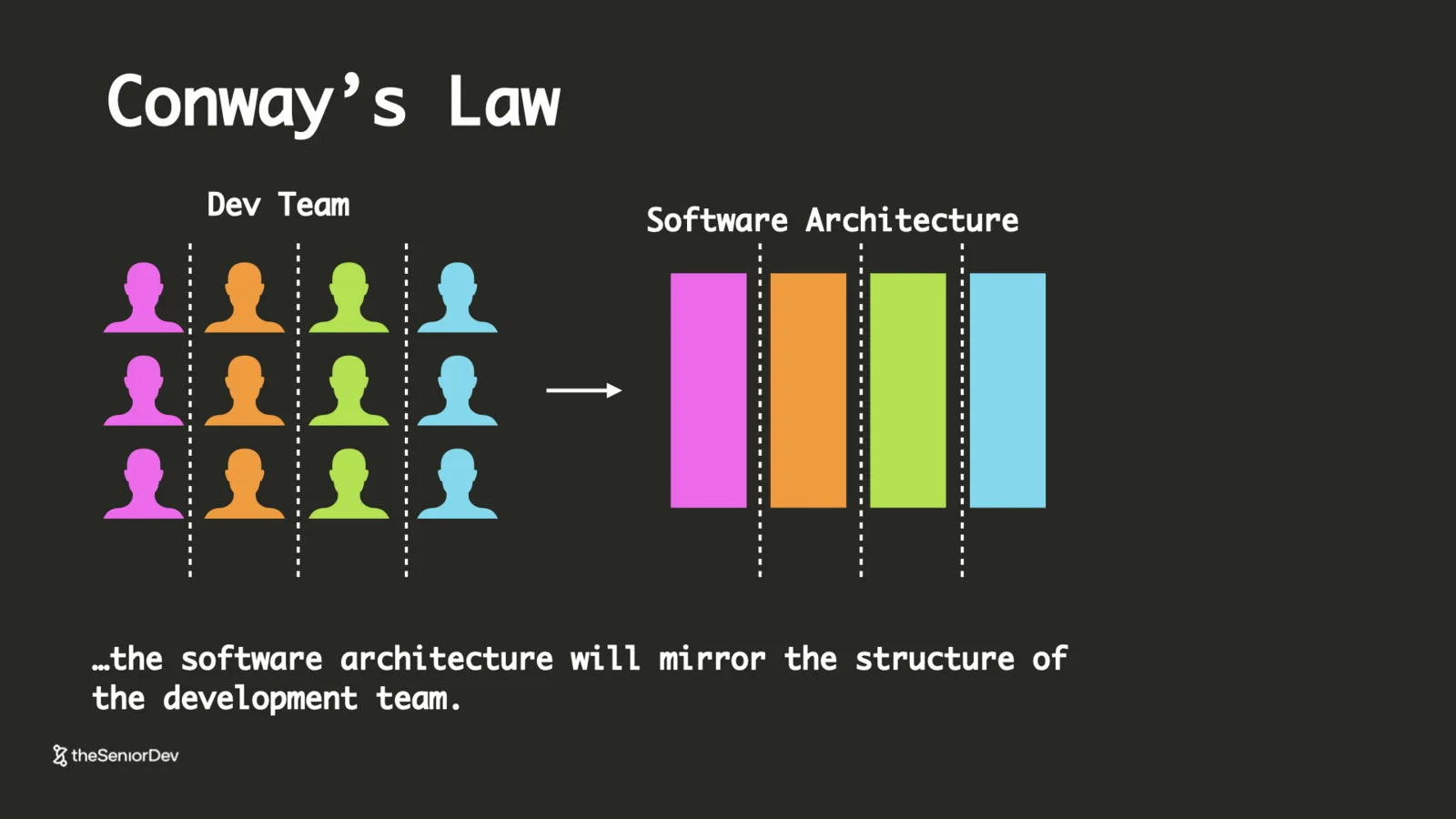 Conway's lawFeature teamsVerification time
 - 02
2. Micro-Frontends & the Shell
Backends split into microservices years ago; the frontend monolith stayed. One global CSS rule from one of fifty developers can still take the whole client down.
Micro-frontends split the client into independently deployed applications — header, product page, cart — each on its own domain, composed at runtime by a shell that owns routing, language, auth and global state.
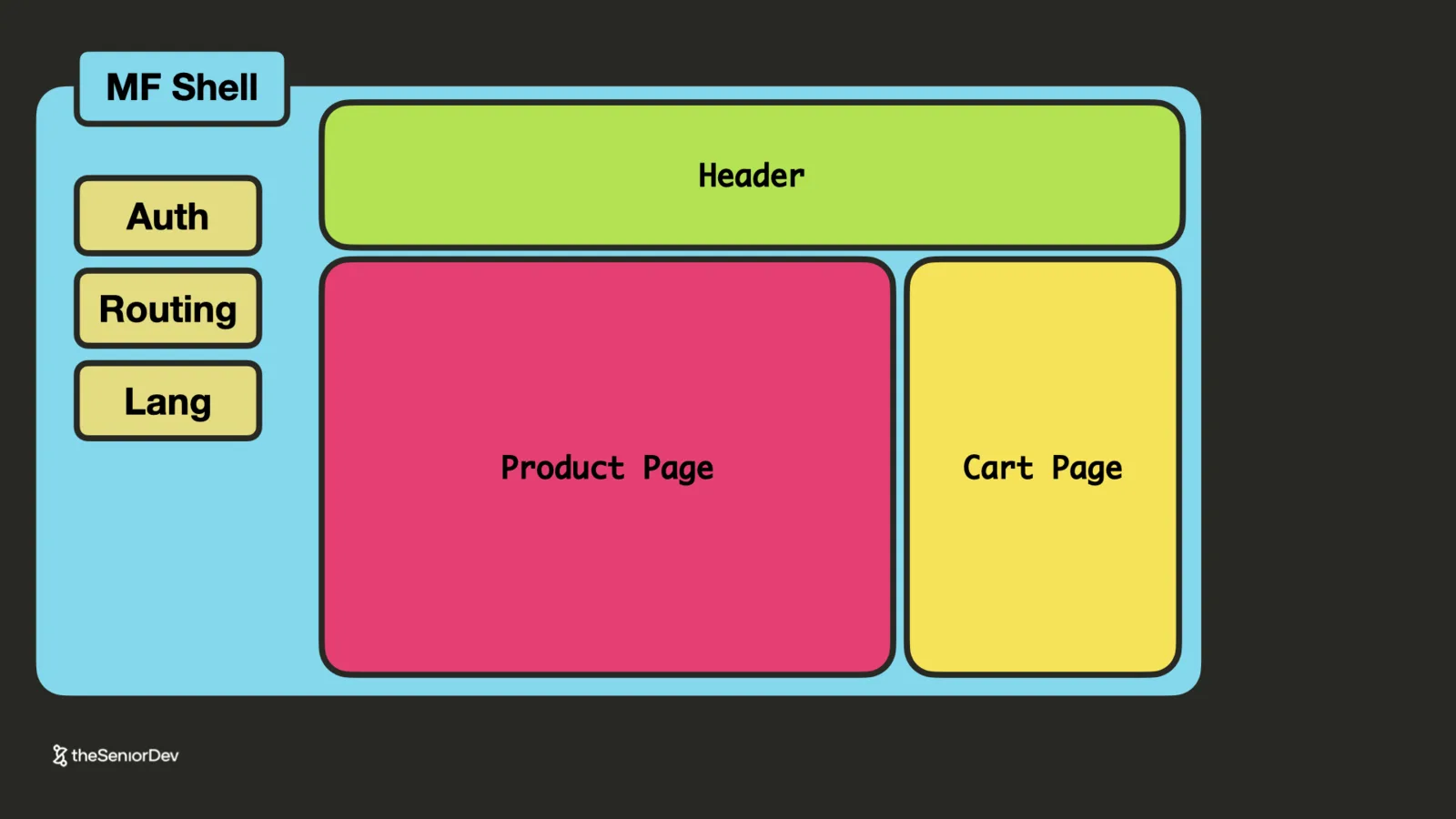 Micro-frontendsShellIndependent deploys
 - 03
3. Vertical Slices
Combine a micro-frontend with its microservices and you get a vertical slice: one team owning a feature from pixels to database, releasing without waiting on anyone.
The career read: move toward being a vertically integrated engineer — a team of one working across the stack with a coding agent. Pure frontend-only roles are consolidating into either feature-team full-stack or platform/design-system work.
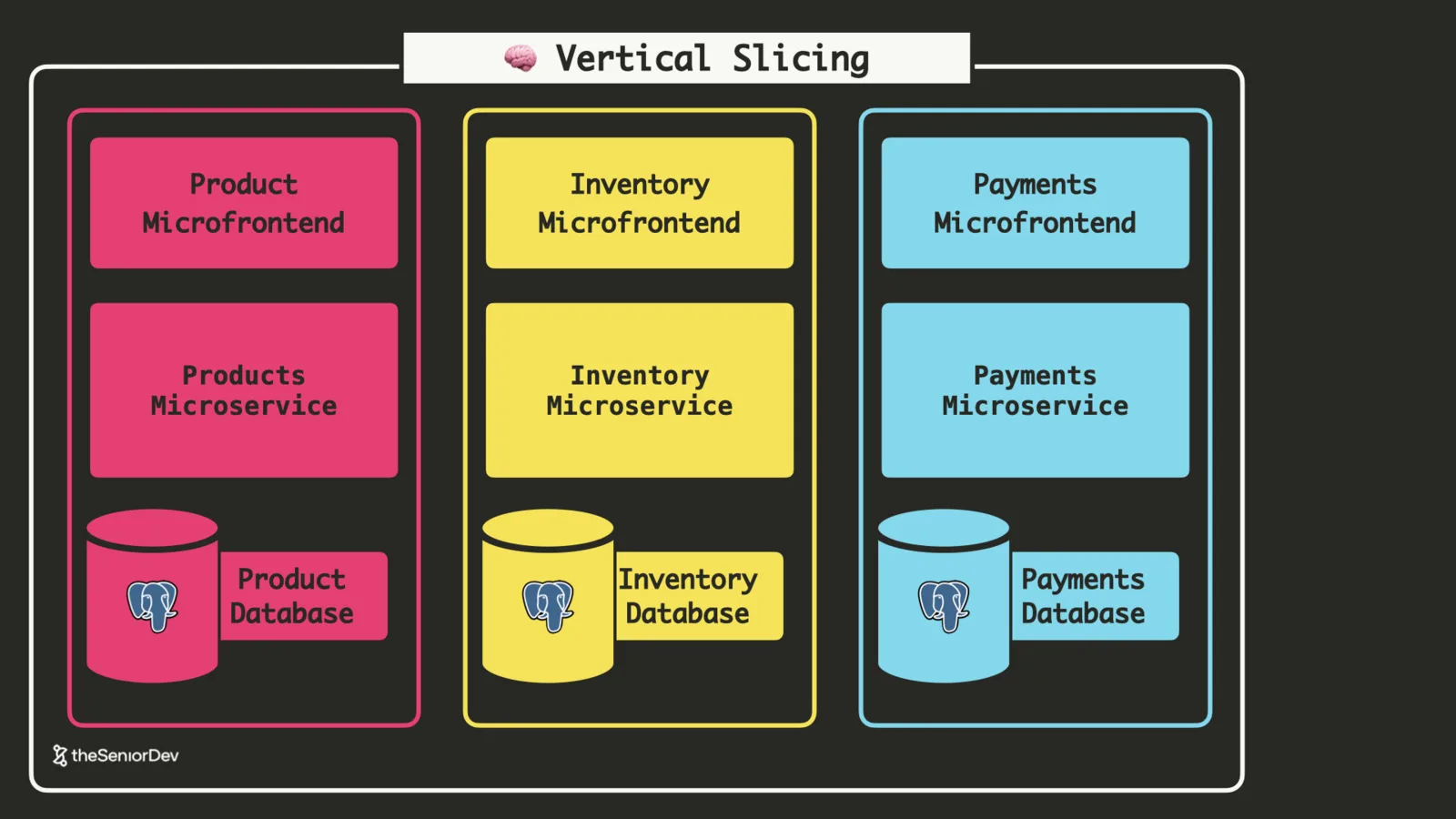 Vertical slicesFull-stack ownershipPlatform teams
 - 04
4. The API Gateway
Every client-to-service request needs the same edge functions: HTTPS, auth, caching, rate limiting, content negotiation. Implementing them per microservice is pure overhead.
An API gateway implements them once, at the front door. Behind it, services live in a private cloud and can even talk plain HTTP — fewer handshake round trips, faster internal traffic.
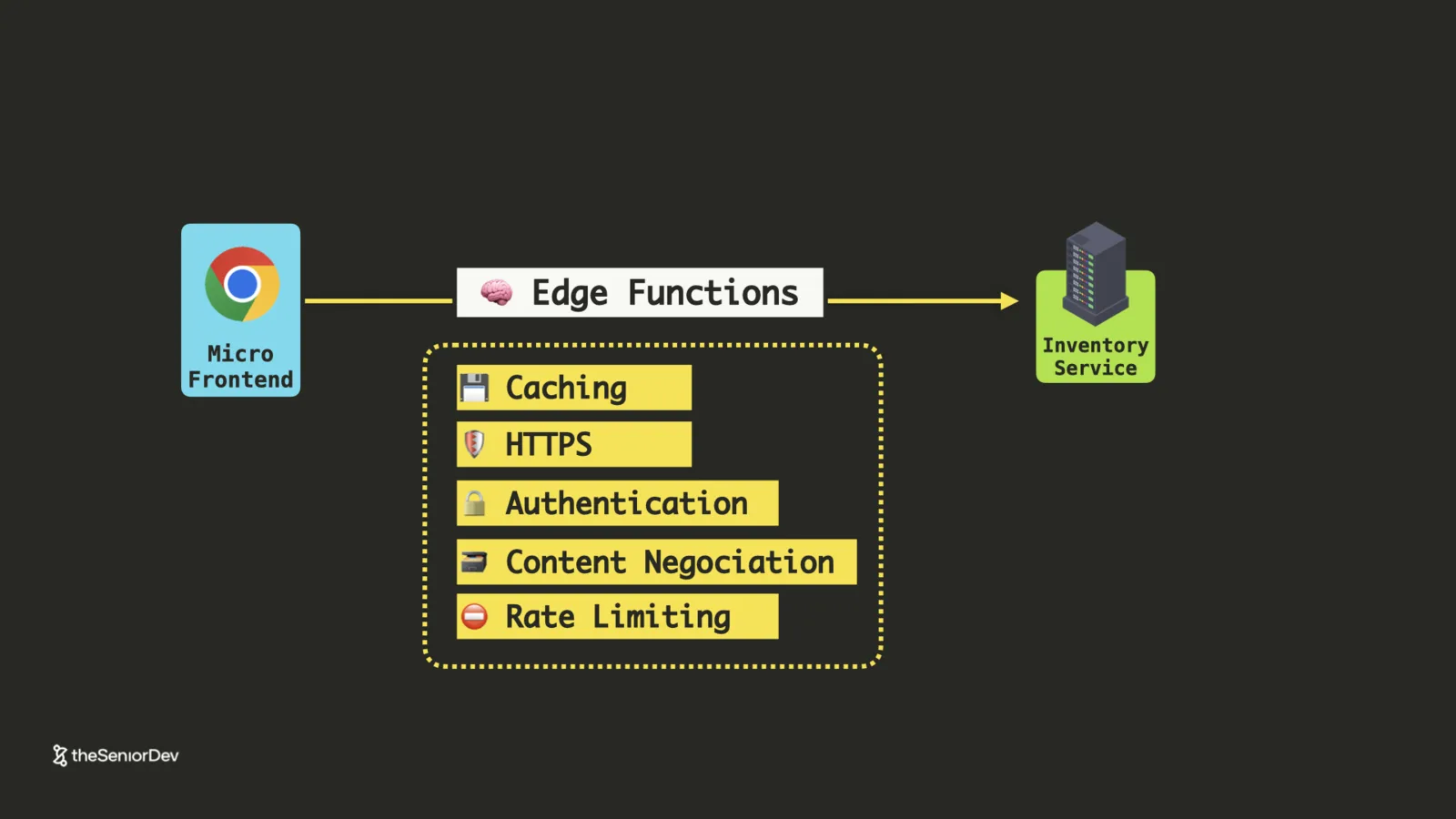 API gatewayEdge functionsVPC
 - 05
5. Backend For Frontend
The slowest part of shipping a frontend feature at a big company is waiting for three backend teams' backlogs.
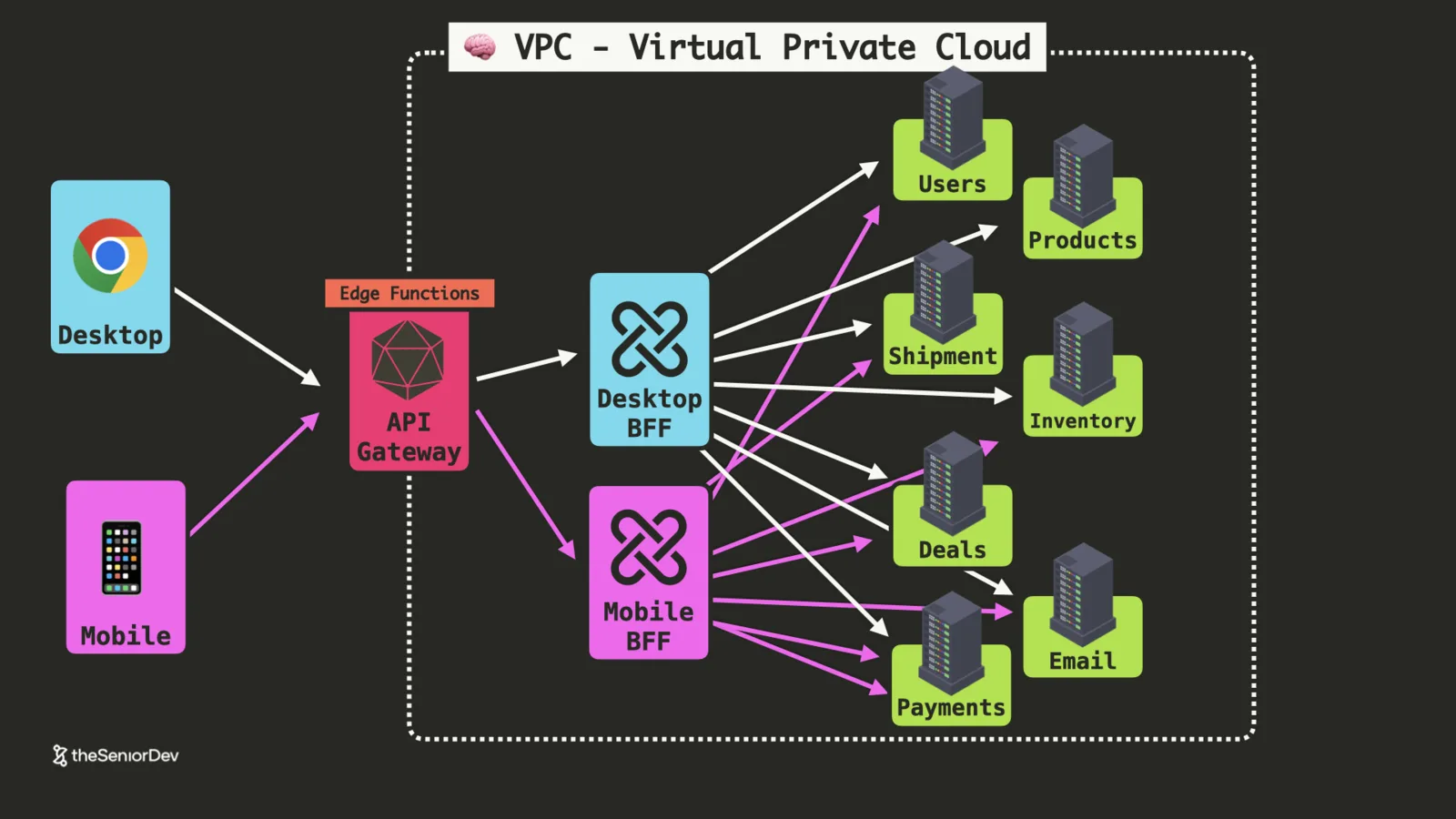
The BFF ends the waiting: a backend owned by the frontend team that aggregates microservices into exactly the API the client needs. Desktop and mobile each get their own — different screens want different data shapes.
This is why senior frontend roles expect API design and a working grasp of GraphQL: at BFF-running companies, the frontend team is a full-stack team.
 BFFGraphQLAPI designOverfetching
 - 06
6. Load Balancing
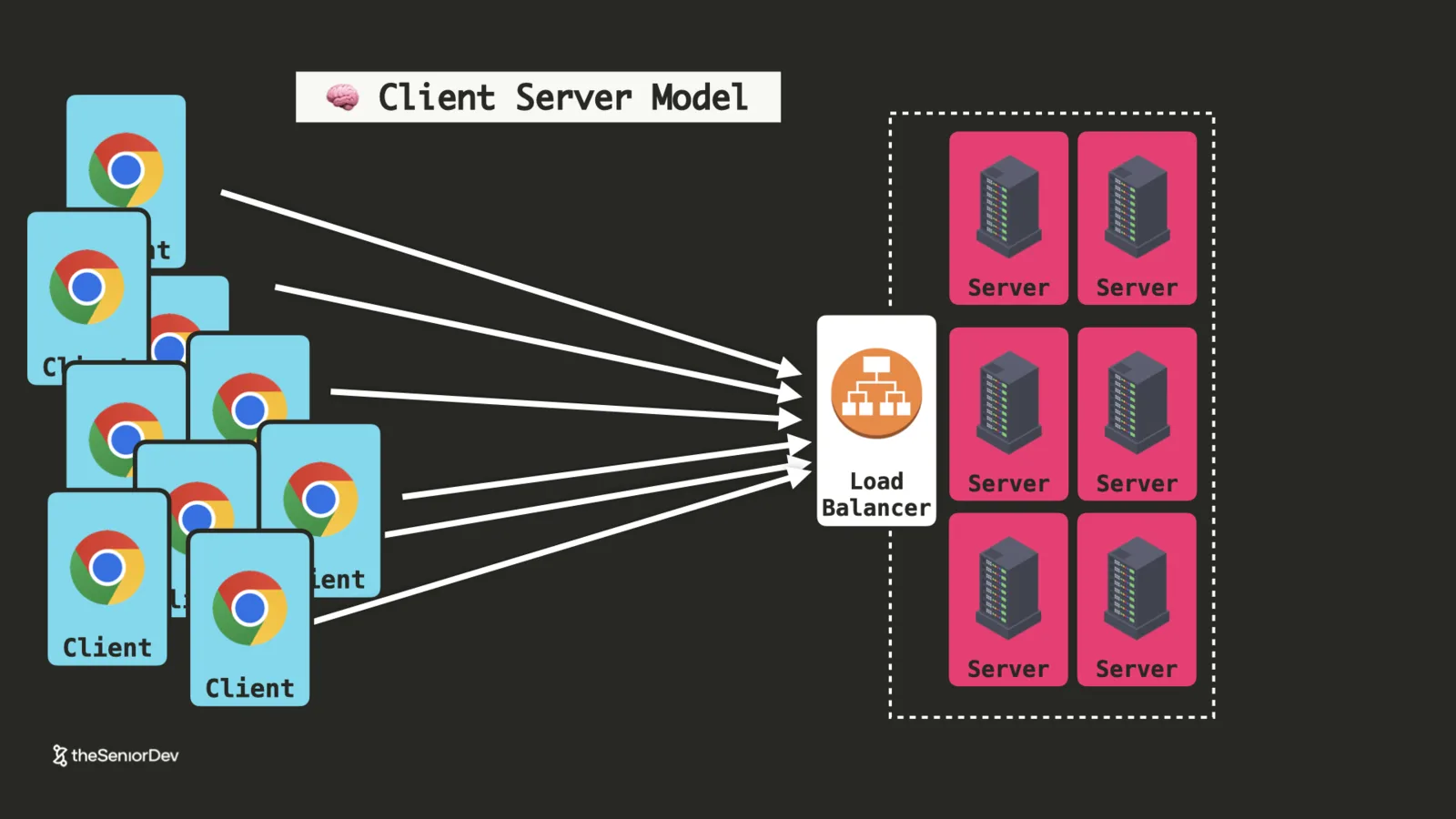
A well-optimized Node.js server handles roughly 2,000-10,000 concurrent requests. Past that, you don't buy a bigger server — you run identical instances behind a load balancer.
You'll rarely set one up by hand (cloud providers provision them in seconds), but you should be able to reason about distribution strategies — round robin, least connections — and ideally wire a small one locally with nginx and Docker Compose.
 Horizontal scalingRound robinnginx
 - 07
7. Containers & Orchestration
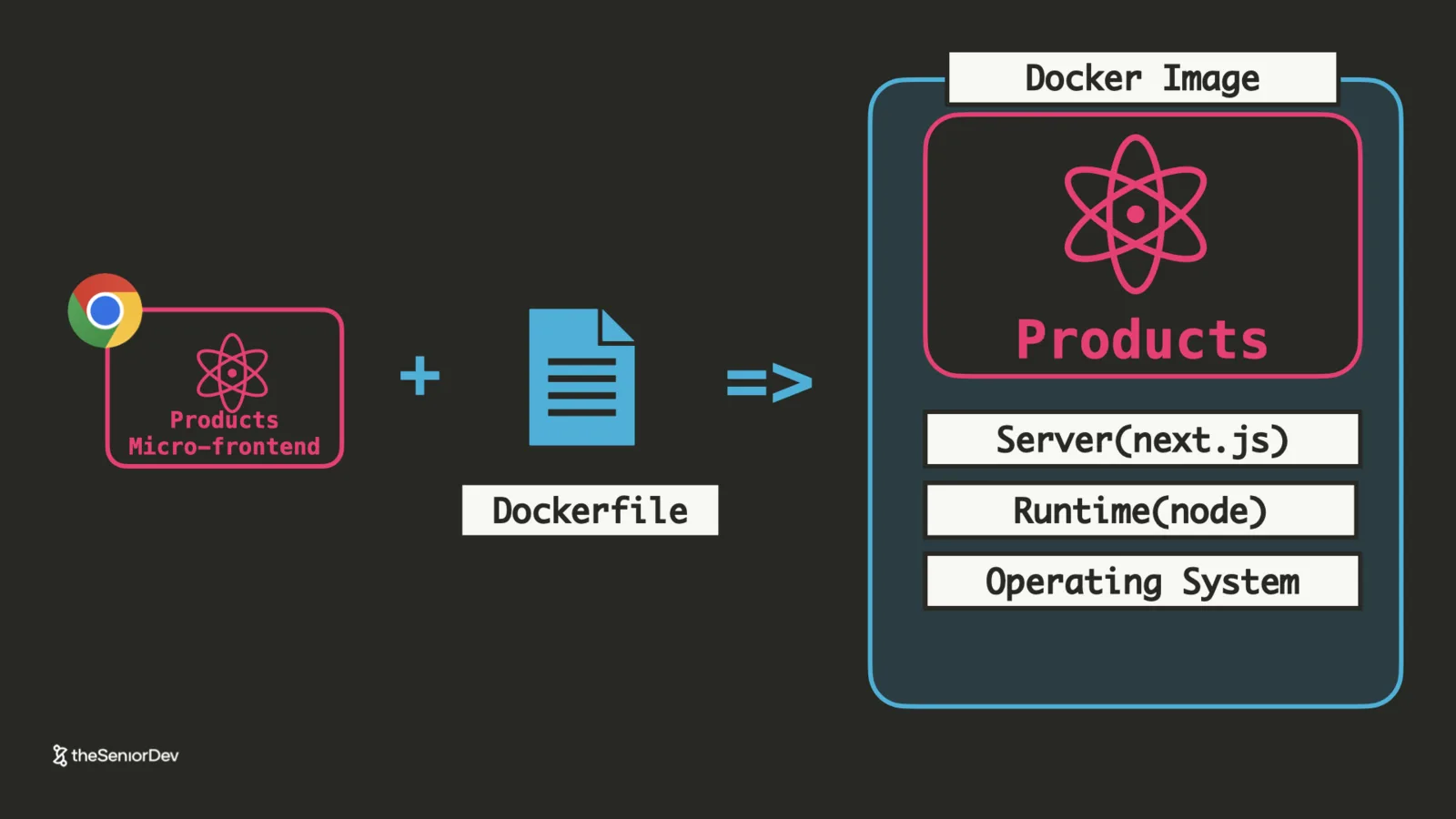
Micro-everything creates a deployment zoo: Python services, Node services, three frontend frameworks. Docker standardizes it — a Dockerfile packages code + runtime + OS into an image that runs anywhere.
Orchestration systems like Kubernetes (or AWS ECS) run those images at scale: parallel instances, restarts on failure, load distribution. You don't need to operate them as a frontend engineer — you need to know where they sit in the architecture, because job descriptions mention them.
 DockerKubernetes / ECSContainer images
 - 08
8. The CDN
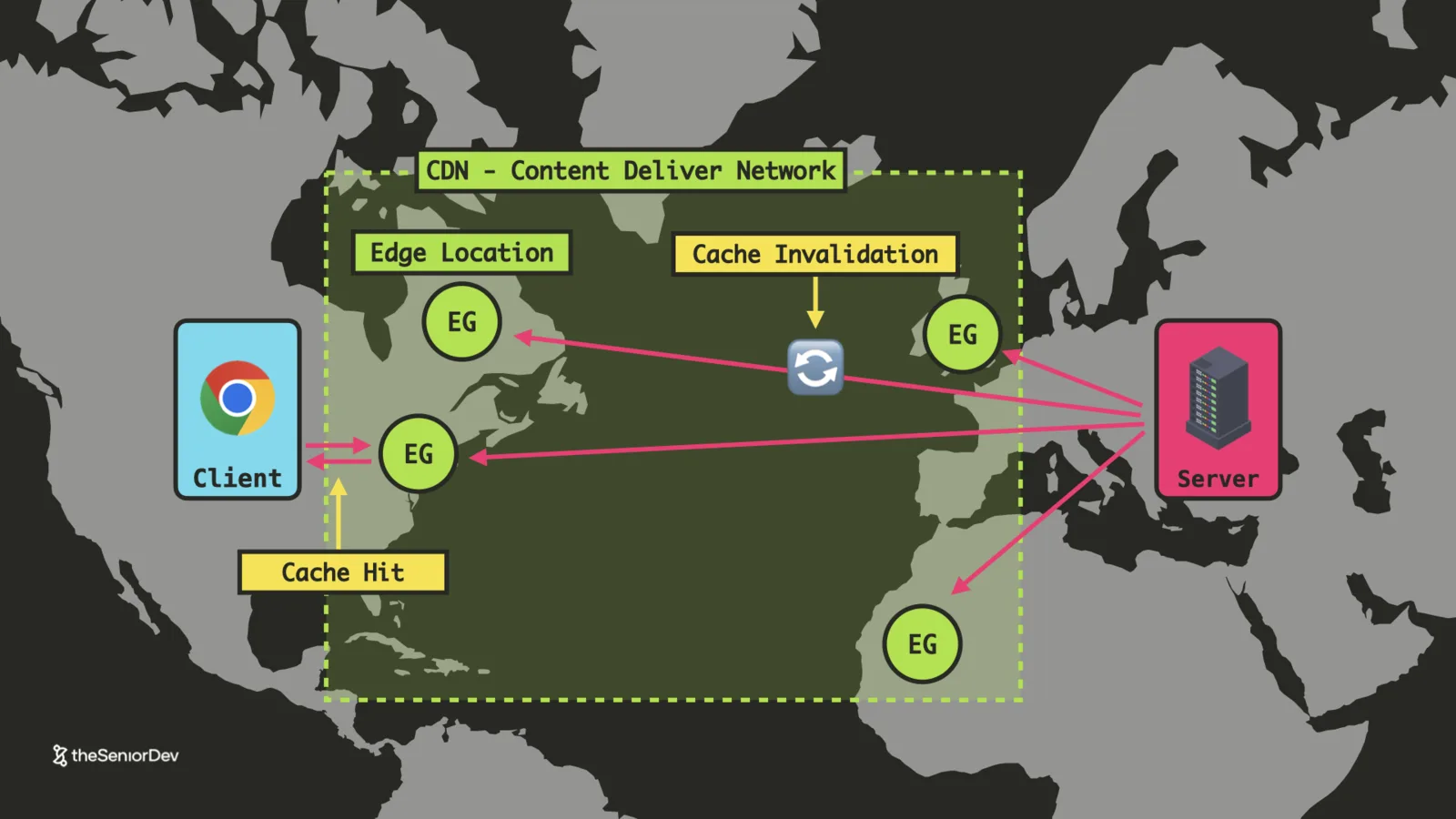
Data travels at the speed of light and no faster — a transatlantic round trip costs ~200-250ms no matter how good your code is. The only fix is distance.
A CDN replicates static assets to edge locations near users. Serving from the edge is a cache hit; pushing a new version is cache invalidation — and your bundler's cache-busting hashes are how deploys stay fresh.
It remains the cheapest, fastest web-performance win: modern CDNs compress and set cache policies out of the box.
 Edge locationsCache hit / invalidationCache busting
 - 09
9. Design Systems & Design Tokens
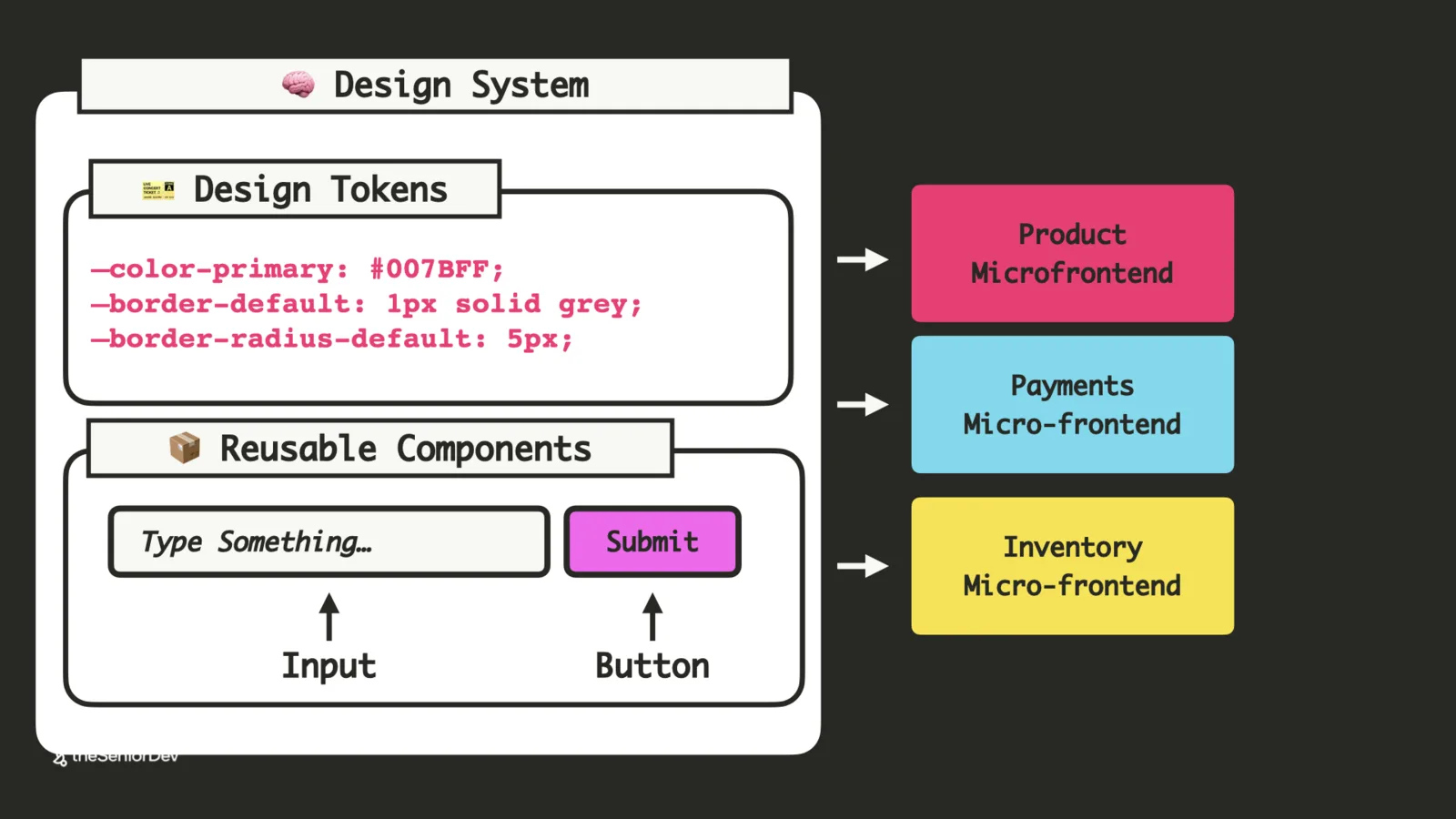
Independent teams drift: the product page button stops matching the payment button, and users can tell where one micro-frontend ends and the next begins.
A design system fixes it: design tokens (colors, borders, typography as CSS custom properties, injected by the shell) plus a package of reusable, tested, accessible components. DRY applied at the architecture level.
For AI coding this is the difference-maker: feed the design system into your agent and output stays consistent across sessions. Skip it and the UI looks vibe-coded.
 Design tokensCSS custom propertiesComponent libraries
 - 10
10. Design-to-Code with MCP
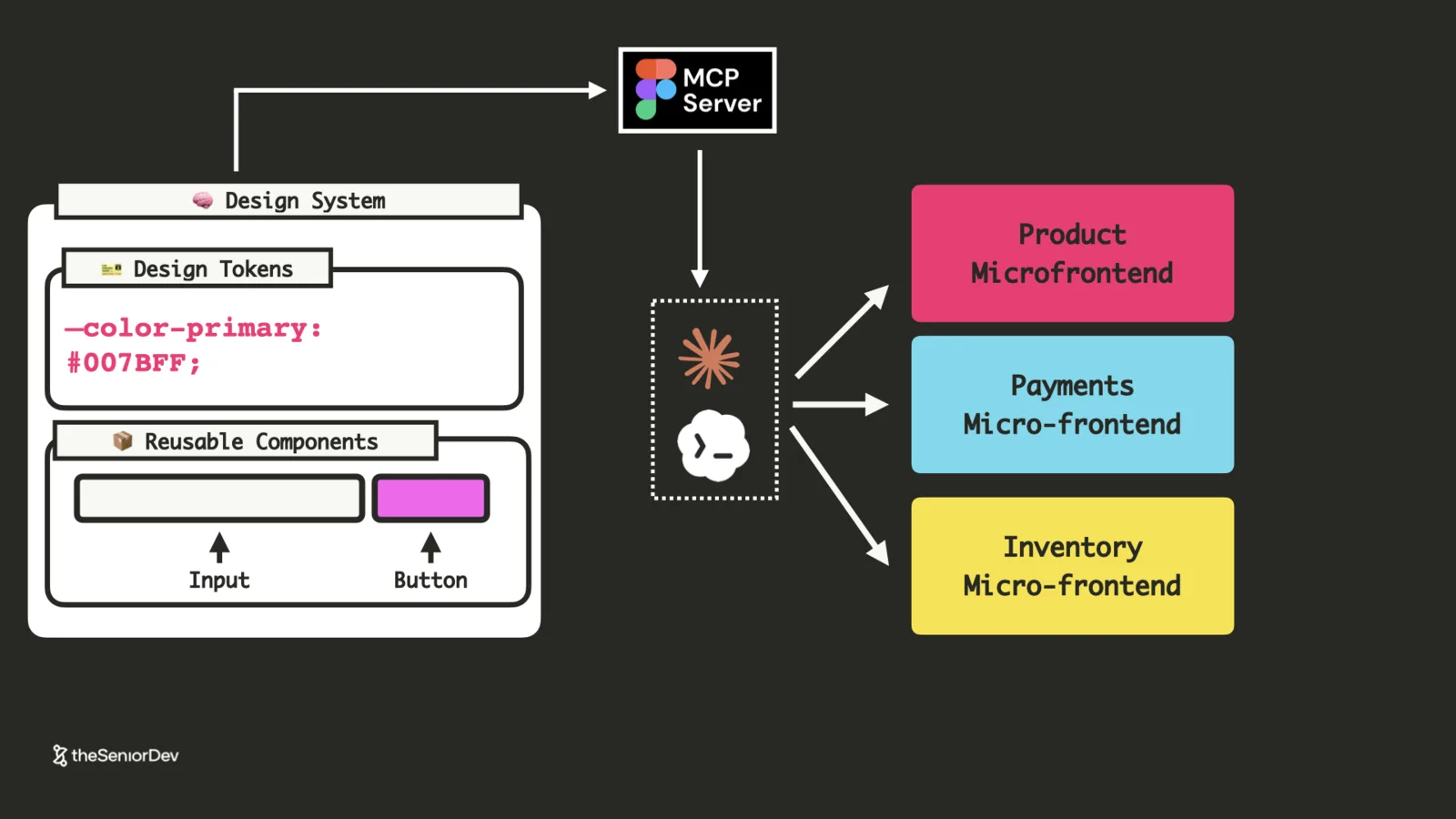
The emerging workflow: designers define the system in Figma, an MCP server exposes it to your coding agent, and features get assembled straight into the vertical slices.
Know what an MCP server is and how to plug one into Claude Code or Codex. Bonus depth: Tailwind is atomic CSS — design tokens turned into atomic utility classes — and knowing that taxonomy helps you structure token systems agents can use.
 MCP serversFigmaAtomic CSS / Tailwind
 - 11
11. The Monorepo
Thousands of repos means drifting code styles, dependencies and quality bars — and engineers relearning everything when they switch teams.
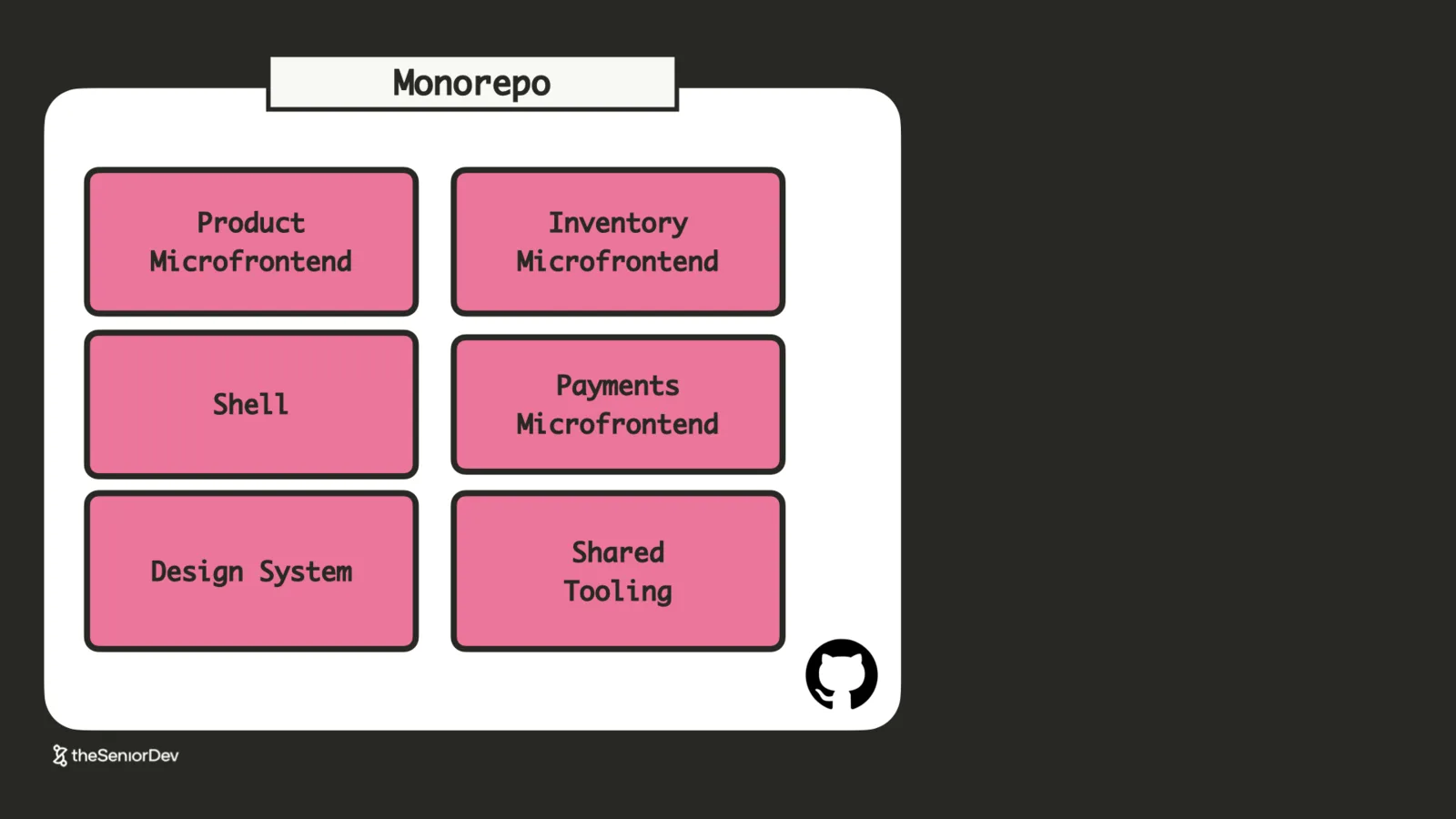
A monorepo puts the applications, the design system and the tooling in one place: shared lint rules, shared TypeScript config, one build system.
For AI coding it's leverage: the agent sees across service boundaries, so extracting a reusable component from a micro-frontend into the design system is one session, not a cross-repo expedition.
 MonorepoShared toolingArchitectural drift
 - 12
12. MCP UI — Rendering Components from LLM Answers
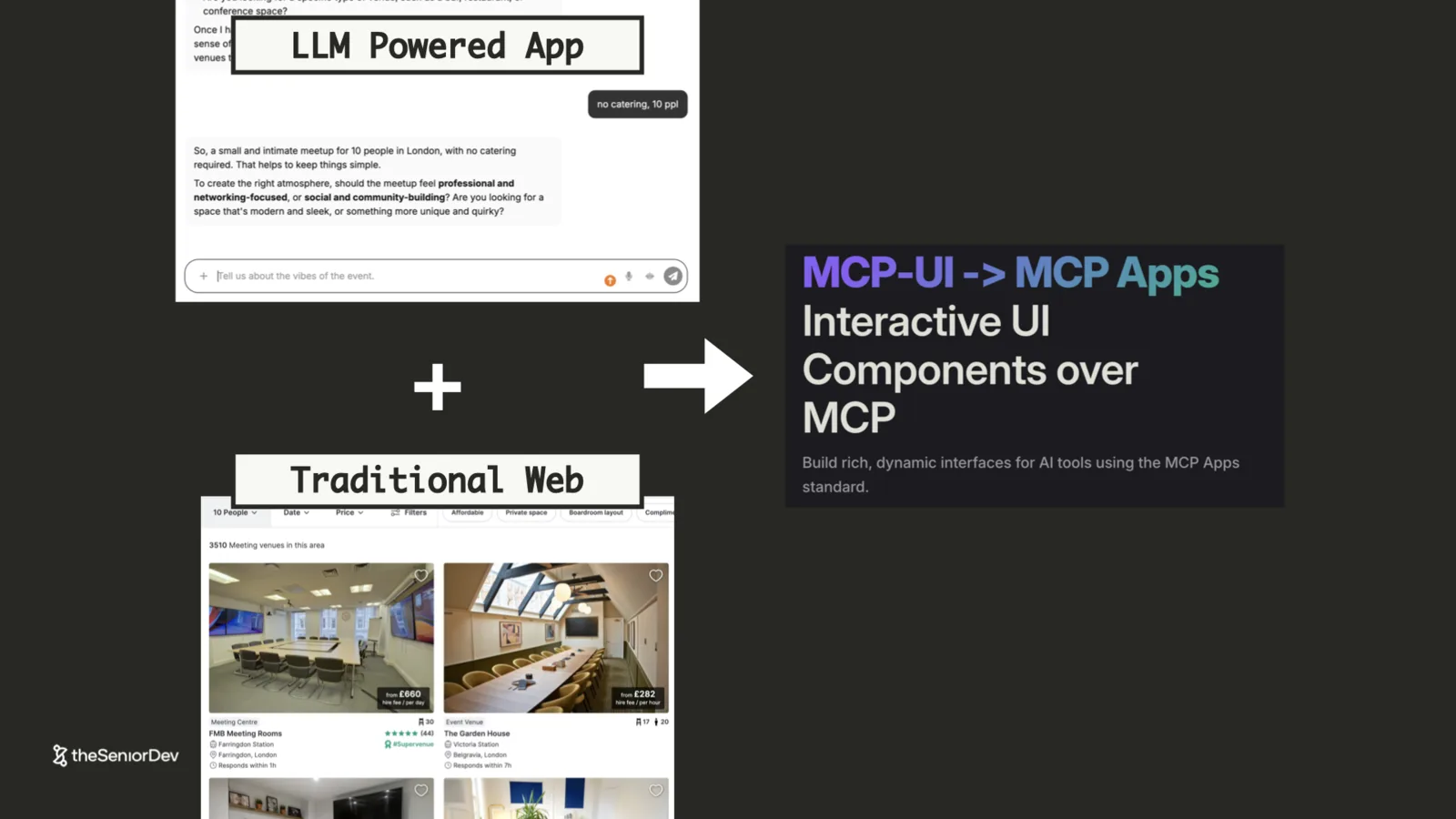
Chat apps used to answer in text. MCP UI lets the LLM answer with components: product cards, maps, pickers — rendered by your frontend from instructions in the model's response.
The harness gives the LLM a tool and resource registry; the model replies with text plus render instructions; the web app parses and renders. It's the glue between traditional web UI and LLM apps.
Chat won't replace UI — it's absorbing it. Engineers who can build these hybrids stand out well past the current hype cycle.
 MCP UILLM appsHybrid interfaces
 - 13
13. Core Web Vitals & the Critical Rendering Path
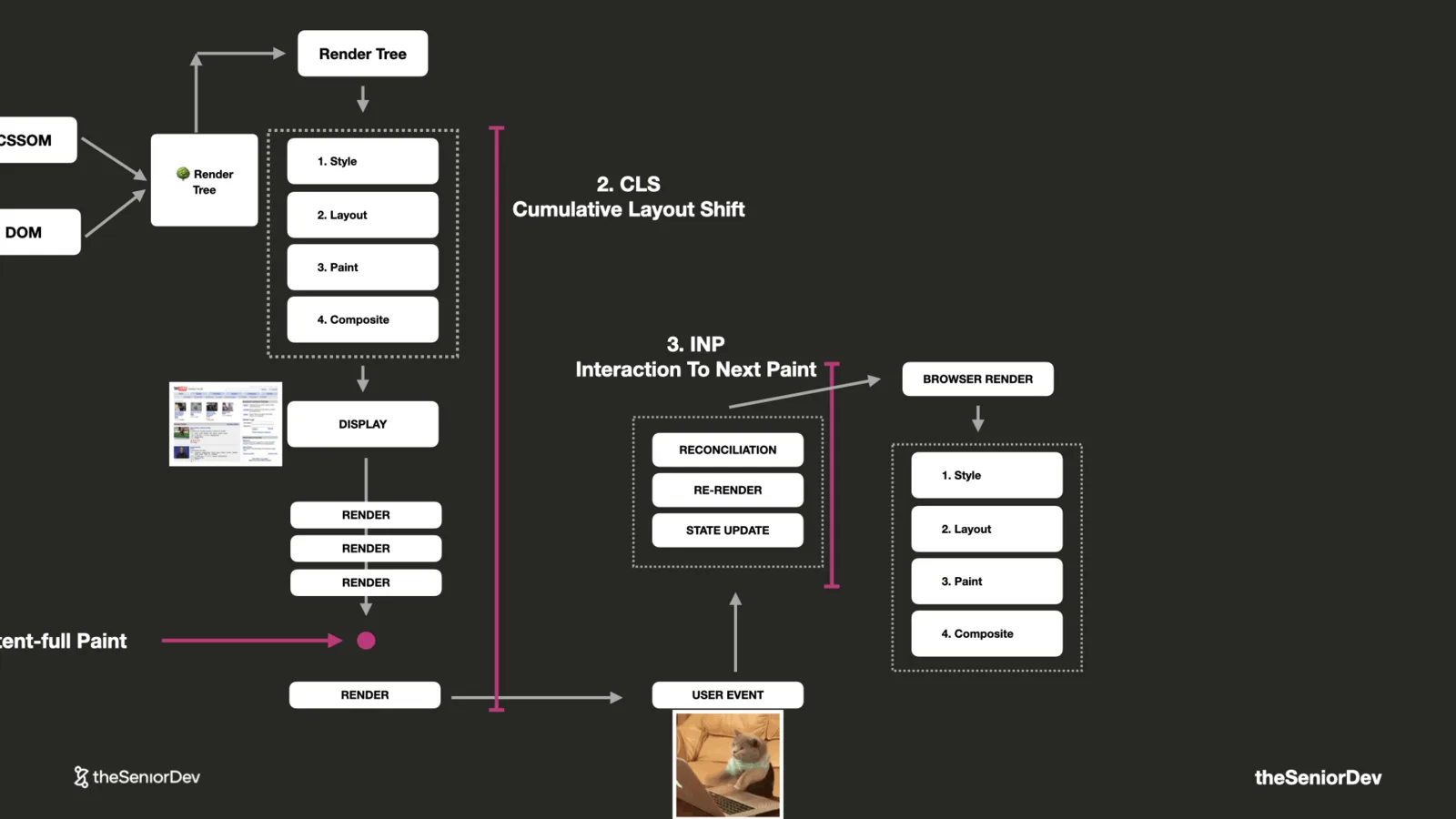
Three metrics quantify frontend performance: LCP (loading), INP (responsiveness to input), CLS (visual stability). They show up in job descriptions now.
They all hang off the critical rendering path: DOM, CSSOM, render tree, layout, paint, composite. Ship too much JavaScript or CSS, or fetch slowly, and LCP tanks; slow re-renders after user events tank INP.
 LCP / INP / CLSCritical rendering path
 - 14
14. Code Splitting & Lazy Loading
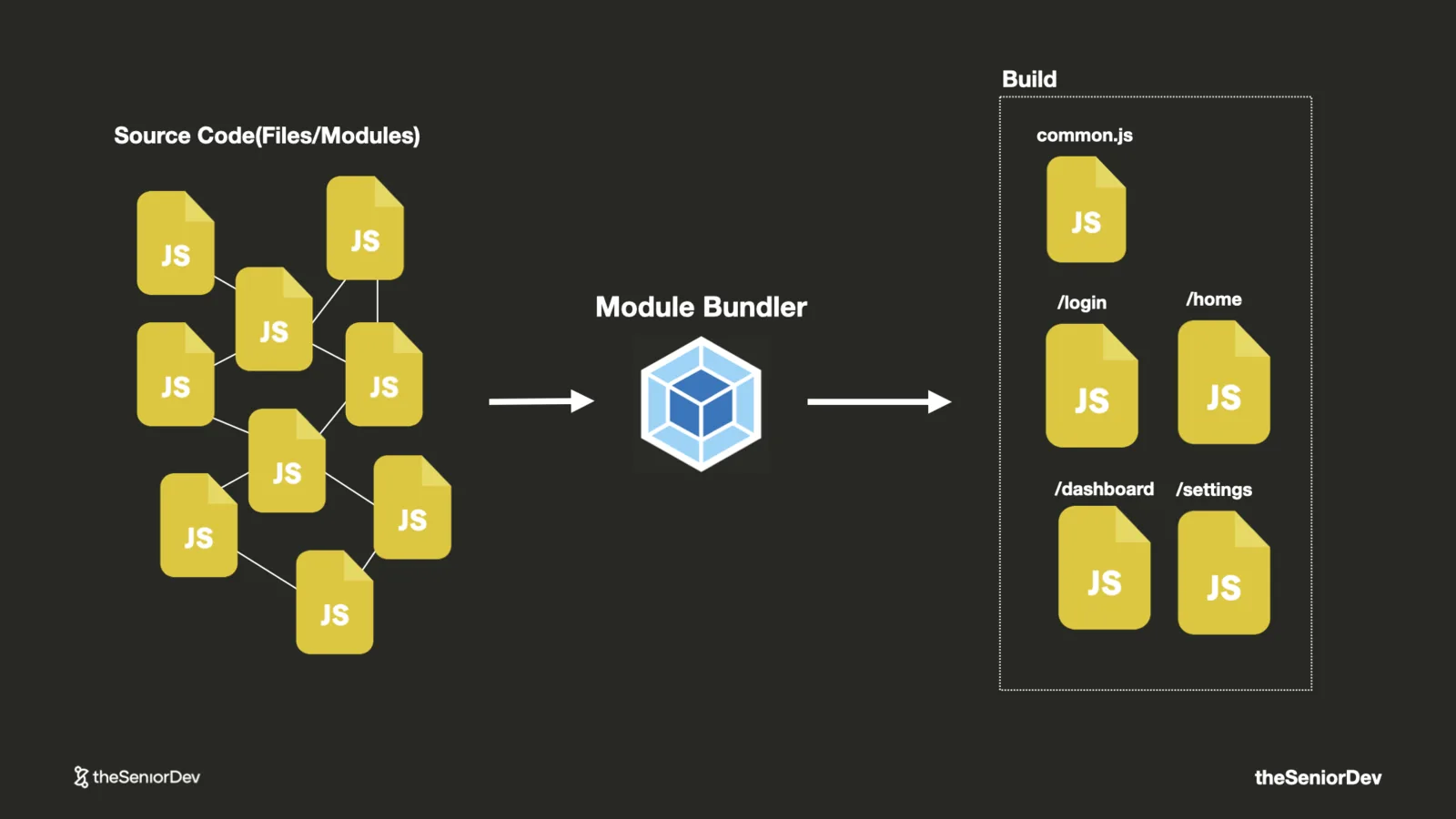
One big bundle wrecks the vitals — every page pays for every other page's JavaScript.
Code splitting ships JavaScript where it's needed, easiest by route: the login page gets login code, the chart-heavy dashboard keeps its weight to itself. The bundler and router do the work.
The umbrella mental model is lazy loading: load on scroll, on navigation, on click — instead of everything up front.
 Route-based chunksDynamic importsLazy loading
 - 15
15. Rendering Strategies: CSR, SSG, ISR, SSR
Client-side rendering gives SPAs the white screen. Static generation pre-renders at build time — perfect until content changes. ISR rebuilds only the pages that changed, triggered by your CMS.
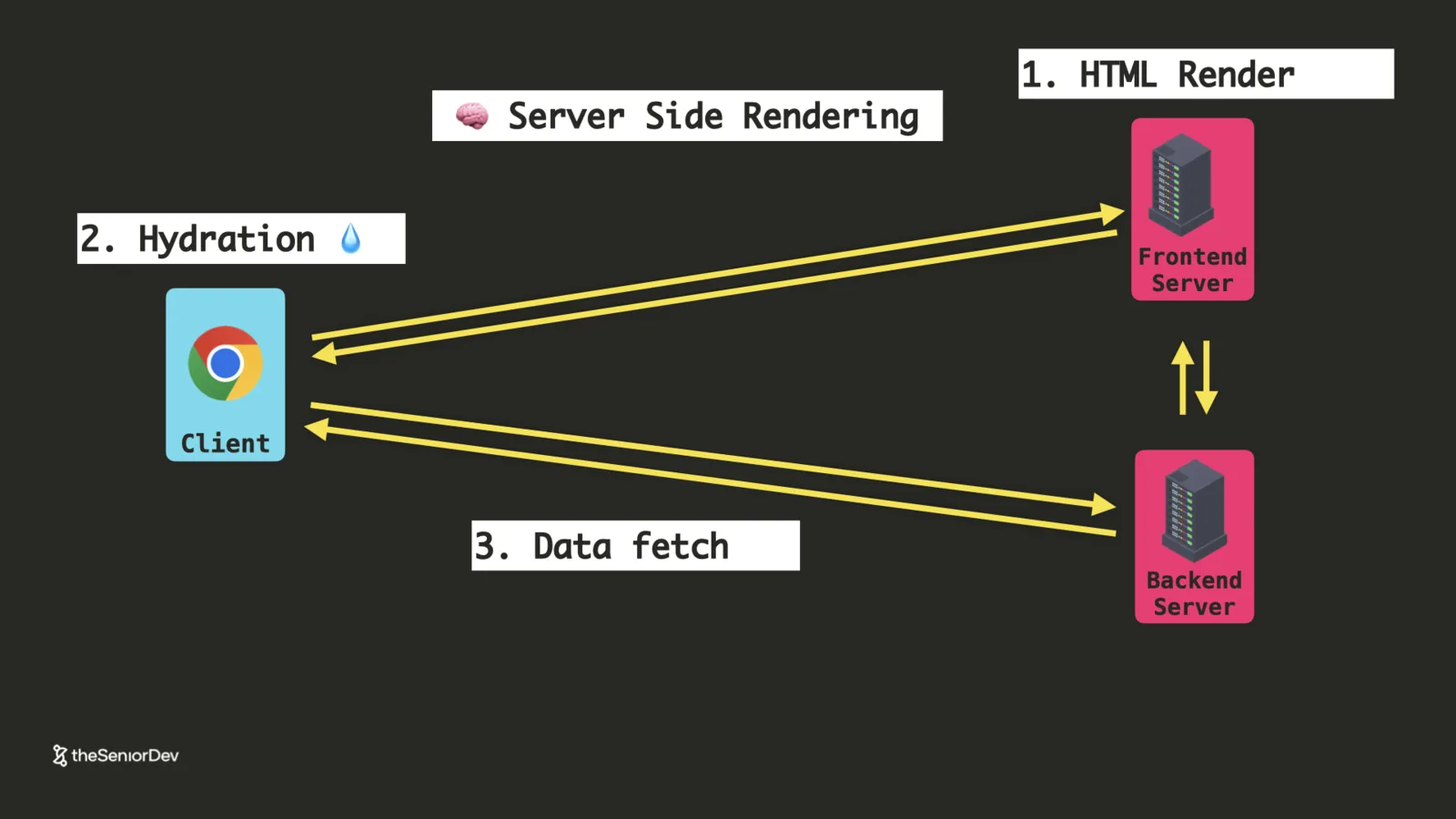
SSR renders per-request on the server, then hydrates on the client. It's also the most complex option — teams adopt it without needing it and drown in accidental complexity. An F1 car for grocery runs.
Default to the simplest strategy your use case allows; reach for SSR only when performance or SEO is a product requirement.
 CSR / SSG / ISR / SSRHydrationAccidental complexity
 - 16
16. Real-Time: Polling, WebSockets & Server-Sent Events
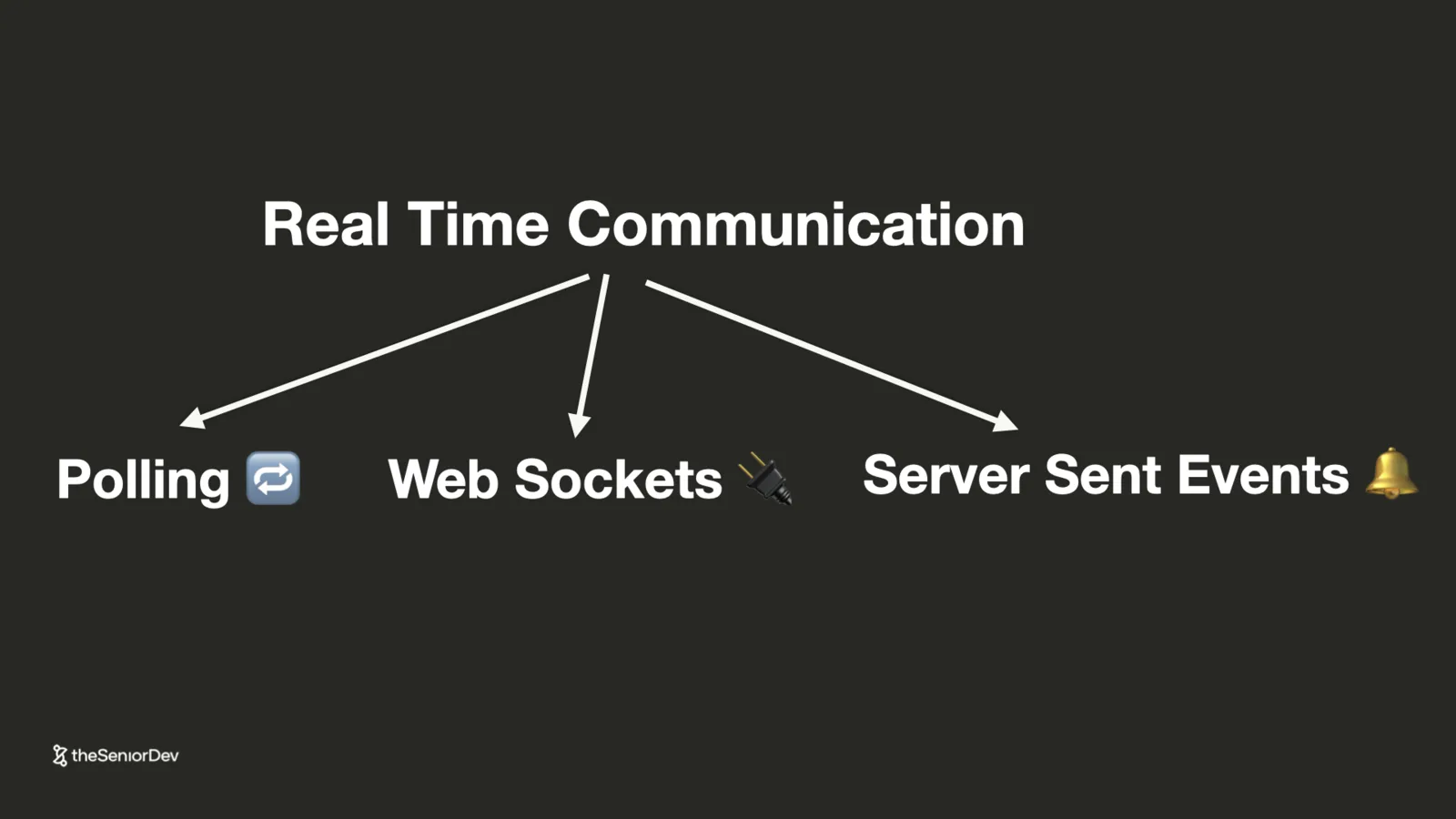
Three ways past request-response: polling (simple, hammers the server), WebSockets (bidirectional, heavy — right for chat between peers), and server-sent events.
AI apps are asymmetric — one query up, thousands of tokens down — which is exactly SSE's shape. Open ChatGPT's network tab and you'll find an event stream, not a WebSocket.
If you're building LLM-powered UIs, the SSE API is the one to learn.
 Server-sent eventsWebSocketsPollingLLM streaming
Transcript
As AI is getting better at writing front and code, your only choice to stay relevant and competitive as a front and engineer is to level up your system design and architecture skills. The problem is that most system design content, it's way to focus on the back end while completely ignoring the front end. So today I'm going to break down every front end system design concept you need to know from micro front end architectures to system design patterns like back end for front ends and then go into mono repos and rendering strategies like server side rendering.
And also show you what is the best way to use AI and jenty coding to deploy these systems to production. Now let's start with our first front and system design concept. Micro front ends. Now the additional front and application will start as a front and monolith that means pretty much everything it's in the same place. And when it comes to micro front ends, it basically means that we will split this application into independent front end applications and then put them all together.
But before we even talk about micro front ends, we need to understand micro services. And that it's a back and architectures time. And so looking at our client server model, both the server and the client will be monoliths, that it's single applications. And at that point we keep adding features to it because you're in the initial phase of the project. But as you scale, more and more people will have to work on the same code base.
And your development team becomes huge. And I worked with developers that's only their development team was 40 people and there they listen up took one hour and a half just for everybody to speak for one minute and a half. And that's just not sustainable. So that's where micro services and micro fronts come into place. Because this kind of architecture doesn't scale from a development point of view.
Now you've probably heard about the term two pizzas team where Jeff Bezo said that team shouldn't be bigger than 5 to 9 people, which is as many as you can feed with one pizza. Now the two pizza steam becomes a one pizza team with AI. Because nowadays you can do the same work with a lot less people using agentic coding. And so the ideal size of the team becomes smaller. smaller. Now do remember that even with coding agents like cloud code drive implementation time to zero, they do increase the verification time.
So being an AI savvy front end engineer, it means you design system that decrease the verification time and minimize architectural drift while they maximize velocity. And so it's not anymore about implementing fast, but rather building a system that is extremely easy to verify. And we'll see how that changes our architecture later on. But keep this principle in mind. And so in the ideal case, we are able to split our monolithic team into feature teams that own a specific feature.
And those teams are full stack and they work with coding agents, but they can deliver independently, and that's how we can keep our product moving forward. And so we'll have this different feature teams, but it's also shared infrastructure, and that's owned by the platform team. You might have front and tooling or pure infrastructures like the servers. So you might have a team, for example, that is building a design system that the feature teams are using.
And all those teams are smaller and they all work with coding agents. That is the new norm in development teams. Now, according to Conway's law, the software architecture of a system will look like the organization of the people. So if what we want it's smaller independent teams, then we need to somehow break our system into small independent vertical slices. And this usually starts in the back end where we take our monolith and we split out the independent modules to build microservices.
Those are independent, small back ends, micro back ends that expose their own API and can be deployed independently. The code base it's independent and you can have independent teams that don't need to talk to each other extending those, and they only communicate between each other through APIs. And so a typical microservice blueprint will look like something like this, where you have an API, there's a business logic layer, then there's a persistence layer, and usually a database.
In this case I added postgres DB, but it could be a no SQL DB. And so this is the building unit of your application, and big applications will have thousands of those in productions. A couple of years ago I used to work for this financial micro company. And we had around 1,000 microservices in production and you had different teams owning different microservices, my team owned 13 of them. And by the way, if you want to see where do you stand across the full stack, there's a free assessment that you can take in the link below, and you basically understand how much of this full stack knowledge you actually have, where is the gap.
And we added a new AI section because a lot of companies are starting to ask AI questions in front and engineering interviews, also. So take the assessment and you can see more or less where you stand in the market and what gaps you need to close. Link, it's in the comments. Now, moving on, we split our backend into microservices, but a front end is still a monolith. So, even if our backend teams now could ship independently and be much smaller and go much faster, the front end is pretty much the same.
And the problem with the front end is that you have so many people pushing code to the same client that it's so easy for someone to make a mistake or bring the whole system down, or change a global CSS rule that then affects everybody. So, as of now, our front end team, it's still very, very big and totally not sustainable. And it gets to a point where we just cannot scale because there's just too much communication overhead between all those people needing to coordinate as they work on the same code base.
And that's why we go back to micro front ends, where we have a front end monolith and we split it in different independent front end applications. Now, how do we put all those together? Well, basically we have a shell. And the micro front end shell is the one that takes care of the global functionality, things like art, routing, language, global state, you know, are the users logged in or not? It's all handled by that.
And all the others model applications, they live inside this one, they're basically loaded by this micro front end shell, and this micro front end shell, it's also passing this global state inside those micro front ends. But remember, those applications are now deployable independently. That means you might have a domain that it's header.thesenior web.com, where for example, we would host only our header application, and you could load that independently, and then you have a product page and a cart page.
But then you have have the shell that puts them all together. So if you look at a big software company like amazon.com, you could basically split the header and then maybe take out the product page and the payment into three different microfront ends. But to be honest, I feel like they have even more granularity there, and they probably split their front ends into even smaller and more focused microfront ends.
So once you apply microfront ends and microservices together, you'll end up with a microfront end that will speak to one or several microservices in the same domain. And this system can now be extended by an independent team. So we can start releasing changes independently, our releases are not a bottleneck for another team, and we can work against the APIs of other teams. This is how pretty much every big software company operates.
And this is what in software architecture they call vertical slicing, where your features are vertically owned by one team. And I'm going to go even farther and tell you that if you are an engineer and you're doing only front and back and you have to move as fast as you can towards becoming a vertical integrated engineer, basically a team of one that can work with a coding agent across the full stack and we'll see in a second why that happens, but that's the transition you really need to go to to survive in today's market. So when it comes to traditional front and engineering and front and development, we see that moving towards two extremes, where you are either more for full stack person that works in the feature team, so they work across this vertical slices and that's where you need to know a bit more about full stack. By the way, we do have full stack videos on this channel, if you want to know as a front and engineer transition slowly towards a full stack, or you're going to be getting really good at the front and you're going to be infra team and you start building at the shell where you build a design system, and that's where you do spend a lot of time, you know, doing traditional front and work with just CSS and building the building blocks that the feature teams will implement. And pretty much both of those people will work with coding agents.
Now, a quick tip about AI and AI coding, micro front ends and micro services decrease the blast gateways of production bug, and they reduce the cognitive load of code changes because you have smaller and localized PRs. You also get less context, which means your AI coding tool would be much more efficient because you work on smaller pieces and the risk is less. So it's a really good strategy when you have a lot of people pushing a lot of code very frequently as we do with AI to move towards micro front ends and micro services. Because the risk is lower and it decrease what we call the verification time. It's just easier to go anti quality when the surface area of the changes you are making it's smaller. So micro front ends and micro services are usually the way to go if you're building fast with AI. Now, let's move to our next concept, which is an API gateway. Now, whenever we have a micro front end and a backend service, we need to end up making a lot of requests. And those requests have what we call edge functions. They need caching, HTTPS, authentication, content negotiation, rate limiting for security. And so all this functionality at the API level, it's pretty repetitive. So having to implement this both on the front side and on the back side every time we plug in a new micro service to the micro front end ends up adding a lot of overhead. And it becomes a lot harder to do this if you have a lot of back end services. So a typical solution is to add what we call an API gateway and that would be your gate into the backend systems. And the advantage with an API gateway is that the client would only implement the edge functions once. So it will basically only implement the HTTPS handshake once or caching or rate limiting. And then once the request goes through the API gateway, it gets forwarded to the backend services, which don't have to care about all these functionality. They should just care about their own logic. And all this usually lives in a virtual private cloud, which means it's totally secure. Because the only way to go into it is through the API gateway. The other cool feature when you have an API gateway is that you can make the communication between the client and API gateway HTTPS. But the communication between the microservices and the API gateway HTTP. Because you don't need that security anymore because you're in a close
environment. And the advantage here is performance because HTTPS, it's likely less performant than the HTTP, because you need more round trips to do the HTTPS handshake. So in general, once you have a couple of microservices in production, it's a good idea to add an API gateway both for security and performance and also less complexity in the front end. Now, let's move on to our next pattern, very similar to API gateway, we have the backend for front end. Now, let's go number our setup from before where we have a client and our API gateway and all our microservices. The problem here is that the client has to make a call to all these different microservices that might have a different API, and there's so many fetch calls. And if you're in the front end team, whenever you need a new feature that needs even the slightest backend change, you need to go and talk to that backend team and figure out if that will be a priority for them, add it to their backlog, and maybe something gets done. So it ends up being very, very slow. And one of the biggest challenge that some of the engineers work with the senior dev, that working big companies is that it's so hard for them to get things done because they have to talk to key different backend teams that have their own backlog and their own priority. So they just don't want to implement that small API folder that they need. So better solution is to somehow own your backend as a front end team, as a client team. There's also a lot of complexity when you have to implement all these different APIs, because they all look different, you need a different client and SDK for all these different APIs. And so that's more front-end complexity. So the solution for that is to add what we call a backend for front-end. This is a backend that will take the front end request and then just forward it to the microservices, but the advantage here is that whenever you have to implement a feature, you can act as a full stack developer when you're in the front-end team. So basically, you have all those microservices, you integrate, right, to change the way you request them from the backend for front-end and then you implement your feature. And you kind of own end-to-end the client side feature. And the backend teams, they can just work in isolation on their different microservices. So the front-end team ends up owning both the client and the backend for front-end and backend teams.
build pure back end services. And this is very important for you as a front end engineer because it means that you do need to know at least at the high level how to extend a microservice, how to build a back end for front end. You need to know API design, and you need to know a little bit about graphQL, for example, which is a great technology to build back end for front ends. This is a requirement for all the front end engineers that you see working at bigger companies, which are usually the ones that also have the best conditions and the most exciting work.
So, even if you're in the front end, make sure that you can also get things done in the back end. Now, the advantage with BFFs is that you can adapt them to a specific client. So, if in the future, we end up building a mobile app that has totally different requirements to our desktop app, we don't need to duplicate API endpoints. So, with back and for front ends, every client will have its own dedicated back end.
Which means every client team can work independently and is completely decoupled from the back end services that can just focus on their own service. And so, basically, whenever the desktop client, for example, goes to the API gateway, they get redirected to the desktop back and for front end. And for mobile, we have a completely different API, a completely different mobile back and for front end.
It uses the same back and services, but it might expose a totally different API to consume them, just because the data needs in mobile are usually different from desktop where in desktop you want to fetch a lot of information at once, but in mobiles, we have smaller screens, so you need different records. And if you try to put all those things together in a single API, it will become bloated, or it will end up not satisfying one of the requests.
For example, you'll have a great API for desktop, but when it comes to mobile, you'll fetch too much data. A lot of data you don't really need because the interface is a bit different. Or if you make this smaller endpoints, when it comes to the desktop, you'll have to make many requests to get the same data. So, you either have over fetching or under fetching, and it's a lot better if you split those things.
Onto the next concept, which is load balancing. Now, going back to our client server model, we have a server and we end up having clients. But the problem is we might get a lot of uses. to a single server. Now, a typical Node.js server is pretty powerful. You can easily satisfy up to 2,000 to 10,000 concurrent requests with a well-optimized Node.js server. But when you go beyond that, you might need different ways to scale it.
Because a single server has its own limits. And the easiest way to scale it is by load balancing. And that means you basically will create identical instances of your servers and then have this component that's an application load balancer splitting traffic between them. Now, load balancing is a topic by itself, there's different ways to split traffic and different criteria, and as a front-end engineer, you don't need to go so deep into it.
But do make sure that you know about it. Ideally, you are even capable of setting up a small load balancer using traditional web servers like Engines and Docker Compose, you can have this set up on your local machine. Anyhow, the important thing is that you can reason your way through it. Most cloud providers, like AWS or Google Cloud, they allow you to provision a load balancer in seconds. So, don't worry about it, it's very uncommon that you need to manually set up one.
But it's important that you know about it. Now, congrats on making it this far, make sure you subscribe so you don't lose any updates in the future, and let's move on to our next concept, which is container systems. So, we basically distributed our architecture into micro front ends and different micro services. But the problem is that deploying all this would be a headache. Now, we need to build up and provision infrastructure and pipelines.
And they all make use of different technologies, you might have a Python microservice. And then a Node.js one, you might have a Vue.js application. And next JS application. And this is all very complicated to get to production. So, in order to standardize the deployment, we can actually use Docker. And Docker is technology that allows you to package your application into a Docker image. And the way you do that is that you take your code, and then you have a Docker file where you can declare a recipe of how we should package that code.
Docker image. The Docker image will contain all the application code and then the runtime. Let's imagine you're using next.js, then it will contain next.js. You'll have the runtime, which is node, and then the operating system, which is usually Linux. And that it's a full Docker image and the advantage there is that. Whenever you find a host that runs Docker, you can run that image, you don't need to worry about the Node.js version, or if you need to install PHP and all the dependencies that your application has.
It really comes packaged all together. This is Docker image, run it, open it sport, you have a front running, you don't need to know about what's inside. And this is wonderful for DevOps teams, because all of a sudden they can take all those images and push them into a container orchestration system. A container orchestration system usually has a container deployment pipeline which will run these containers.
And so running a container is not as easy as it sound, you might need load balancing, you might want to run several instances in parallel. And be able to, you know, if a container fails, spin out another one really fast, so all these kind of hard work. It's built into systems like Kubernetes, you probably saw it in job office. Now, do you need to know Kubernetes as a front end engineer? No, but you do need to explain.
You do need to know about it and you will see a lot of front end positions. That mention either Kubernetes or container systems or ECS, which is the AWS alternative to Kubernetes, in the job description. Don't be scared. You don't need to become a DevOps engineer by tomorrow, but you should be able to. At a high level understand where it fits in your architecture. Finally, a more front end concept, a CDN.
A content delivery network. So what is a CDN? So, going back to a client server model, imagine you are a client, you want to go on a website, usually you go to the server and get some static files. That is JavaScript and CSS and you download that and you run that on your web browser. Let's imagine in a more hypothetical case that you are a user from the US and you want to visit an application that is based in Europe.
For you to get the JavaScript and CSS and all the you know, you have to go all the way to the Atlantic Ocean and come back. And that round trip adds latency. And there's no physical way you can work around it. No matter how performant your application is, there is the limit of the speed of light. Because data only travels as fast as the speed of light and over long distances, like this very fast, but it's still will add around let's say 200 milliseconds to 250 milliseconds on every request of latency. So solution to that is to try and increase the distance between you and where those files are hosted. And the easiest way is to use a content delivery network. So basically a CDN will be a network of these edge locations that are placed all over the world, and what happens is that the server will push the static assets there, and whenever you make a request, you'll be redirected to the edge location that is closest to you. Now this mechanism on how exactly you are getting redirected to that edge location that is closest to you, it's very interesting and I do want to make a video about it. But I'm not sure if it's something you're interested in. If you want a video about it, let me know in the comments. It's a bit more technical and it's not something you'll get in interviews. But to be honest, it's really interesting. So if you want me to make a video about it, just give me an excuse by letting me know in the comments and I'll go ahead and do that. Now, a CDN it's a distributed cache, so the technical term for whenever you get the asset from the CDN, it's a cache hit. And whenever the server pushes a new version, that's called cache invalidation. And this concept is very closely related to what we call cache busting, which is a mechanism that module bundlers use to invalidate your assets so we make sure that when you're deploying a new version, users really get the latest one. Now the previous version that is probably still sitting somewhere in the CDN, I do have other videos in the channel talking about it. So I'm not going to go deep into it, but make sure you are able to relate those things across the stack. Now, keep in mind that a CDN is the fastest and most cost effective to increase web performance by serving optimized assets with the right cache policy out of the box. Because nowadays CDNs do a lot more than just placing the asset close to clients, they also compress it and they also
so take care of the caching policy. So it's a really cheap way for you to fix most performance problems. Now, let's talk about design systems. And going back to our micro front end discussions, we have a feature team that's a product feature team, and then we might have the payments feature team and they work separately and release independently. Those are completely separate product teams. And the problem there is that you might get code repetition or what we call visual divergence.
You can have the silos mentality and so basically a button in the product page will look differently than a button on the payment page. And so you will use what we call visual coherence and people will start to notice that those are actually separate front ends because they look differently. And that's not good from a product perspective, but it's also not good from a technical perspective because you have too much repeated code.
And so the solution is to have a design system and in a design system, the first thing you do is to define your design tokens that's basically your team information. What's your primary color, what is your border definition, your fonts, families and so on and so forth. And the modern way to do that is you add them as CSS custom properties, basically variables at a global level in your CSS, probably in the shell micro front end, and then it gets fed into all the other micro front ends.
But you can go a bit farther and build reusable components that then the feature teams can use to assemble their features. So you can build inputs and buttons, and basically they would consume that UI package and use it in all these different micro front ends. So basically what you achieve is that the UI looks consistent, but also you don't repeat your code. The cool thing about the design system is you can take care of accessibility, you can have all those components unit tested building a lot of AI in the last couple of months. And the first thing I do when I get a new project is to try to extract from whatever the design is, the design system because then you feed that into your coding agent to different sessions and you still get consistent output.
If you don't do that, the agent will make things up in your UI, which just look different and it'll be obvious that it was vibe coded. Now our next concept is a design to code MCP. That's a model context protocol server. And so basically, remember we have a design system and normally you would input that to start building with it. But nowadays, let's imagine that your designers built your design system initially in Figma and then you implement it in your library.
You can use the Figma MCP server with a coding agent to very quickly assemble features into the feature teams, into the vertical slices of your product. And this is the kind of workflow that most companies are moving towards. So if you are a front end engineer, you got to make sure that you know how to use an MCP server, you know what an MCP server is, and ideally, whatever design tool your team is using, you can plug an MCP into that or you might have to even build that connection yourself and then plug that into your AI coding agent like Cloud code, which is the most using enterprise or codex. Now, a quick note on CSS architecture and design tokens.
What you can do to take things even five days to apply the atomic CSS methodology and with your design tokens, create atomic classes that you can use in your code base. So basically, you define what the border would be, but then you create a dot border class that has that property, and then the only thing that other developers have to do is to use that class. And this is how tailwin CSS works. So keep this in mind, tailwin CSS, it's an implementation of the atomic CSS architecture style for CSS and there's three more architectural styles, which I won't get into right now, but who knows, maybe I'll make a video about it later on.
Next front system design concept, the mono repo. So, basically our applications right now are sitting in all these different repos, where we have a GitHub repo for the shell, one for the payment micro front ends and inventory micro front ends and it's all spread out into thousands of repos. And the problem there is that you'll end up with different code styles, different dependencies and different quality standards. Some people might be using TypeScript, they might be using different linter configurations. And it's so easy to have what we call architectural drift or code style drift where two projects diverge too much. What's the problem with that? If you're a developer and you change teams, you have to relearn everything. So you don't really leverage standardization. And the way to fix this is to put everything into a single repository. So basically, you have a big repository that contains all the other small applications and you have tooling that works with both of them. So, for example, when you run NPM run build in a monorepo, all your applications will build individually. Now, when it comes to AI coding, a monorepo gives coding agents the context they need to make changes across service boundaries. So, for example, if you're building a micro frontend and you realize that you run into a reusable use case, you can easily extract that and propose it as a component into your design system. That might be a different repo and you can do that with a coding agent. In a single session, if you have everything in a monorepo. If not, you have to somehow fit those two different repositories, your coding agent and everything becomes harder. So combining micro front ends and microservices with a monorepo, it's usually the most efficient way to work with AI. Now, one thing I'm really excited about, it's also MCPUI. So MCPUI is basically combining the traditional website with an LLM powered app. And that's basically the glue in between them, the duct tape, let's say that. And so, basically, in a chat application, you usually send a chat query and then that goes to the LLM. And the LLM will answer back, but in this case, it can actually answer with UI components. So it actually render products, for example, in the answer, not only text. But to do that, it has to somehow talk to the back end and then we need to render some components. And that is what MCPUI solves. And this is an example I found in a recent website where I was looking for venues for events
because we are organizing our annual in person meetup for the senior devs. So we're going to meet all the engineers we work with around Europe, or we'll in the US and I was looking for different cool venues where we could actually meet up. And so I was talking to this chat UI and all of a sudden, after a couple of questions, it started rendering those venues. And it's asking me for input, and then it will go into a deep search and give me even more venues. And as you see there, it can even render a map.
And all this happens in a chat application. And I think this is the direction front end will go with LLMs where we will integrate LLMs in what applications would be. A lot of people were saying that there's no more need for a UI now that we have a chat. I disagree. I think the UI, it's a very useful way to communicate things and I think you need front end developers. But we will be able to combine the LLM approach with the traditional web approach.
So this component was rendered because the front end parsed it from the answers of the LLM. At a high level, the way this works is that the model harness will provide in the context the tool registries and all the MCP servers and an SI user prompt. And the LLM will send an answer back to the tool UI with the text answer, but also with an instruction to render a certain div and then the tool, the web application has to follow that and render it.
And just to really bring this to the code, the way we declare a resource or an MCP UI is we basically tell the LLM, hey there's this resource and you can use it in this case scenario. And this is the answer you can give. And then our front end has to take that and parse that and then render it. If you want me to make an in depth video on how exactly MCP UI works, let me know. But this is one of those patterns that if you know really well, you'll really stand out.
Because I believe it goes way beyond the current AI hype, and it's actually something very useful for specific edge cases and you'll see a lot of applications actually implementing these hybrid solutions. Now, to wrap the video up, let's talk a bit about performance and the most important pattern. That you'll even see now mentioned in job descriptions for front end engineers, it's the core web vitals.
And so basically the core web vitals are three metrics that quantify the three dimensions in which we measure the performance of a website. And those are the loading speed, the interactivity speed, and the visual stability. And the three core web vitals that measure this are the largest contentful paint, the interaction to next paint, and the cumulative layout shift. Basically, those are measured by Google and they tell us what a good number would be.
And so, when you look at the largest contentful paint, it will be the time it takes from when you hit enter to when the largest element in the web page is rendered. The interaction to next paint is slightly different, and it has to do to when you interact, so you do something, and then when do we repaint the UI. And the CLS is basically how much the UI changes when it loads. And so, the LCP and CLS have to do with the initial render and the IMP has to do with the re-renderings, which is very important when you talk about component frameworks.
Now, to understand those, you need to understand the critical rendering path, which is all the steps you go from downloading some HTML to actually showing something on the screen, and that involves building the DOM and then building the CSS arm, then building a render tree, then computing the layout tree, which is basically a tree of where all your nodes are and the positions and the width, and then transforming that into what we call paint operations that go straight to the GPU, then going to the composite phase, which has its own complexity and I'm not going to talk about it.
But just to summarize this, all those steps will happen, and then you'll have some re-renders because we use component frameworks, you get data, you start re-rendering, and you finally finish. And then that's when you paint the LCP. So all that time is measured in the LCP. And the bottom line here is if you're shipping a lot of JavaScript, if you're shipping a lot of CSS, if you have to fetch a lot of data and your server is slow, your application will be slow and you'll get a very poor score in the LCP.
The other thing that will happen if your application is fully optimized is that you'll have layout switching all the time as you start loading things, because CSS comes too late and then fonts come in and then some data comes in. And then we also will take screenshots of that and try to figure out if you are moving things too much. That would be the cumulative layout shift. And finally, the interaction to next paint is basically whenever you have a user event and you have to go to the reconciliation and render after state update in your framework, and then you start again, you modify the dom, and that triggers a repain.
So, all that time it's quantified as the interaction to next paint. So, basically, if you have very slow renders or you are rendering too many components when users do something, then you have a very slow IMP. You can measure those with 20 light house and I go a lot deeper into this video on this channel about it, so make sure you check out that one. Our next concept also has to do with performance, and it's called splitting.
Now, traditionally a module bundler will take all our JavaScript and put it together in a single big file. But loading that single file will totally mess our core web vitals because we load too much JavaScript. So, code splitting allows us to split our JavaScript to where it's being needed, so you can really ship only the JavaScript that's needed to a specific page. And the easy way to code split is by out.
So, basically, you would only ship to the slash login page the components that are specifically needed for the login, and if you have a dashboard that's very heavy with a lot of graphs, for example, you don't ship all that, so you selectively ship your JavaScript to where it's being needed rather than putting it together all in a single file, and all this is achieved with a module bundle like Webpack or Vite, which understands your bundle, splits it and then dynamically loads it based on the patur on working together with your application router.
And higher overarching mental model here, it's lazy loading, which is the opposite of eager loading. Eager loading means you are really loading. make this call web vitals better and working cross the critical impact. And finally, let's talk about the rendering strategies. And nowadays, we usually work with modern component frameworks like React, View and Angular, and the problem with those is that when you land on the page, you see a white screen.
And the reason for that is because, you know, you load that empty HTML, and until you're done really run whatever render function they have, you don't really see much on the screen. That's what we call client side rendering. So in an SPA architecture, in a single page application with client side rendering, you'd go, get your static file and then you'll need to go, get some dynamic data and then finally render and all that takes a lot of time.
So if you want to have a very performant website or a website that's really to be craled by a search engine, then client side rendering is not the best choice for you. An alternative to this if you have a static website where there's not a lot of interactivity is to pre-render it on the server and ship it already rendered. So when your client goes to get the static files, they already get HTML and CSS and they don't need to run so much JavaScript.
Now, again, this only works with static sites. If your static site will change often, let's say you have a blog and you want to publish new articles, then what you can do it's incremental static generation. That means you only regenerate the pages that have changed, so basically your CMS will trigger a rebuild when you add a new blog post, and that will get the dynamic data and go through a build pipeline and regenerate.
the only portion of the static files that change. So it's a bit of a partial rebuilding of the website, the advantage here is not only that makes the build faster, but if I'm a client and I already downloaded part of your CSS and JavaScript, I don't need to download redownload the whole thing. Only the parts that change. Now, in most cases, this is built into a framework like Nextjs. So you'll never have to worry about this yourself.
And finally, we have server side rendering. And in server side rendering, the client will make a request to the front end server, but then the front end server will request the backend server and get some data. and then only need back pre rendered. So the client receives a full HTML page. So you don't have this problem of the white skin. The problem you still have is that this page is not interactive yet.
Because you haven't went through building the virtual dome and attaching, for example, in the case of React, your virtual dome to the actual dome prebuilt. And that's why you need to hydrate. And so basically, you render that HTML page and then you have to execute your JavaScript, create internally the virtual dome and then that virtual dome is attached to the existing HTML markdown. That's what we call hydration and finally, when you hydrate it, you might have to do some extra data fetching, so you might still need to go to the back.
And again, this is one of the most complex approaches. So be careful with it. It's only useful whenever you need very, very fast performance or you need SEO. And a lot of people and a lot of companies jumped into this and they're doing server side rendering. But that's like building an F1 car to go to the groceries. It's over engineering and it creates a lot of problems and everything, it's slower, there's so many issues that will appear when you have this kind of setup.
Technology to make it work, it's very complex, bugs are harder to solve. So you want to stay away from it and really prefer simple solutions unless your use case really needs the highest performance. Oh, finally, let's talk about data fetching and I know we are front end engineers, but it's very important that you also can work with a data layer, as I said before, we are moving towards front end engineers being more full stack and that is server sent events.
And all this has to do with real-time communication, when it comes to real-time communication that is not following the request response cycle that has showed until now. You basically have to waste through it. You can do polling, you can do web sockets or server sent events. And so pulling would mean that you keep calling a specific endpoint until something happens. So, let's say we have a transaction that's processing, I can keep calling the status endpoint until it becomes completed.
That's very easy to do with plain JavaScript and set timeout. There's nothing complex about it. The problem is you're calling your server way too much and so it doesn't scale really well. you can have race conditions. So it's a very simple solution, but not the most performant one. The next alternative would be web sockets where you open a channel between the server and the browser and you can send updates and they can send your updates back. The problem here is that again, it's a lot of overhead and it's extremely good whenever you have bi-directional communication. Like you're working for a chat application for example, where both the client and the server would keep sending chunks of messages. Now, for most use cases, this is not really needed and again, it's complex and it's very intense on the server. It needs a lot of resources. Now, with AI, we do need real-time communication, but it's only one directional. Because usually when you send a request to a chat application, you then just wait and they start sending you tokens back. So it's a server sending a lot of messages, but usually you only send one. So there's a lot of asymmetry between the client and the server. And the way to make this happen is with server send events, where you send a text message and that will create a conversation and on that endpoint you're able to receive updates from the server. So you receive all these tokens, but you don't send so many. And this approach is the one used by most LLM applications, wherever used the OpenAI NPM package in a React application to build a chat app with an LLM. That's exactly what they use under the hood and you can actually figure this out if you go to your network when you use chat GBT or cloud and find that conversation request and you'll see that the answer to that, it's all these event streams. So you're getting chunks of the answer. And that's how you build these cool UIs for LLMs. It's not web sockets and it's not pulling, it's the server send event API. Make sure you look it up because it is something that will help you build products, software products, software applications with AI embedded. Thank you so much folks, if you want to go even deeper make sure you check out these two videos on our channel. One of them is about all the frontend architectures that you need to know as a front engineer and the other one it's about in depth concepts about web performance, CSS component frameworks that you really need and that show up in interviews at the senior level.
I'll see you in the next one.