
Video guide
35:43 · 16 October 2025
15 Frontend Concepts Every Senior Developer Has Mastered
Chapters 16 sections
- 0:00Introduction
- 0:34Critical Rendering Path
- 3:00Core Web Vitals
- 6:26HTTP Caching
- 10:37Content Negotiation
- 12:00Lazy Loading
- 14:45Bundle Splitting
- 16:42Critical CSS
- 19:50Essential State
- 22:09The Reducer Pattern
- 24:56Windowing
- 26:00Server-Side Rendering
- 29:47Rehydration
- 30:26Partial Pre-Rendering
- 31:40Server-Side Components
- 33:02Micro Frontends
Key concepts in this video:
- 01
1. The Critical Rendering Path
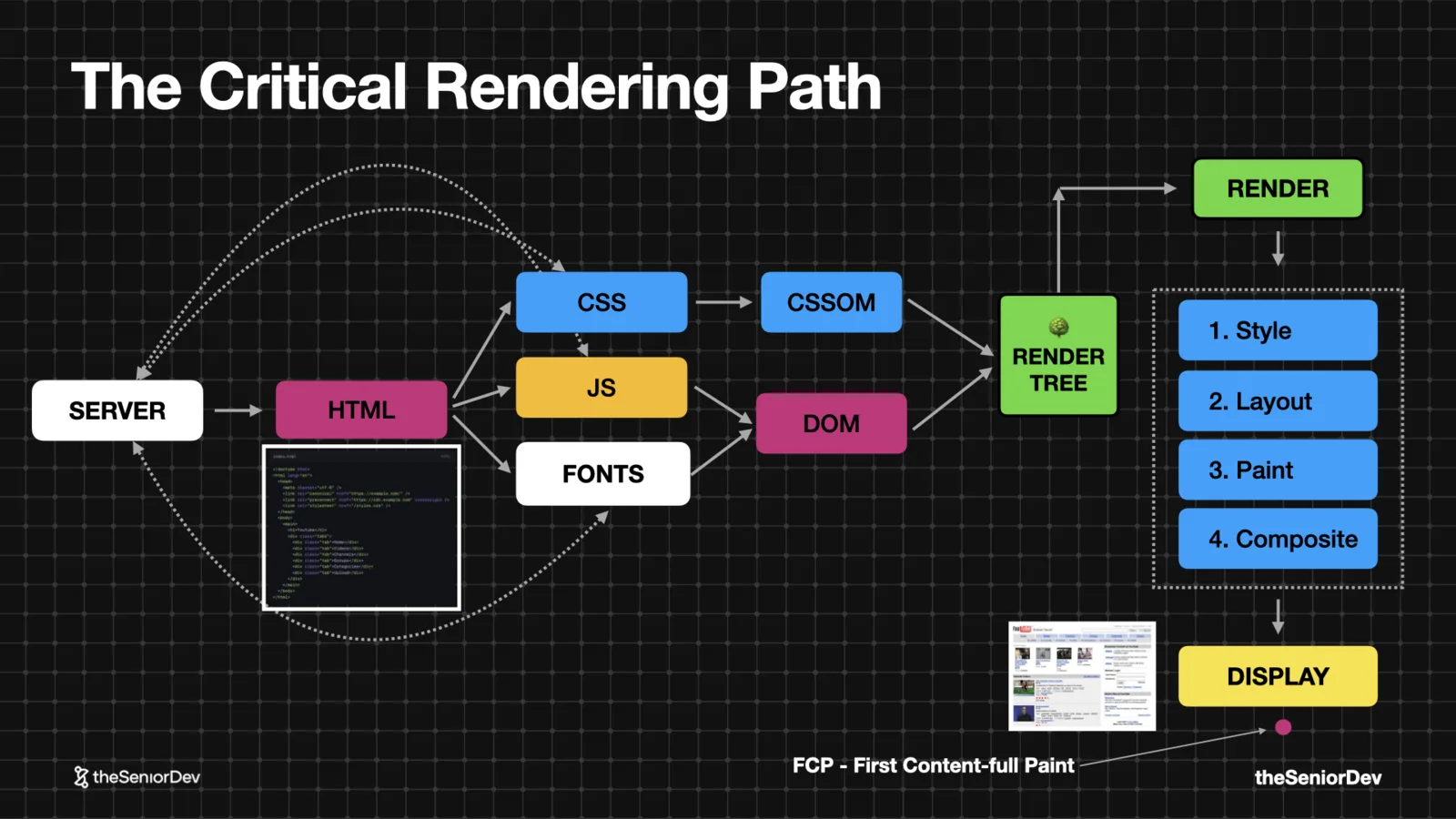
The steps the browser takes to turn HTML, CSS and JavaScript into pixels: parse the markup, download the blocking resources, build the DOM and CSSOM, then style → layout → paint → composite.
The first pixel milestone is the First Contentful Paint. Almost every performance concept on this page traces back to this one model.
Senior tip: never open with framework talk. Explain the browser mechanics; use React as the example, not the answer.
 DOM / CSSOMRender-blocking resourcesFirst Contentful Paint
 - 02
2. Core Web Vitals
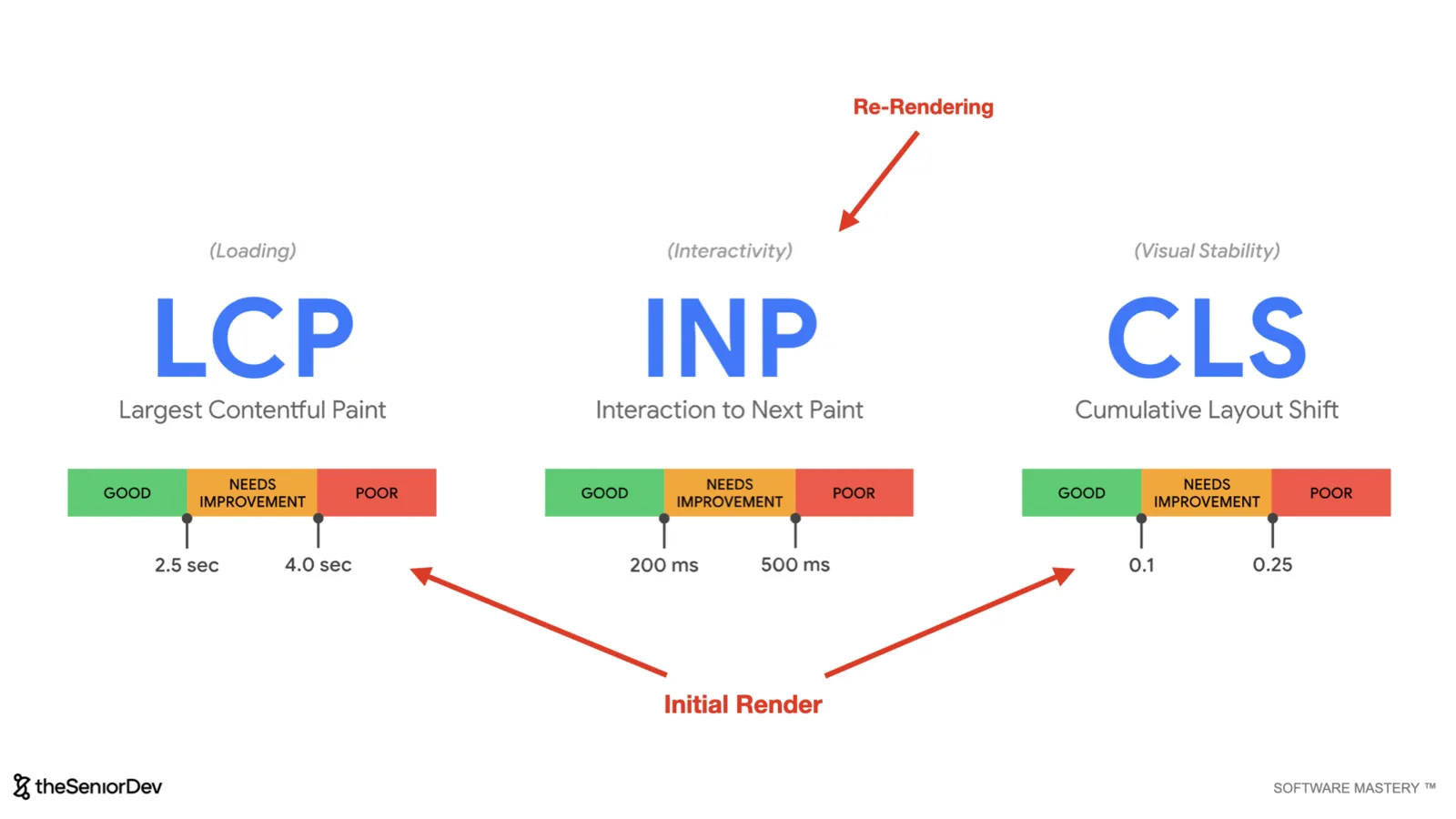
Empirical metrics for how fast a page loads and responds: Largest Contentful Paint and Cumulative Layout Shift measure the initial render; Interaction to Next Paint measures re-render speed after input.
Think Formula 1 benchmarks: you don't say your app is fast, you measure it against the industry and know which number is bad.
 LCPINPCLSPerformance budgets
 - 03
3. HTTP Caching
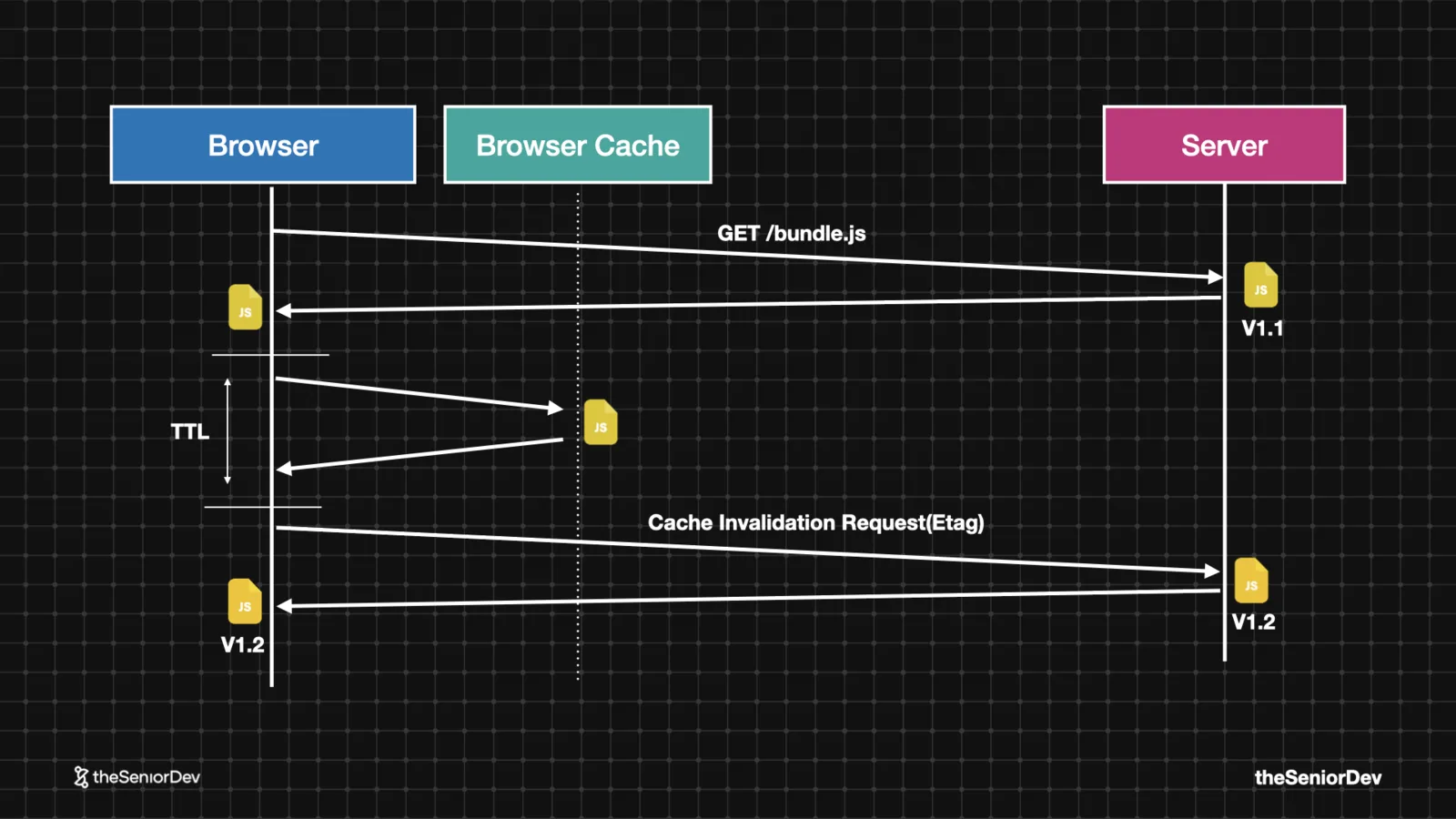
Caching is memoization at the file level: reuse the output for the same input, for a predefined time — the TTL.
The browser stores assets per the Cache-Control policy. When the TTL expires, the ETag header decides whether the cached copy is still fresh or a new download happens. Open DevTools on any big site and read the headers — it's all there.
 Cache-ControlETagTTLMemoization
 - 04
4. CDNs & Content Negotiation
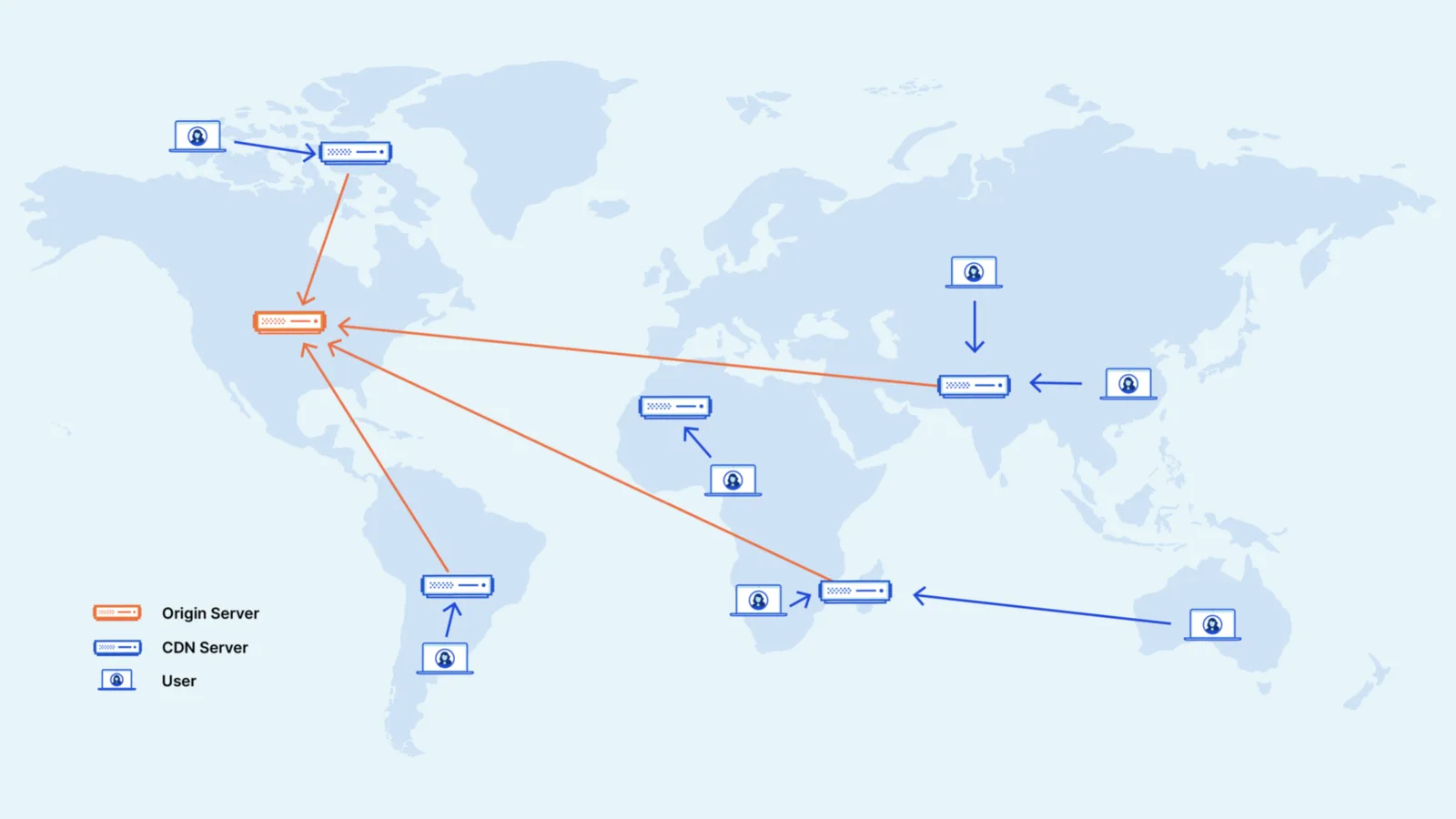
A CDN replicates your static assets to edge locations near the user — the single best first performance move for most apps. It also sets sane caching and compression out of the box.
Content negotiation is the client saying "I accept gzip or brotli" in headers, and the server sending the compressed version. Decompressing is cheaper than downloading — that's the whole math.
 Edge locationsgzip / brotliAccept headers
 - 05
5. Lazy Loading & Dynamic Imports
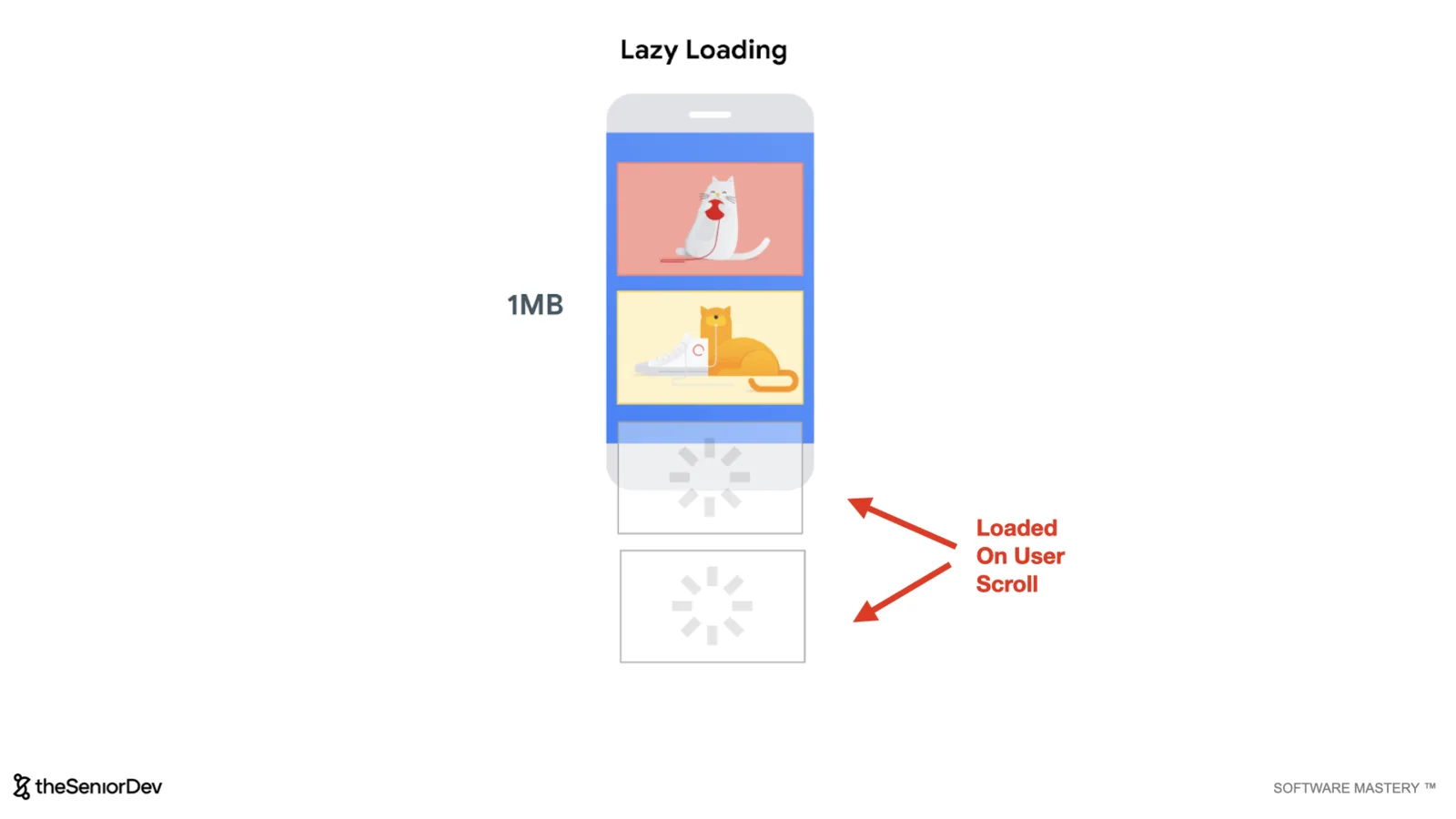
Eager loading loads everything up front. Lazy loading loads assets when they're needed — images as the user scrolls, JavaScript when the user acts.
For JavaScript that means dynamic imports: instead of a static import bundled at build time, you fetch and execute a chunk at runtime, right when the modal actually opens.
 Dynamic import()Code on demandIntersection-based media
 - 06
6. Bundle Splitting
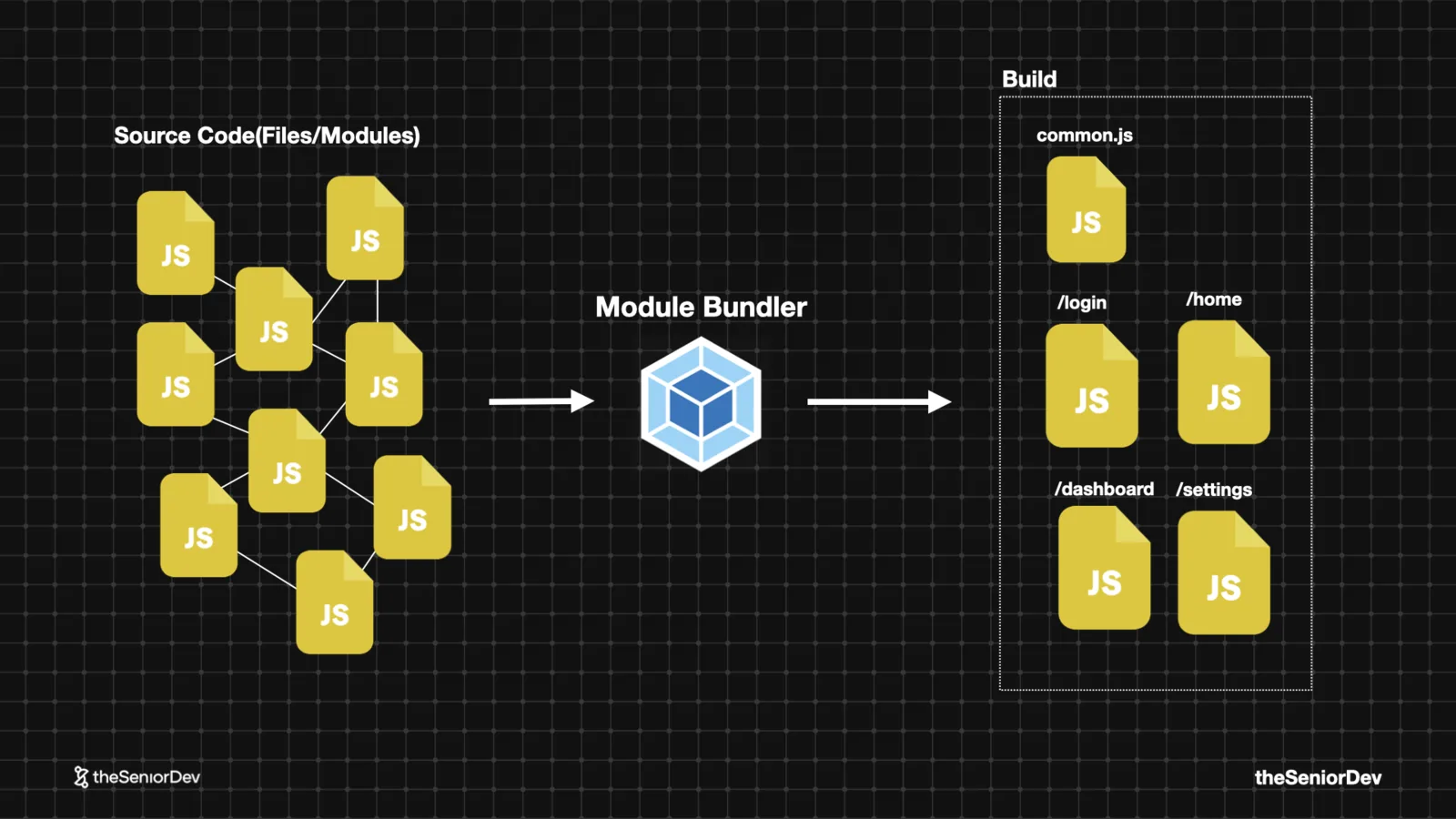
One production bundle means every page pays for all the JavaScript of every other page.
Split it: vendor code in one chunk, then one chunk per route — login, home, dashboard. Users only parse what the page needs. With a bundler and a router this is one of the cheapest wins available.
Senior tip: think in systems and relationships, not memorized facts. Bundle splitting is the critical rendering path applied to your build output.
 Webpack / ViteRoute-based chunksvendor.js
 - 07
7. Critical CSS
CSS is render-blocking by design — the browser wants every rule before it paints the first element.
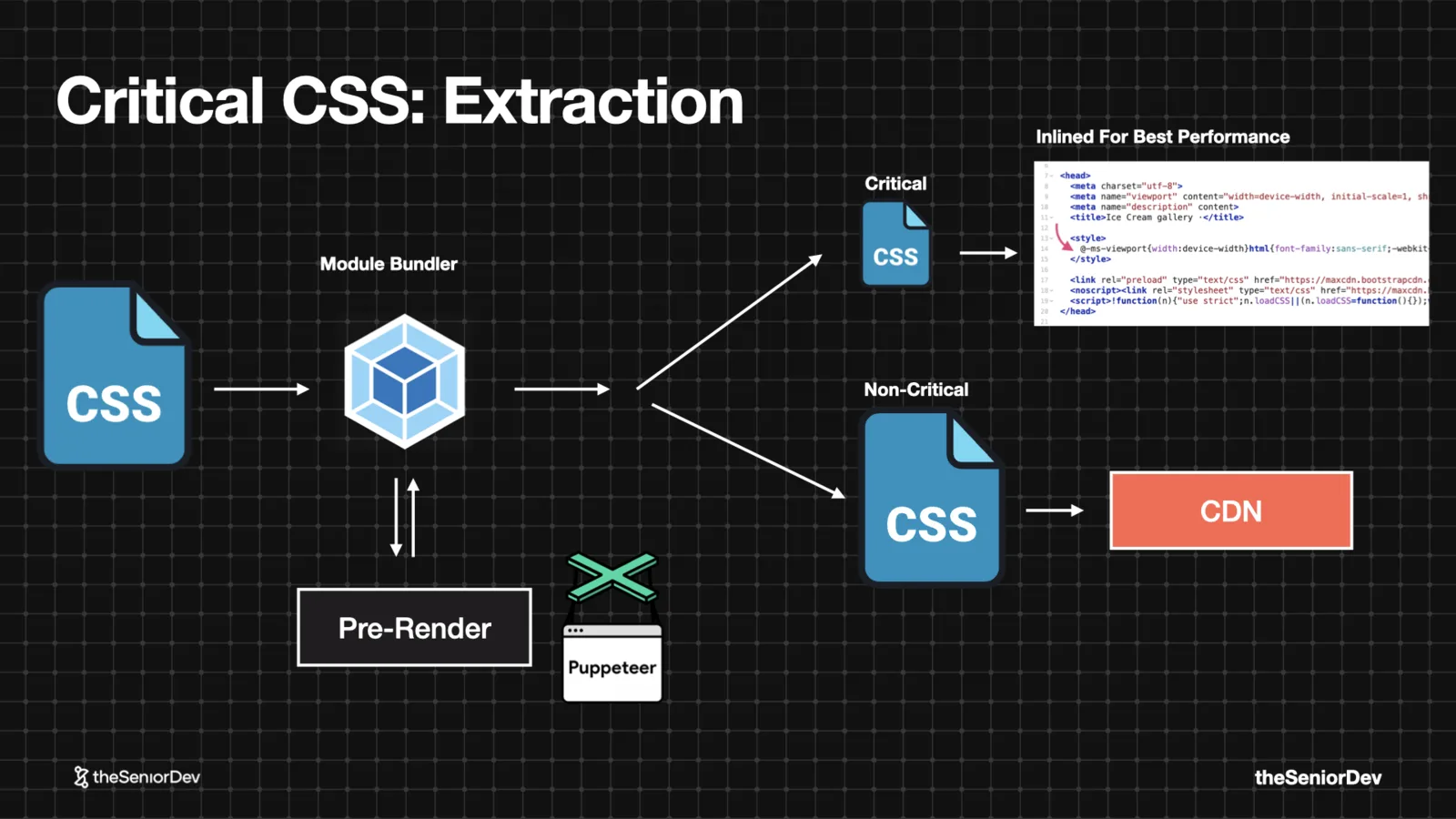
Critical CSS extracts just the rules for the above-the-fold view and inlines them in the HTML; the rest loads without blocking. Bundler plugins pre-render your page headlessly to compute which selectors matter.
Simple idea, sophisticated tooling. This is how large e-commerce sites keep first paint fast with megabytes of CSS.
 Above the foldRender-blocking CSSInlining
 - 08
8. Essential State
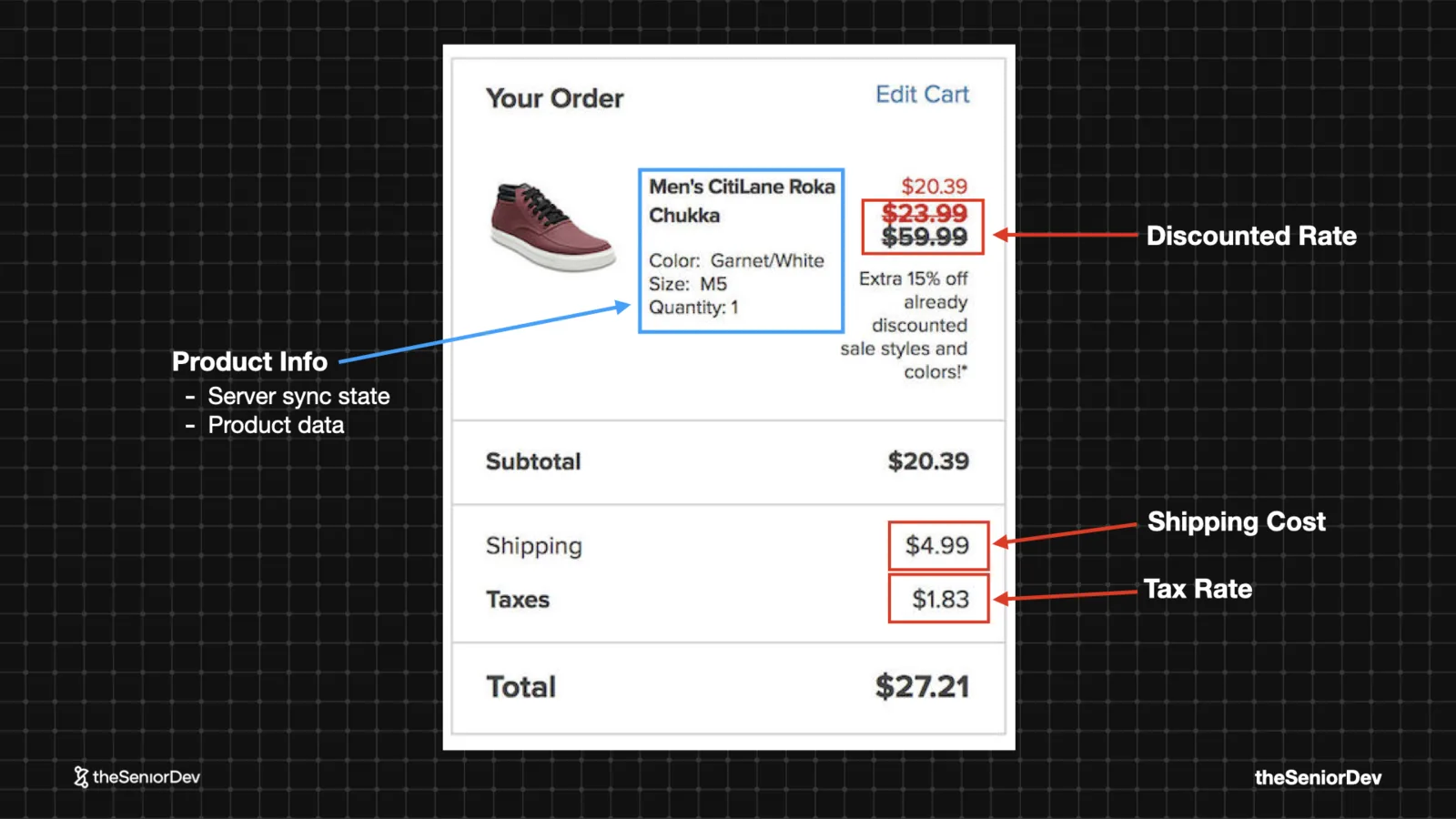
The minimum data needed to render a UI. A senior looks at a checkout screen the way an automotive engineer looks at a car — X-ray vision for the state and components underneath.
Subtotals, discounted prices, totals: all derivable. Keep product data, a discount rate, a shipping cost — compute the rest. Less state means fewer re-renders, fewer bugs, simpler tests.
 Minimal stateDerived valuesDeterministic UI
 - 09
9. The Reducer Pattern
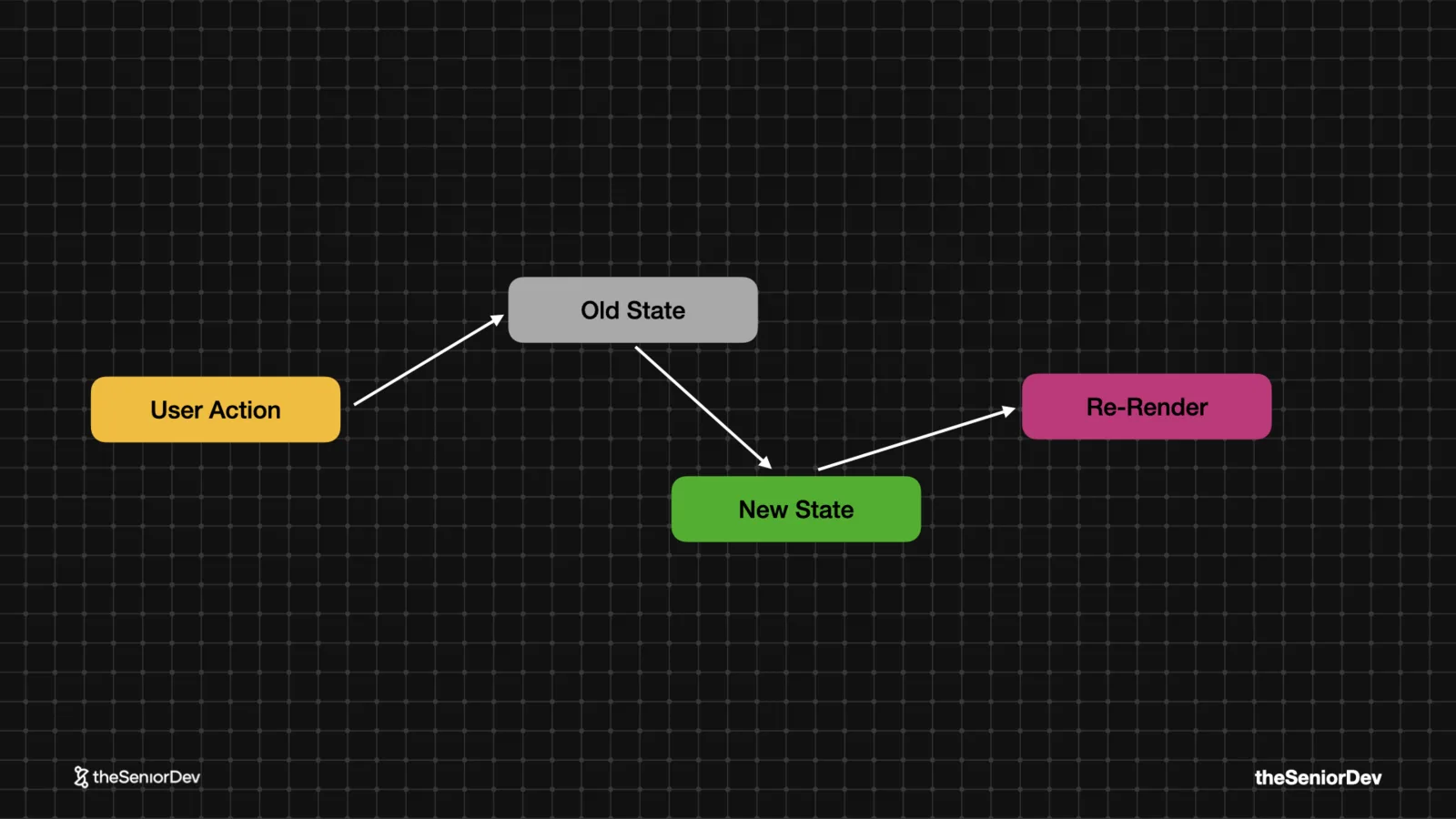
When one action updates six components, updating state piece by piece means lifted state, prop drilling and chaos.
A reducer is a pure function: old state + action → new state. One deterministic, testable, side-effect-free calculation; components subscribe to the result.
Mid-level devs talk about Redux and Zustand. Seniors talk about the pattern — libraries change, the mental model doesn't.
 Pure functionsImmutabilityPredictable state transitions
 - 10
10. Windowing / List Virtualization
Feeds die by a thousand DOM nodes: memory and CPU pressure make everything slow even when the user does nothing. INP suffers first.
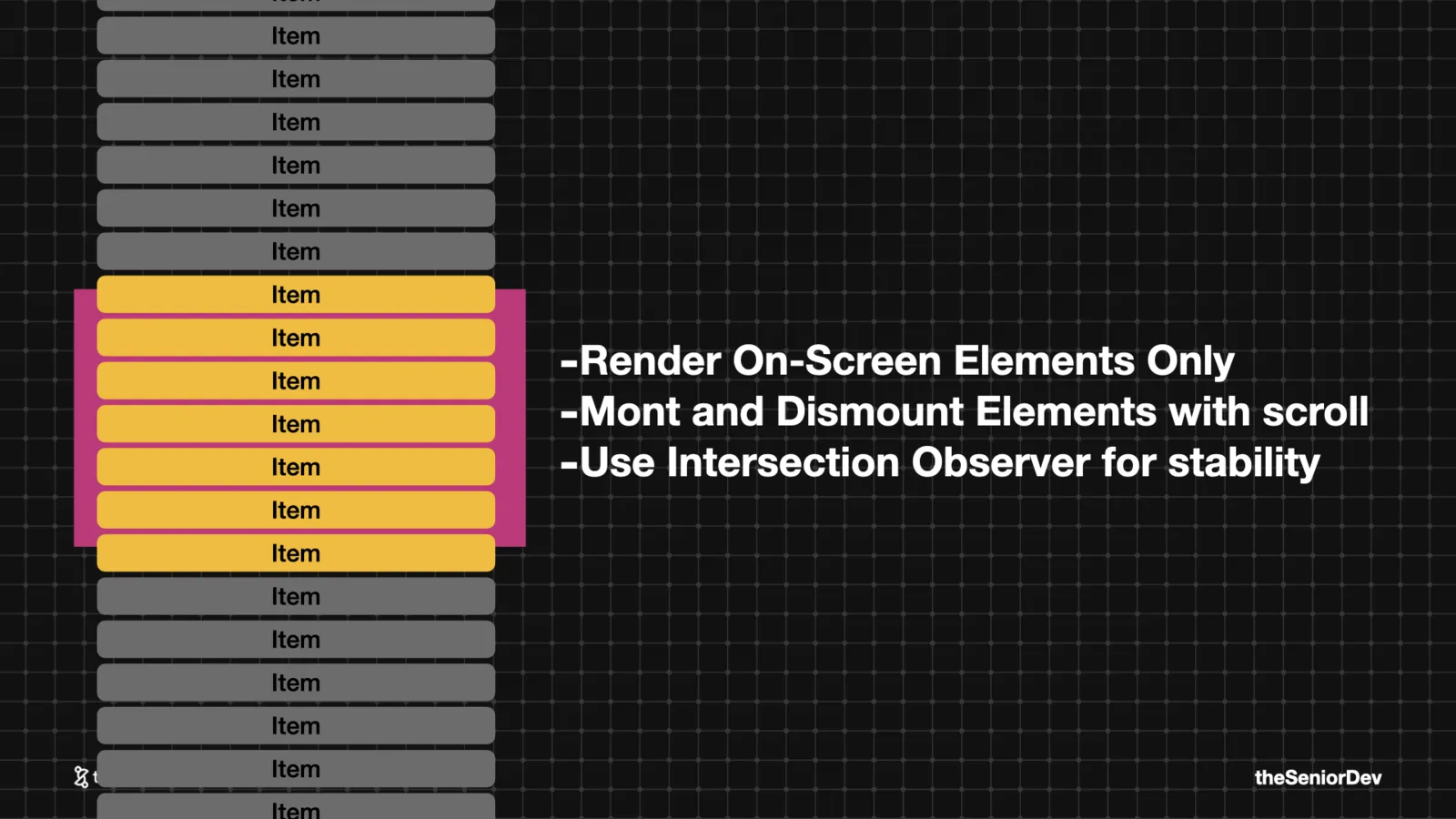
Windowing mounts only what's in the viewport (plus a small buffer) and unmounts the rest as the user scrolls, using the IntersectionObserver API. Any "build a news feed" system design answer needs this.
 IntersectionObserverreact-virtualizedINP
 - 11
11. Server-Side Rendering
A client-rendered app ships an empty div and a promise. Slow devices and networks stare at the white screen of death.
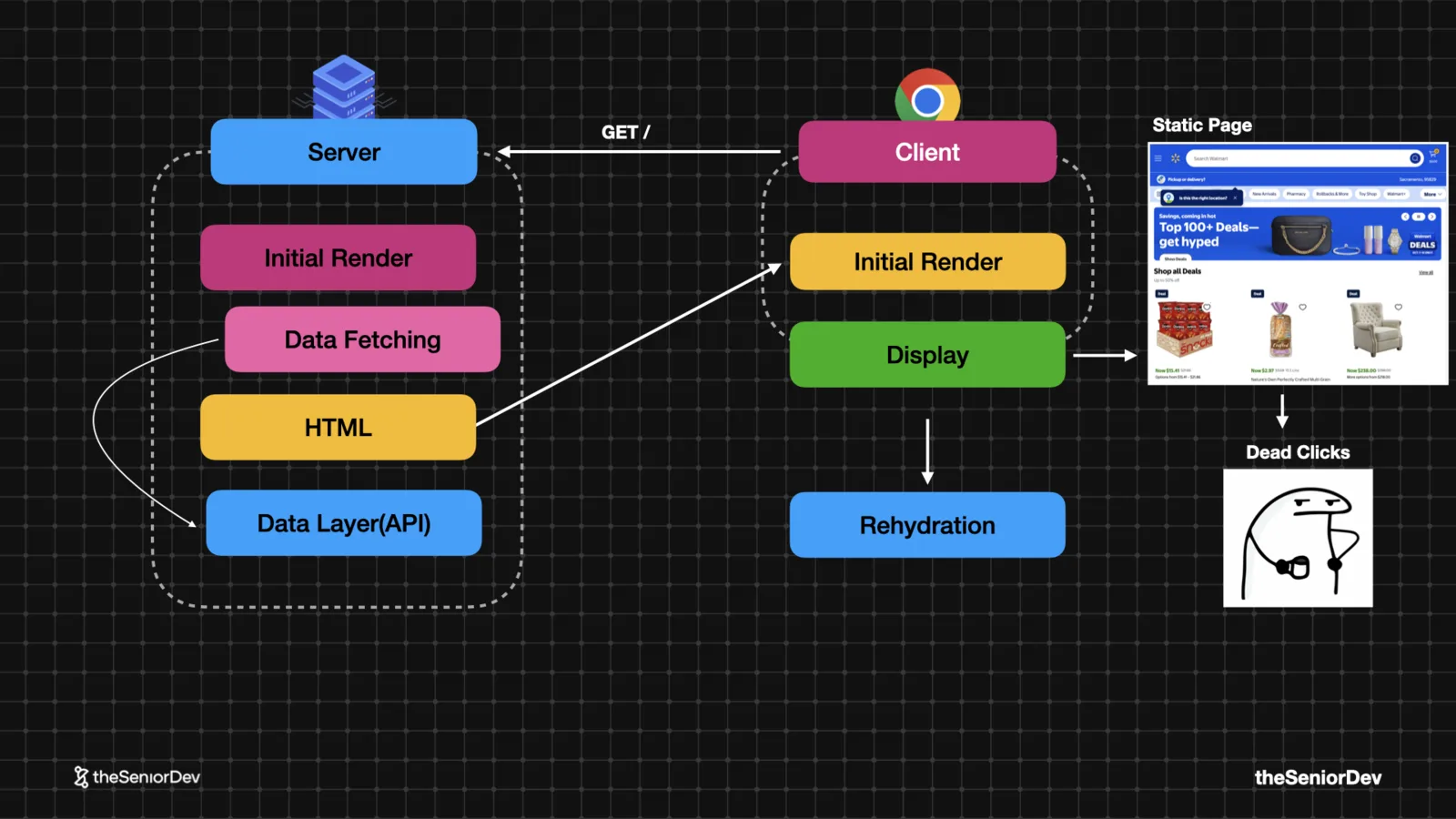
SSR runs the framework on the server: fetch the data, pre-render the HTML, send something real. The user sees the page immediately — interactivity comes next.
 Pre-rendered HTMLFirst Meaningful PaintSEO
 - 12
12. Rehydration
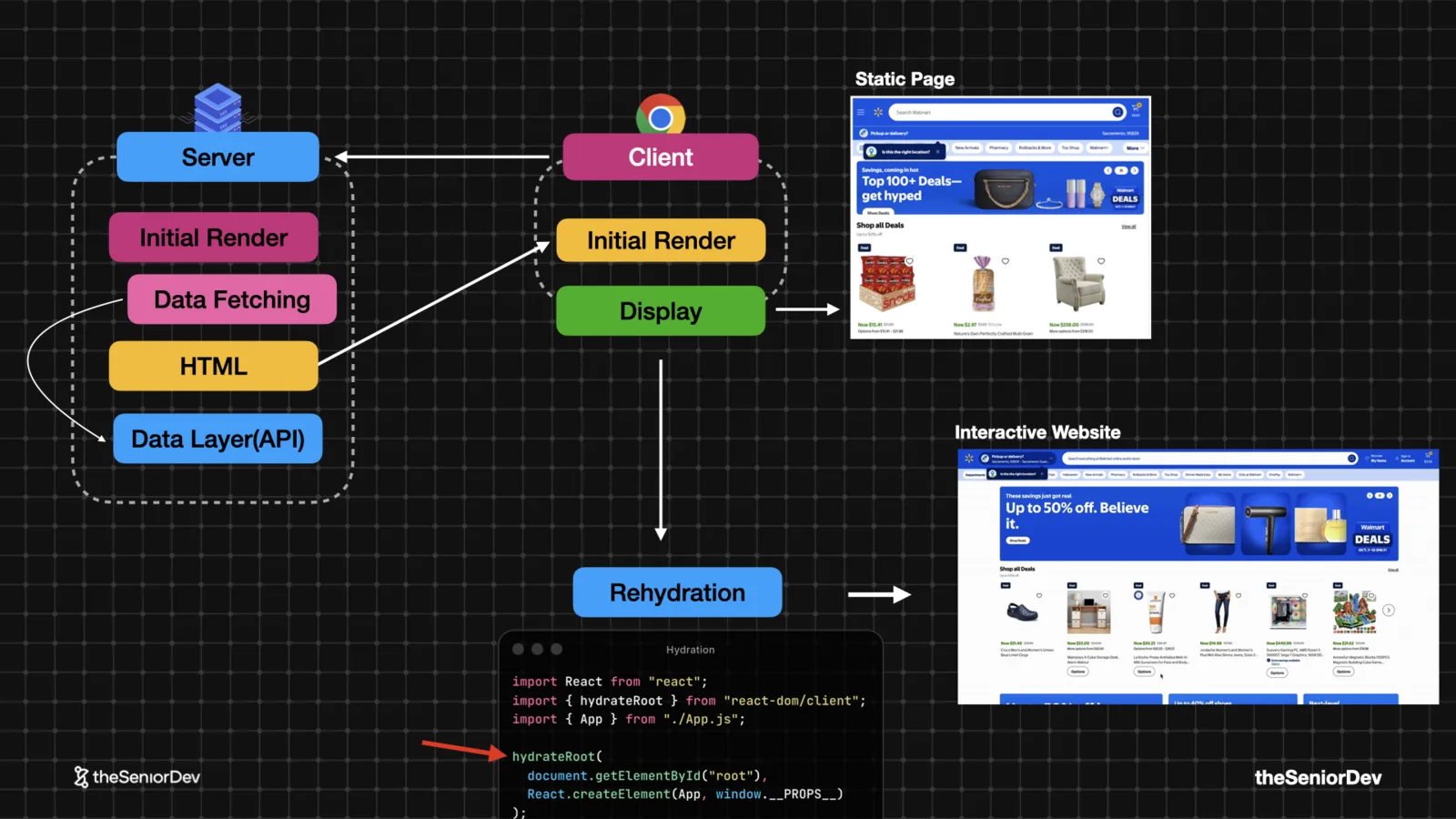
The pre-rendered page is static until the client bundle downloads, builds the component tree and attaches it to the existing markup. That's hydration.
Until it finishes, clicks do nothing — rage clicking territory. And when server and client markup disagree, you get hydration errors. Know why they happen.
 hydrate()Hydration errorsTime to Interactive
 - 13
13. Partial Pre-Rendering
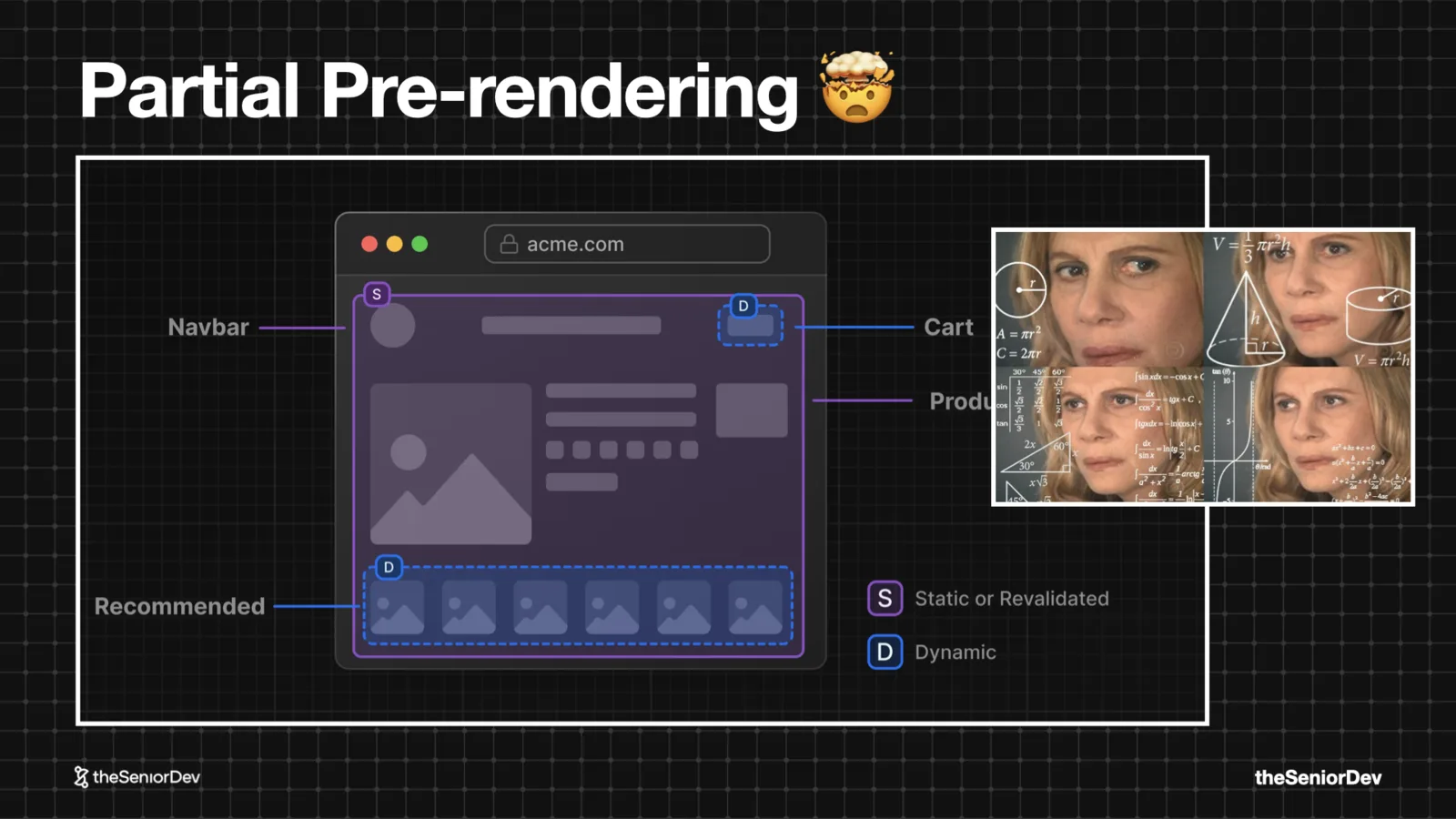
Mix rendering strategies on a single page: static-render everything you can, client-render only the dynamic islands.
The framework decides which parts ship as fast static HTML and which hydrate. Maximum performance for pages like e-commerce — at the price of real complexity. Only reach for it when speed is a product requirement.
 Static + dynamic islandsNext.js PPR
 - 14
14. Server Components
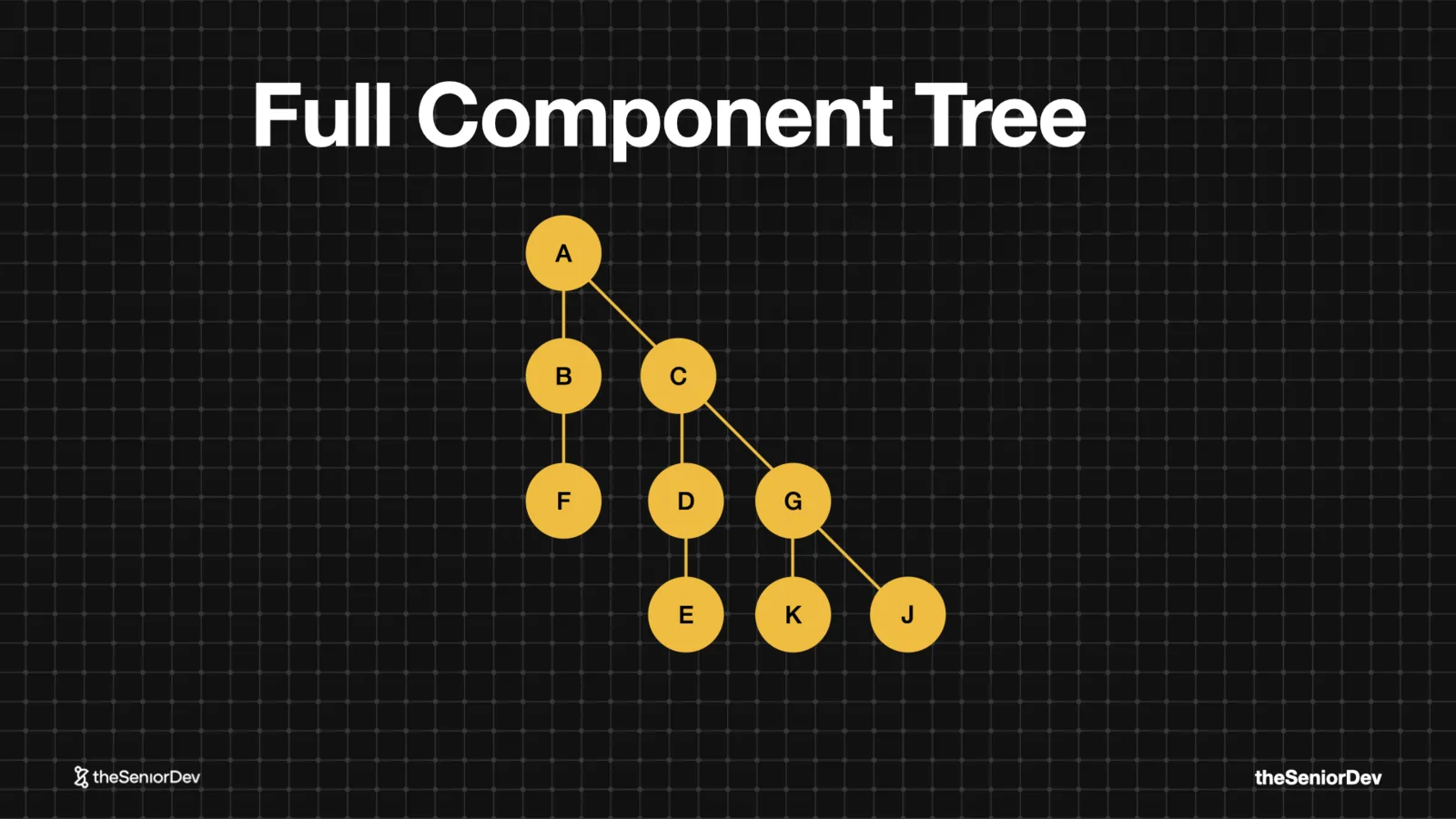
Ship zero JavaScript for components that never change. The framework renders them on the server and sends only markup; client components get extracted and hydrated.
SSR makes the first paint fast; server components make hydration fast. Together they're why modern frameworks default to rendering on the server.
 Zero-JS componentsRSCSmaller bundles
 - 15
15. Micro-Frontends
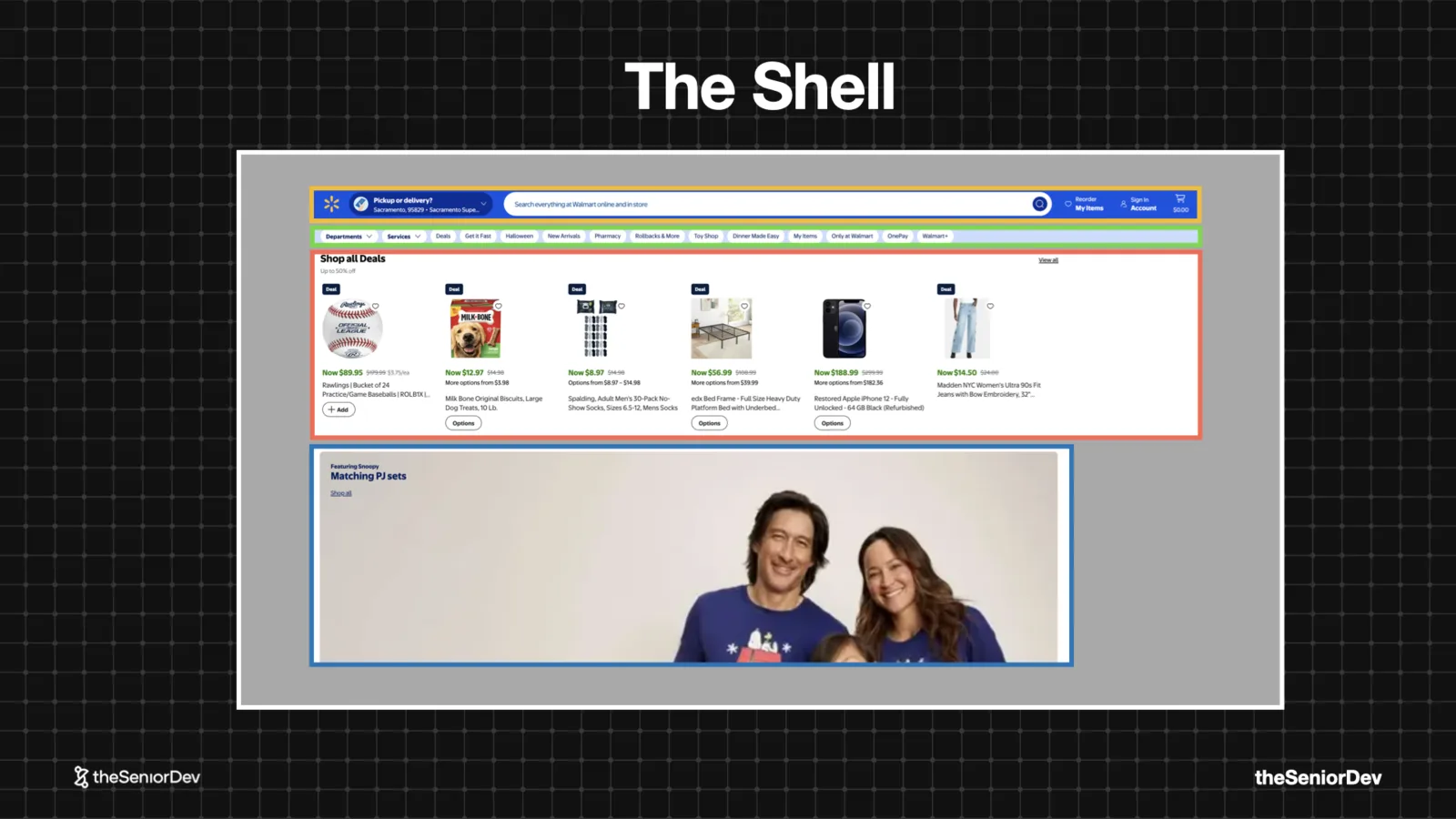
Break the UI into independent applications — search bar, deals, product grid — composed by a shell that owns theming, auth and global state.
Each team is a small company: own product manager, own deploys, own BFF. That's how Walmart-scale frontends ship daily. And it's overkill for almost everyone smaller.
 Shell + remotesIndependent deploysTeam scaling
Transcript
jior front end engineer, everybody tells you get to senior, but no one tells you how. We've analyzed over 300 senior front end engineers. Different backgrounds, different frameworks, and one pattern came up. Every single one of them has mastered these 15 core front end mental models. Most developers can't even explain five. That's why they get stacked mid level for years and keep failing technical interviews.
But master all 15 and you'll easily move up into the top 10% front end engineers. And of course, get to senior. Number one, the critical rendering path. The critical rendering path, it's the steps the browser needs to do in order to go from HTML, CSS and JavaScript to pixels on the screen. It all starts on the server where we get our HTML file and so the browser will get this markup file and starts reading it.
And it will probably find some links to more CSS and JavaScript assets, maybe some fonts. And based on those files, it will go ahead and download those, parse them and start building, in the case of the CSS, the CSS m. That would be the reflection of the DOM, but with CSS, basically building all the CSS you'll need to render the DOM. And with the JavaScript that it will find in the head section of the HTML document, it will build the DOM.
And so it has to do all this to build the render tree and once it has the render tree, it can start the rendering process. Now, the rendering process has four steps, we need to first style. Then layout, then paint, and finally composite, to finally display pixels on the screen. And all this has to happen until the user sees something. And that's what we call the first contentful paint, which is our first milestone in the rendering process.
Now, if this sounds like a lot, don't get scared by the end of this video, you will master this, because a lot of the concepts that will introduce later on, they always relate back to this main main. module. Now, let's get a little deeper. Whenever the browser receives a document, like this one, it will start reading it top to bottom. So, it'll go through each node slowly, little by little, and interpret it.
Whenever it finds a resource, like a CSS file or JavaScript file, it needs to go to the server, download it, and render it. And finally, we get to the body, where the actual things are, and render our first h1. The resources at the top, we call them render blocking. Because in most cases, they need to be downloaded, parsed, and interpreted before we can move on. And the element at the bottom, that would be our first contentful paint, that h1, it's actually our first element.
And here goes the first senior developer tip: Whenever you are explaining something, don't jump straight to framework talk, like, oh, React, view, or next. Instead, you want to focus on the underlying principles like the browser mechanics and use frameworks as an example of an implementation. Now, let's move on to number two, the core web vitals. The core web vitals are basically empirical metrics that measure how fast the page loads and how fast it responds to user input.
And there's mainly three of them. We have the largest contentful paint, the interaction to next paint, and the cumulative layout shift. These two, the LCP and the CLS, are basically measured doing the initial render. The IMP, the interaction to next paint, it's actually measured while you re-render. So, it basically tells you how fast the page will re-render after the user clicked on a button, for example.
You can think of those as performance benchmarks. A good analogy would be Formula 1 cars that you can actually classify and benchmark based on their top speed, their agility, their downforce, their aerodynamics. And you can have empirical metrics that basically measure all those, and that's how you can classify. And so, in the case of a website or a web application, you can actually benchmark your application against the average in the industry.
figure out how well you're doing. Now, I just got this analysis on our website, and although we have a very good CLS, our LCP, for example, is pretty bad, so I'll probably have to go ahead and improve that. Now, how do the core web vitals relate to our first mental model, which was the critical rendering path? Now remember the critical rendering path where all those steps that needed to happen before we have that first pixel on the screen.
But once that happens, we keep rendering. And so, as the browser keeps finding HTML markup, it will keep rendering those incrementally all the way to the bottom of the page. And along that process, it will render the largest content full paint. That means it will display one of the largest elements that's being calculated on the website. And that's the first core web metric. Now, in general, this will probably be an image because if you're working with e-commerce websites or SAS websites, then it will probably be an image or a piece of text, but it's mostly images.
Finally, during this whole process, as you render your web page, there will be changes in the layout. You might have CSS coming in that changes everything or new elements that are being rendered, and that will generate layout shift. So what the browser will do is to take screenshots of the web page and then try to measure and make sure that there's no big shifts, and that would be your cumulative layout shift metric.
And finally, once the page is rendered, you might have the user clicking or typing on something, which usually, in modern frameworks, creates a state update. From that state update, you'll have a rerendering of your component framework and what we call the reconciliation process, which will finally trigger a browser rerender. The time we spend basically from that user interaction to doing the state update and finally the reconciliation, it's the IMP.
The interaction to next paint. So, as you see, a bit of a different metric, but it's basically measures that when you go to the website and you start clicking around, it keeps being fast. It's not only about loading speed, it's also about responsiveness to user input. Now, before we move on, I'm going to introduce myself, I'm Bogdan from the senior dev. I started The senior dev with my brother that I was 5 years ago, and we basically help JavaScript developers get to the senior level with direct mental models, with a proven roadmap, with feedback on what you're doing, so you know you're doing the right things,
and with a global community. We've already worked with over 350 and if you want to know more exactly about how this works, check the link to the free training and the road map in the description. Moving on to concept number three, HTTP caching. Well, before we start talking about HTTP caching, we need to talk about caching in general. And caching it's a pattern based on a core mental model, which is memorization.
And you'll see memorization at every layer in any kind of application. You can have memorization at code level, you can have caching at database level. But at the end of the day, it's always the same pattern. So basically, memorization it's reusing the output of an operation for future queries if you get the same input. And so this is probably the most accurate description of it, whereas you see, the security guard is pretty much applying the same treatment, probably not good from a security perspective, but it's literally reusing the behavior.
Now, moving on to caching, especially at file level, it will be reusing the same file for a predefined amount of time, that's the TTL. And so if the user tries to request that file again, we will give them the cached version, we will reuse it, so we don't need to go to the server and then download that, which usually takes longer. And the TTL, as I mentioned, is that time that we should consider the cached asset fresh.
You will see TTL settings at DNS caching level, in your CDN, and so now you know basically what it means. Now back to HTTP caching. We usually have a browser, and the browser has a cache. And then we have a server. And so it all starts with a request for a specific file. Like let's say we need our bundle or we need to fetch a CSS file. We will send that request to the server. We'll say I need this file.
Because there's nothing in the cache, we cannot really reuse an old version. And finally, the server has that file and it will send you stored over to us. But, as it sends it over, it's also gets stored in a cache, if it has the correct cache control policy. So in our next request, we will actually go to the cache, get the file from there and use it. So we don't need to go all the way back to the server again.
And finally, that's what we call the TTL, is the time we are allowed to do that. Because at some point, the asset will expire, at some point it will say, hey, you know what, go check if there's a new version. And when that happens, we will go and check, hey, is there a new version, and if there is a new version on the server, then we finally make that request. That's what we call a cache validation request, and it's basically managed with the ETag header.
If you go to any request you're making, you'll probably find a cache control and the ETag header, and then we would get the new version. And then again, that will be stored in the browser cache for whatever the TTL was specified. Now, the way this is done in the browser is that it's all done with the request and responses. I invite you to go to any website you like, and in this case, I chose Walmart. I've basically went to the developer tools, chose a CSS file they have, and we can see the cache control policy where they set that max age to 3 million milliseconds.
But basically that means after that time, we will need to go and check the ETag again with the server and figure out if our cache is still fresh, and if not, we'll need to download the new asset. You can find this in pretty much every website. Now, we don't usually have to set the caching policies ourselves because it's usually the CDN that will do it for us. And a CDN is basically an infrastructure piece where you can put your static assets, and it will push them to different edge locations.
So whenever the user will try to access that resource, they get it from the edge location that is closer to them. So we are more efficient just because we are closer to the user, but it also usually applies direct caching policy and it applies direct compression policy. So it comes with a lot of optimization. out of the box. It's probably the best thing you can do from a performance point of view for a web application and the first one.
Basically, the CDN will become our server. So whenever new static assets are published, so imagine you recompile your application and you release a new version and you have that JavaScript bundle and the CSS files, they would go to the CDN. And the users will get them from the CDN. And so basically, it's used to distribute static assets to those edge locations across the globe for very fast access.
And out of the box, it gives you all these implementations like an efficient cache policy and compression, which is done through content negotiation. And that's our next key mental model, content negotiation. So basically, content negotiation is the process in which the client speaks to the server and whenever it needs a file, it will send out some headers, usually it's the accept headers. And in the accept headers, it will mention that there's different encodings for that resource.
So it will basically say, I want the JavaScript file, but you can give it to me compressed. And the two most popular algorithms for compressions are Gzip and Brotly, with Brotly being actually the most efficient one. So it will basically mention, hey, you can give me this as a Gzip or a BR, which stands for Brotly. And then the server will look at that request, it will look at the metadata, the request headers and figure out if I have a more optimized version of the asset, like a Gzip or a Brotly, then I'll give it to you.
In this case, we will send over the Gzip version. And of course, we need to add to our response headers the content encoding Gzip so that the browser knows, okay, I have a CSS file, but it's being compressed. So I need to decompress it really fast. The reason why this works is because it's cheaper to decompress things than to download them in their initial version. So that's the maths behind it.
It's cheaper to download very fast a smaller version, a compressed version and decompress it than download the original. Now, content negotiation, it's one of the core mental models for death full stack if you want to know even more of them. Go ahead and take the free 10 minutes 10 class assessment where will basically help you figure out where you are on the seniority scale. And lot of the questions you'll find are actually real questions from interviews, so it also gives you an idea of where you stand technically in the market. Now before we move on, our second senior developer tip is that senior front and developers are expected to have very good fundamentals of the data layer too, things like HTTP, graphQL, rest APIs, or even web sockets. So make sure you invest time into those two so they don't become a blind spot. Because it's extremely hard to get a senior front end position without knowing at least the fundamentals of HTTP, TCP, HTTPS and rest APIs and graphQL. Let's move on to our fifth mental model, which is lazy loading. Basically the opposite of lazy loading, it's eager loading where we load everything at once, but again, those things would be very heavy. In this example, I have images and we load the four images on the spot. A better way would be to implement lazy loading, where we only load assets where they are needed when the user does something and they actually need that specific image, then we give it to them, especially if it's not needed in the initial render. So, as you see here, those two images are loaded when the user will scroll rather than loading them on the initial render. That's a lot more efficient. Now, can we lazy load JavaScript? And the answer is yes, but to do so, we need to rely on dynamic imports. And so traditionally, in your code, you probably use static imports like this one. This kind of import it's evaluated by the module bundler at build time. So whenever we run our build before we deploy the application, that will be interpreted and it will be all added in a single bundle. It will be included in the main bundle and then shipped to the browser and then the browser will execute that as soon as it gets it. Basically, it becomes one of those critical assets that blocks rendering. The strategy for us to make loading more efficient is to move all those things that are not needed to when they are needed. Basically, we import a JavaScript script at runtime, just after the user did something. We go and fetch that
document and we execute it versus a traditional static import that was done when we build the app. And that's how it looks in the code. We have that click event, and whenever that will run, it will actually run on a synchronous function to download that model, JavaScript, JavaScript we need to open the model, and then finally we'll open the model with a function it got. But basically, again, it needs to go to the server and get that chunk, that leftover part.
That part of JavaScript will be fetched and executed at runtime, so there's less initial JavaScript that we need to run. Now, dynamic imports are one of those core fundamentals in JavaScript, and if you want to find out more, check out the JavaScript interview cheat sheet at the bottom, where we basically put together 25 of the most common questions and make sure you review that before your next interview.
Moving on to the next concept, let's talk about bundle splitting. So, bundle splitting is basically lazy loading applied to our JavaScript bundle. Traditionally, we would have a lot of source code in different files or in modules, and all that will go into our module bundler. In this case, I chose Webpack, but it could be Vite or any other module bundler. Basically, this module bundle will put all together in a single production file.
That was the big advantage and that's why we basically use module bundles to put everything together, because it would be impossible to include all our files into the head section of the HTML file. Now, the problem with that production bundle is that it's being used on every single page, so everybody gets all this JavaScript in the beginning. And as you saw, this all this has to be parsed and interpreted before we showing it into the user, so you will have a lot of performance problems if you just keep everything together.
And with bundle splitting, we are able to split our bundle into smaller subsets that are being used on different paths. So, basically, we take all our dependencies and we put it in our common JS or vendor JS, and then we split all the other paths into login, home, dashboard. So when users go and load the dashboard, they don't need all the JavaScript needed in the login section or settings. This optimization, it's one of the easiest to set up if you're using for example a back in and out and it's how most applications work today.
And that comes my third senior developer tip, which is you always want to think in systems, components and relationships rather than memorizing. And I hope what you got so far in the video is that we start with a mental model, but then it's related to everything else. The critical rendering path, it's related to things with with our module bundler and it's definitely related with our co web vitals and that's the way you want to learn.
Never rely on memorization, when you go to interviews and you get nervous or they ask you a question in a different format, you want to remember it. So always try to think, okay, how does this new concept relates to the whole system and how do they work together? It's a lot easier to remember things like that and also a lot more fun to learn. Now let's talk about our concept number seven, which is critical CSS.
We saw what the critical rendering path is, what is the critical CSS? Now remember that in our HTML file, we had some render blocking resources, those ones they really block the render. So they all need to be downloaded, parsed and interpreted and CSS was made render blocking by design. So basically browser developers, they said, well, you know what, before we'll actually go and interpret our Dom nodes and actually show something, we want to have all the CSS together because you never know which CSS class or property will actually affect that first element.
So we really need to compute all the CSS before we move on. And that's the problem with CSS in big applications that if you have a lot of CSS, it will take a lot of time to just pull all that together. Before we even show anything to the user. And so instead of doing that, with critical CSS, we'll focus on the above the fold CSS. And that's basically the CSS responsible for showing that first section to the user, whatever it's in the viewport.
And as you see here, it depends if they are on a desktop or if they are on mobile. It will be different. And so that's what we call the critical CSS. Now you might ask yourself, how do I extract? My critical CSS from my application? Well, you usually have all your CSS spread around your bundle either. in JavaScript or in CSS files and all that will go into the module bundler. Module bundlers like Webpack have plugins that will pre-render the application on a given viewport.
And inside, it's using a headless browser, like Puppeteer, and it'll basically visualize, right? It will fake render the application on the device you said, and then it will basically calculate which CSS specifiers are actually used and extract those. And so what Webpack will do after that is to separate your CSS into a critical CSS, the one that really has to be there that affects the above the fold elements and the rest of your CSS.
The critical one will be in-lined, so there's no extra request. You get it in the HTML markup, and the beautiful thing about that is that it's extremely fast to read that and build the CSS on. The other part of the CSS will be actually added as a link in the CDN, but probably out of the header. So it doesn't block the rest of the render. That's probably the most efficient way to handle CSS at scale. Now, as you see, this idea is very simple, but it's usually requires very sophisticated tooling and a lot of testing to usually get it right.
Big retail companies, e-commerce companies like Walmart or Amazon, will use those because they do have very big websites with a lot of CSS, and they really want to load very fast because it's very sensitive for their users. Now, congratulations on making it this far. If you like the video, if you found it useful, like and subscribe so more people get it, and also you don't miss on any of our future content.
If you have any suggestions for us, drop it in the comments. Me and Deosh, we read all comments, personally, even the nasty ones. So like and subscribe to get more of these in your feed. Now moving on to number eight, we will talk about essential state, which is a bit different from everything we've been talking about until now, ly. In the same way, an automotive engineer will look at a car. Now, when I look at a car, I see all these details, I see kind of the exterior, the surface of it.
Because to be honest, I'm not an automobile engineer. But when a car engineer looks at a car, they see it in a totally different way and they see the inside, they see the systems inside. They can basically abstract it away. They forget about the details and focus on the core things, the core mechanics inside that car. And it's basically the same with the UI where a senior developer will basically see something like Netflix, right? And a civilian will look at it and be like, oh, this looks nice.
Whereas a senior front end developer will look at it and see all the component structure and the state, they'll kind of have this x-ray vision and that's what you want to achieve. How would that look for this kind of UI? So what's the essential state in the UI in this picture? Let's assume all the calculations for the prices are done on the front. Well, if you superficially look at the UI, you'll think, well, we have some state with the product info there, we probably have to fetch that from the database, like the product data, and then we'll have the price.
Then there's this discounted price that we'll also have to keep that in state. Then there's a kind of the discount text, maybe we can put together the discount price and discount text. But that's two two different things. And then there's the subtotal, there's the shipping cost and the taxes and finally the total. A new by would say all that's that's that's all state. Let me put it all in state. But someone with a lot of experience will look at the UI and try to compact that into only the essential state.
And basically, if we reflect on this UI, we realize that we just need the product info, which usually would contain the price, then we need the discount rate and the shipping cost and maybe the tax rate to paint everything else. So pretty much everything else should be able to be calculated based on that. And so as a senior frontend engineer, you always want to condense and use as little state as possible to render the UI.
State is not usually a good thing. because it can cause re-renders, you need to test the UI differently. So the more deterministic it is, and the least state you have, the better. And as a senior developer tip, the first thing a senior frontend developer see is when they look at the UI is the essential state that the first that's the first thing they look for. And that's why they're much faster than somebody that's a junior or mid level that that gets distracted by all the other details.
Let's move on with number nine, the reducer pattern. Now, let's review the whole user state and re render cycle. So usually, we have a user action, then we have some old state, we compute some new state and that will trigger like a re render of the component framework and finally of the browser and the UI. The problem with this cycle is that sometimes you might have very complex UIs, like this one. This is an accounting software from into it and as you see there is a lot going on.
And the problem when you have all these data around is that you might have global settings that affect the whole view, and that's when things get very complicated. And so basically, let's imagine the user would click on that privacy button at the top and that actually affects five or six different components and we need to really change our view. In the traditional way, you would kind of look at your component tree and then compute some new state, right? You have the old state at all these levels, and then you have callbacks that allow you to update that state, and you'd go somehow one by one and try to update that state, all happening when they click on that button.
And finally, all that will trigger renders and you get your new componentry. The problem with this is that number one, it's extremely tedious, and number two, if you want to do this well, you'll have to lift a lot of state to make sure that it's at the level where you need it, and then do a lot of prop drilling to make sure it gets to the exact UI element. Now, instead of doing that, you can use the reducer pattern, which most state libraries include nowadays.
So basically, you have a user action that goes into a reducer function. And the reducer function, it's a pure function that takes the old state and can compute the new state based on that. And so different components then are connected to this new state and would update based on the one calculation you make. So we go from thousands of changes to a single calculation. is the very simple function that will take a state and an action and create a new version of the state.
And keep in mind that the reason why this works is because those functions are pure functions. That means they are immutable, deterministic, they have no side effects. And that's what allows us to have this predictability in the UI at scale. And here's a big difference between mid-level devs that will talk a lot about tuchan or Redux or use reducer when you talk to them about state, that's the language they will use.
And senior folks where they will be more focused on the patterns. They kind of ignore libraries because they know that libraries change every time. And there's this mental models that actually libraries implement that are the most important. And the beautiful thing is that once you have those mental models, it's extremely easy to learn a new library. You just jump on it and you know, okay, is it using the reducer pattern?
Okay, immutability. How do they handle state? How do they handle updates? How do they implement pop sub? How do they implement the observer pattern? And once you know those things, it's extremely easy, almost instantaneous to learn the library. Okay, moving on to custom number 10, windowing. And so basically windowing or list virtualization has been introduced to solve that one, however, vital we didn't talked about, which is the IMPD.
The interactions and next paint. Because usually this is caused by slow re-rendering. And so Google tells us that the limit should be around 200 milliseconds. So you'd be able to start painting again after user clicked on something at the latest after 200 millisecond. I would go fight and say that 100 millisecond it's already very high. Now for your typical crowd application, you don't need to worry.
But imagine you have an application where you render a lot of items at the same time. Like one of those social media feeds or for example Pinterest where you can scroll and scroll and scroll and you get all these items rendering in the browser. What will basically happen is that you'll end up with too many elements on screen. And I do not recall the exact limit, but I think if you're after the 1000 HTML elements, even the browser starts to suffer and there's too much state which lives on memory, and that puts too much pressure on the CPU and memory, and your application will start to become slow, even if the user is not doing anything complex,
there's too many things rendered in the browser. But as we see, a lot of those things are not really visible. And so windowing or at least visualization would be being able to mount and amount elements as they are scrolled outside the view port and avoid having to many dom elements at the same time. We basically use this whenever you use any kind of fit system. So if you go into a system design interview for the front end and they tell you we are going to build a social media website or a news feed, you know you'll have to use windowing or at least visualization to make sure that you keep your IMP metric healthy. So basically that core web vital is still an acceptable interval. So we only mount the elements that are in the view port and we keep mounting and unmounting them in the case of React. So we render only those elements and we mount and dismount. Of course there's a tolerance, so we usually one or two more elements that are outside of view port, but we have time when they scroll to kind of keep rendering. In order to do so, we use the intersection observer for stability. Because you can do that with a scroll position, but it was very hard back in the days when we didn't have intersection observer. So basically, even if you move, you keep rendering. And the intersection observer, it's a native DOM API to detect when an element it's inside a point view or when it's outside. And so basically this would be a very basic code snippet where you use the observer. And so you can add intersection observer to your components and then mount or unmount children depending on if they are in the view or not. But in most cases, you'll probably use a library like React virtualized, make sure you check that out and they make it a lot easier. So you don't need to yourself go in and implement the intersection observer. Keep in mind, we are seeing the intersection observer as a quite common interview question, so make sure you review and you'll know when it's useful. Okay, now let's move on with concept number 11, server side rendering. Now why do we need server side rendering? Well, the main reason is because in modern applications, the HTML we ship to the client, it's usually just an empty div called root, where we'll actually render on the client the application. So basically the browser will download our JS
bundle and then it will download React and React DOM and then execute this render app. So basically, in the FCP and that first content for pain, we literally only show an empty div. And then it takes a while until we actually make the first meaningful pain, which means when we actually show content to the user that is relevant, it's not an empty screen. Traditionally, you'd go from the server, get the HTML, and then the client will do that initial render where the user doesn't see much, and you'll have that the white screen of death.
Basically, the the whole screen will be empty. And finally, the React application will run some effects, start data fetching through the data layer, through the REST API, and then re-render, and finally, they get to see the full website. And so the main problem here, it's what they call the white screen of death, the VSOD, where you just look at a completely blank screen. Especially if the user has a slower device that takes a while to interpret JavaScript or a very slow network, that will take a while, so they'll feel like, okay, maybe this website is just broken.
To solve this, let's go back in time and instead of rendering on the client, we go back to rendering on the server. And so basically, on our server, whenever the client tries to get our web page, we will do the initial render on the server. We will actually run React or whatever framework you're using to render on the server. And then we will do the data fetching from the server to the database and then get that data and finally pre-render our full HTML.
So we move this rendering efforts to the server, and then finally we send it to the client. And so the beautiful thing about this is that after the initial render, the user will actually see a static page, they will see the web page rendered. However, the problem is if they try to interact with it, it's still kind of dead. This is plain pre-rendered HTML. Uh, the interactivity is not there, so if they start clicking around, they might go into some rage clicking.
And that's where rehydration comes into place. Rehydration is our next mental model. Rehydration is getting that server rendered HTML and getting your client-side fiber tree virtual DOM building that and then putting them together, so you start having interactivity. So basically, we still need to go ahead, download our bundle, parse it, and then run the hydrate command on the client. And finally, after that happens, the users will actually have an interactive website that they can click around and it will actually do stuff.
Now a very common problem with rehydration is the fact that you will get hydration errors. And there's different causes of this, if you want me to make a video where I go much deeper into server side rendering, let me know in the comments. Okay, now let's move on to one of the latest rendering strategies in the front end, which is partial pre-rendering. And with partial pre-rendering, we'll actually use static rendering, so we'll try to render as much as we can on the server.
But inside the web page, we might have places that are actually dynamic, where we actually need to render things on the client. And so your framework will basically decide based on whatever interactions you gave it, which things will be pre-rendered and super fast, and which things will be pre-rendered, but need to be hydrated on the client. And so this is one of the most complex ways to render websites.
But it's very useful whenever you have things like a very fast e-commerce websites and you really need blazing fast performance. So keep this in mind. Again, it's a combination of everything we've seen and it's all based on optimizing that critical rendering path and make making things appear and be interactive as fast as we can. But it also adds a lot of complexity to your development process and it's usually handled by a framework like Nextjs or Nuxt.
Again, it's very complex, so beware of that. And so partial pre-rendering will be applying different rendering strategies on the same page to minimize client-side rendering and preserve interactivity. Okay, now moving on to concept number 14, server-side components. With server-side components, rather than shipping our full component tree, all the JavaScript needed to render this whole thing to the client, we actually loot at our component tree and try to find out only the elements that need interactivity.
So, are they listening to any user events? Do they need to react to it? they're going to be changing state, and if they don't, then we ship what we call a zero JavaScript. So, those components that we under on the server, we will only ship the mic up and we'll ship no JavaScript for these components, which makes our final bundle even smaller. So this is done at framework level, and by default, a lot of frameworks like nextjs will try to render everything on the server unless you specify this is a client-side component.
If it's a client-side component, then the JavaScript needed for this component will actually be extracted and actually ship to the client, and this will be rehydrated. The beautiful thing about this is that it makes that whole rehydration process faster. So we mention that server-side rendering makes the initial rendering very fast, and client-side components will make rehydration fast. So you also have interactivity as soon as you possibly can. And so basically server-side components will render all the non-interactive components on the server, and they will ship only my cup, so zero JS and no hydration for components that are not interactive.
Finally, our last concept, it's micro front ends. And this is a topic by itself. If you want me to make a video specifically on micro front ends, let us know. Uh, but basically micro front ends will be breaking this UI into different applications. So if you look at a Walmart website, for example, I would be able to break this into all those different pieces, which is the the very top search bar, then we have a categories, and then we have the deals, and then finally, uh, some featured products, right? All those could be independent applications, but then we have a shell.
So basically with micro front ends we'll break this apart into four different applications. So we'd have the top bar, that will be one application with the independent team working on that. Then we have the bottom part, and then we have the deals micro front end, which will be another application. They can even use different frameworks if they want, and finally the featured product one. Now to make sure all those things imagine the location, the language settings, is it type mode, all the teaming and the authentication.
So basically the shell will inject that state into the children micro frontend. And all those different teams will work in parallel. And the beauty of this is that you can have so many frontend developers working on the same application and you can go much faster. So with micro front ends, we actually scale the development, we scale the development speed. We don't make things faster, actually it will be slightly slower.
Because all those things load at runtime, so it will take a bit slower sometimes to load. And so shared functions like state and CSS will go to the shell, but then we'll have our independent business domains. Where you'll have your Deals microservice, as we see, and then they have a BFF of backend for frontend, and then they might have different microservices. And this is basically like a a small company inside a company.
Because they have their own product manager and they can release features independently, they can deploy at any time. And that allows big companies like Walmart or Amazon to release features very fast. where you break that frontend monolith into different applications and then you can split your development teams. Because you have too many people in a team, it's just going to be chaos and it'll be very hard to coordinate.
It's a lot easier if you separate your architecture. Now thank you so much if you made it this far, it's been a very long video. You've made it, congratulations. Knowing these concepts is not enough, if you want to go deeper in frontend architecture. Check out our video about every frontend architecture pattern. And if you're writing on the frontend, how to move towards more backend given that the market is very competitive in the frontend, make sure you also check our video about how frontend is dead.