
Video guide
48:26 · 11 November 2025
Frontend System Design: From Client-Server to Planet Scale
Chapters 10 sections
- 0:00Introduction to Front-End System Design
- 0:57Functional Requirements and UI Mockups
- 3:49State Modeling and Lifting State
- 9:39API Modeling and REST Resources
- 13:18Non-Functional Requirements and Traffic Estimation
- 19:01Web Performance and Core Web Vitals
- 29:24Caching and Asset Optimization
- 31:53Scaling the Data Layer with BFFs and Gateways
- 36:51Maintainability, Micro Front-Ends, and Monorepos
- 42:05Availability, Security, SEO, and Observability
Key concepts in this video:
- 01
1. Functional vs Non-Functional Requirements
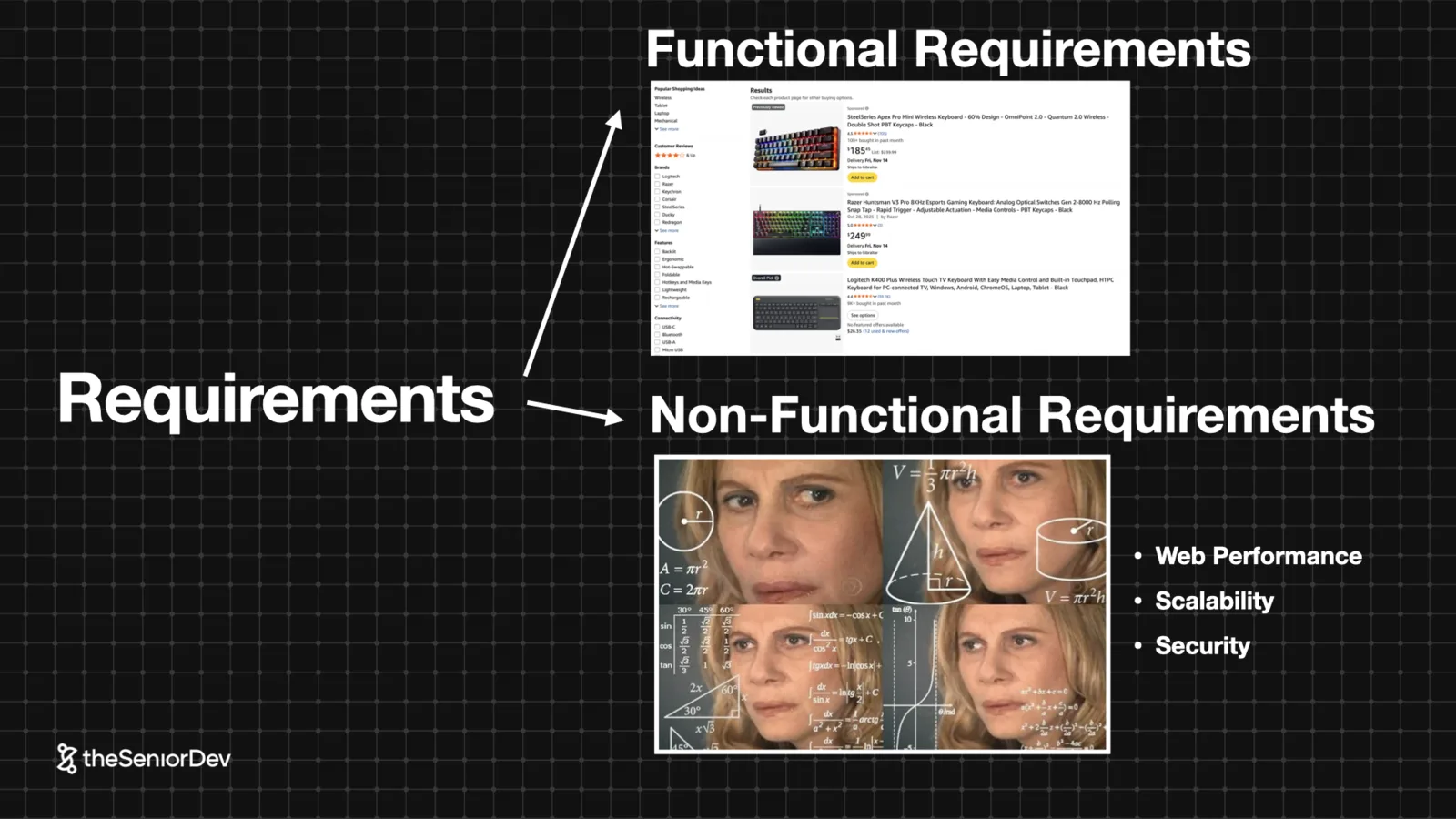
Functional requirements are what the system does: view products, add to cart, pay. They come straight from user stories, and from them you sketch the low-fidelity mockup.
Non-functional requirements are how it does it: performance, scalability, availability, accessibility, maintainability, security. This is where system design actually starts.
Your seniority shows in the questions you ask: expected traffic? Geography? Device split? Traffic spikes on Prime Day? Accessibility legislation?
 User storiesLow-fi mockupSix NFRs
- 02
2. Essential State & the Irreducibility Test
State comes from exactly two places: user interaction and data fetching. Condense it to the essential state — the minimum data that can render the UI.
Then run the irreducibility test: remove any state variable and the UI must break. If it doesn't, that variable was derived state pretending to be essential.
 Essential stateDerived stateLoading / error / data
- 03
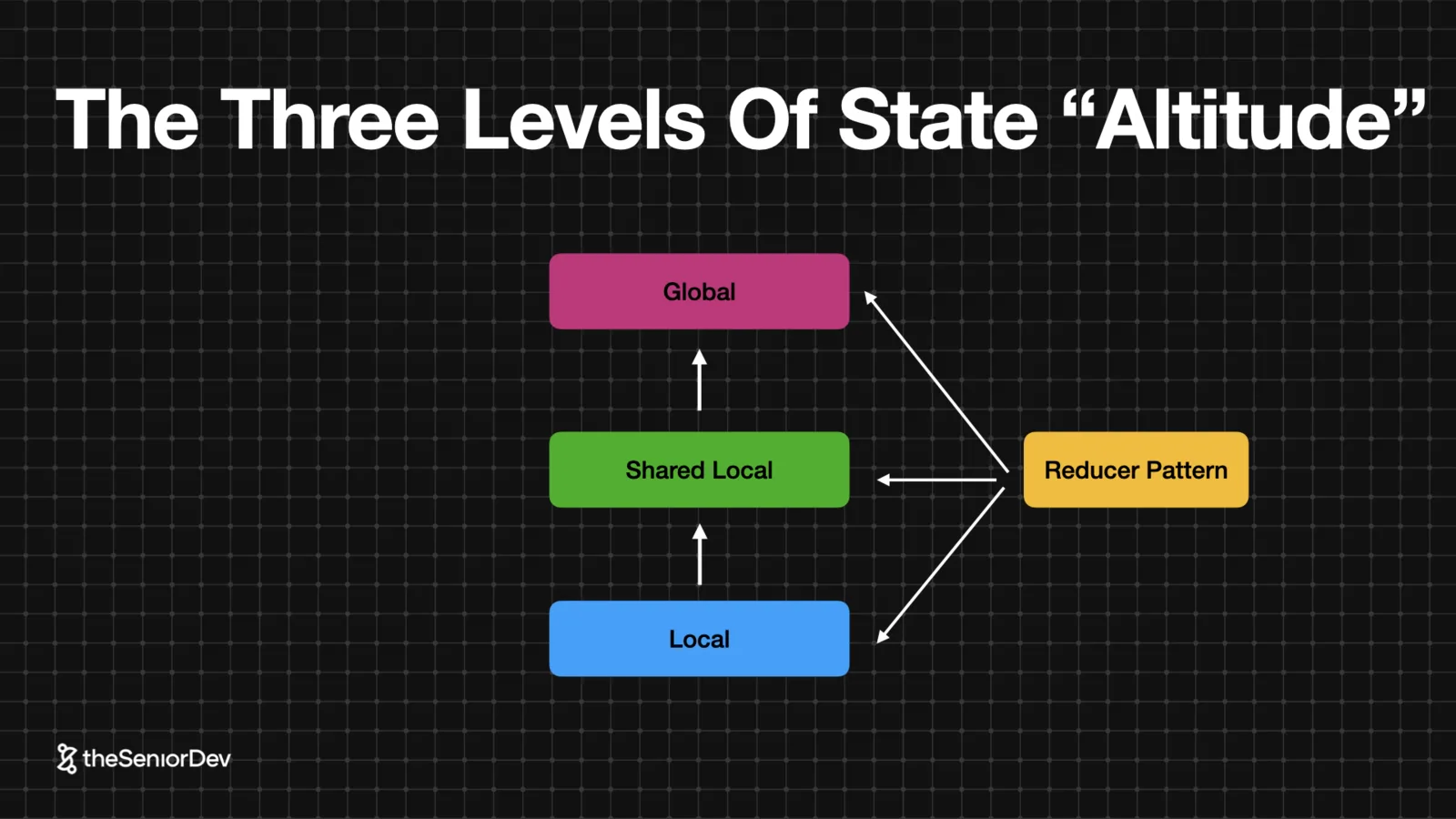
3. Lifting State: The Three Altitudes
Local state, shared local state, global state. Place state as low as possible, as high as necessary.
Pagination looks local until you realize the API request needs it — so it lifts to sit beside the product-fetching state. Brand filters follow. Auth is genuinely global.
This discussion — where does each piece of state live and why — is usually the first thing the interviewer probes after the mockup.
 Component treeProp drillingReducer pattern
- 04
4. API Modeling & the Underfetching Problem
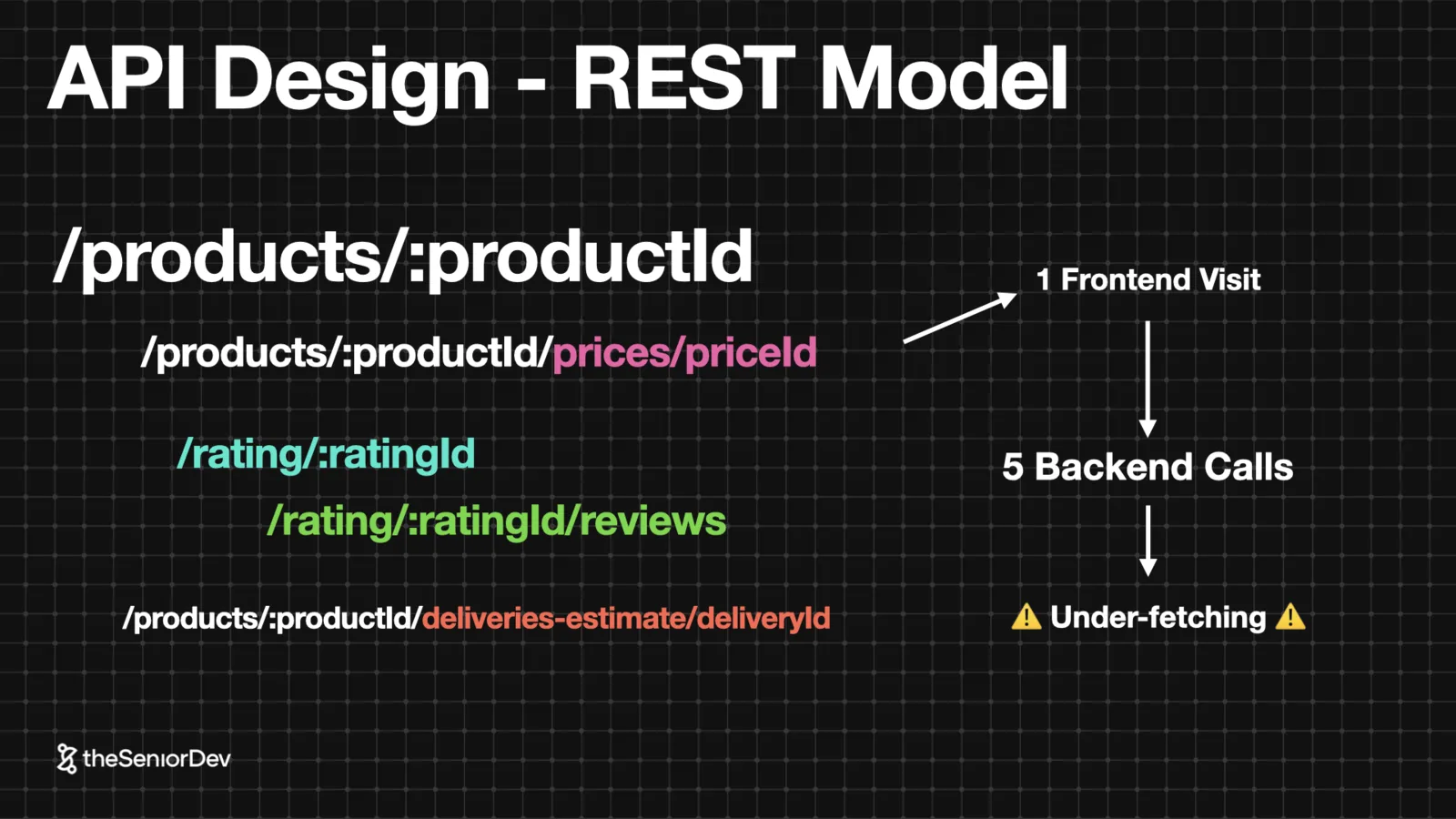
Model your entities as REST resources: /products, /products/:id/price, ratings, reviews, delivery. Prices and ratings change on their own schedules — they're separate entities, not fields.
Filtering, sorting and pagination are query parameters on the collection endpoint.
Count the requests: one page view, five backend calls. That's underfetching, and it's the setup for the BFF and GraphQL later.
 REST resourcesQuery paramsUnderfetching
- 05
5. Back-of-the-Envelope Analysis
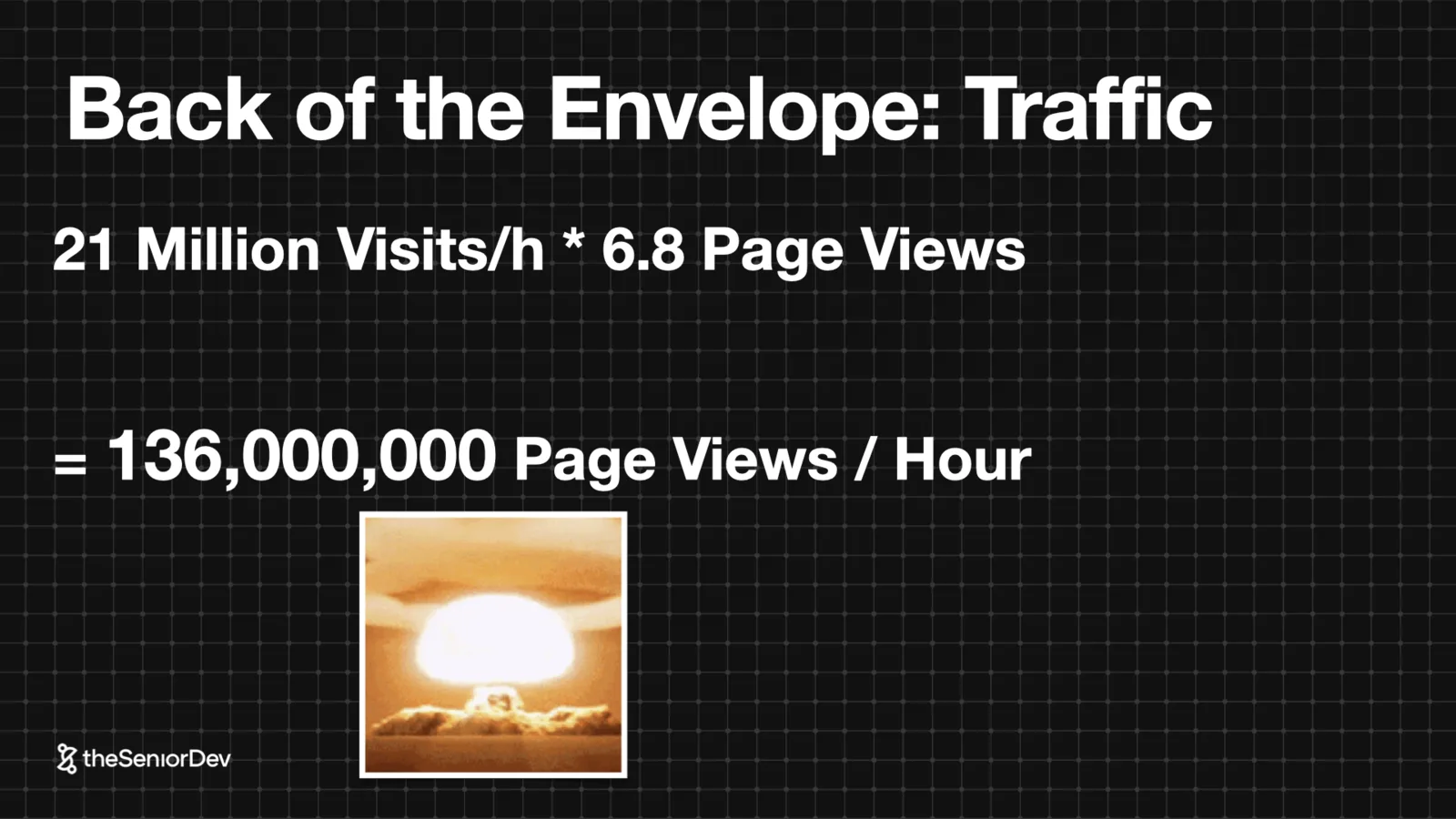
2.11 billion monthly visits means nothing. Break it down: per week, per peak day, per peak hour — about 21 million visits an hour, times 6.8 page views each: ~136 million page views per hour.
The exact numbers matter less than the reasoning. Going from a fuzzy marketing number to requests-per-second with your interviewer is the skill being tested.
 Traffic estimationPeak-hour mathRequests per second
- 06
6. Web Performance as an SLI
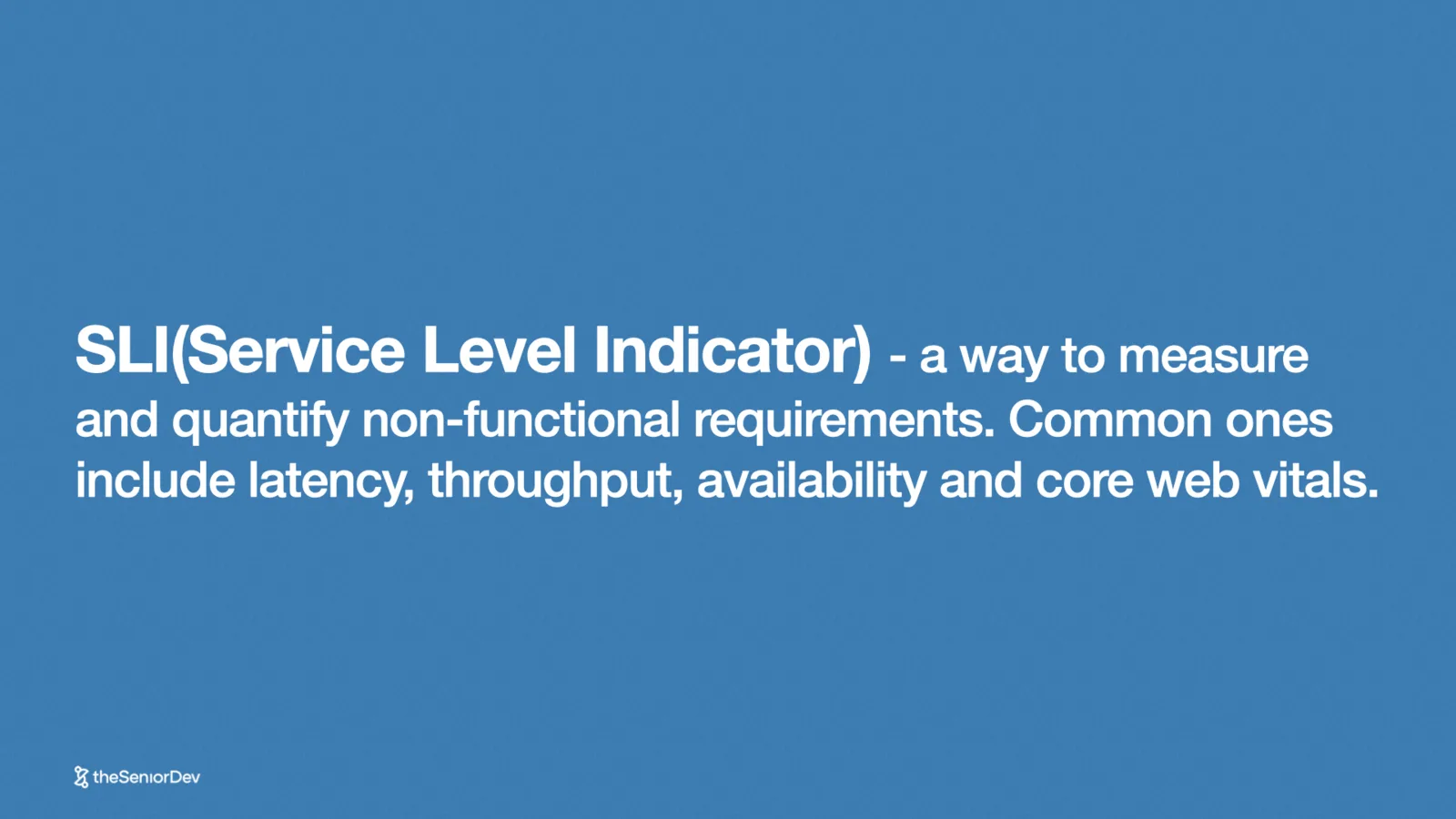
An SLI is a service level indicator — a quantified non-functional requirement. On the frontend, your SLIs are the Core Web Vitals: LCP and CLS for the load, INP for responsiveness.
First question about any UI: how static or dynamic is it? Media sites, e-commerce, social feeds and enterprise SaaS sit on a spectrum, and everything downstream depends on where you land.
 SLICore Web VitalsStatic vs dynamic spectrum
- 07
7. Latency & the CDN (Scale Level 1)
Light through fiber crosses the US in ~9ms. Real networks take 140-160ms per round trip through the switches, and HTTPS needs about four round trips before a byte of content moves. That's ~600ms just to say hello.
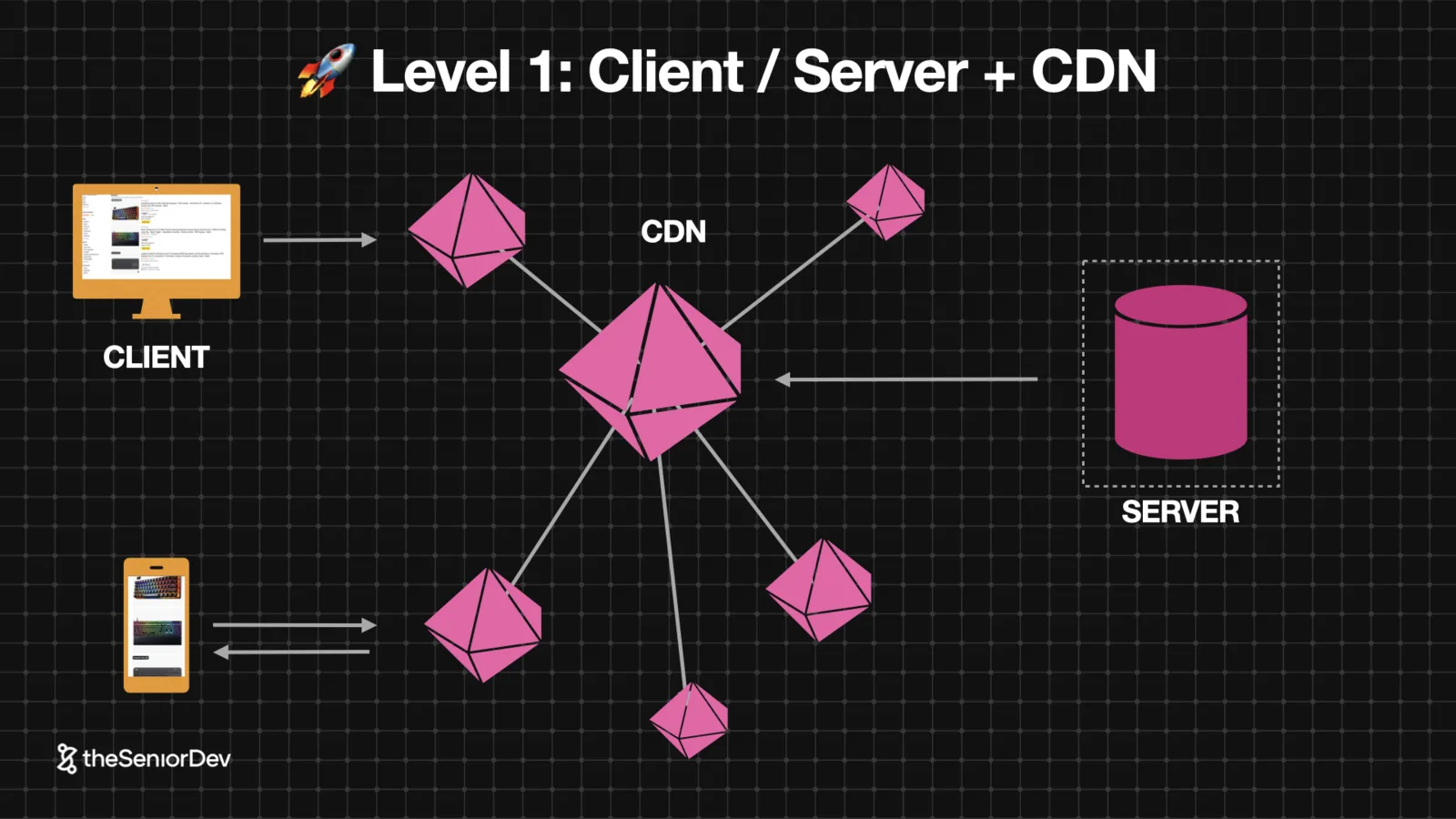
The fix is not a faster server — it's distance. Replicate static assets to edge locations near users: the CDN. Free extras: HTTP caching, compression, image format conversion.
 Network latencyTCP + TLS handshakesEdge locations
- 08
8. SSR, Edge Compute & Distributed Data (Scale Levels 2-3)
Client-side rendering gives dynamic pages the white screen of death. SSR pre-renders on the server — but now every dynamic route pays the latency tax again.
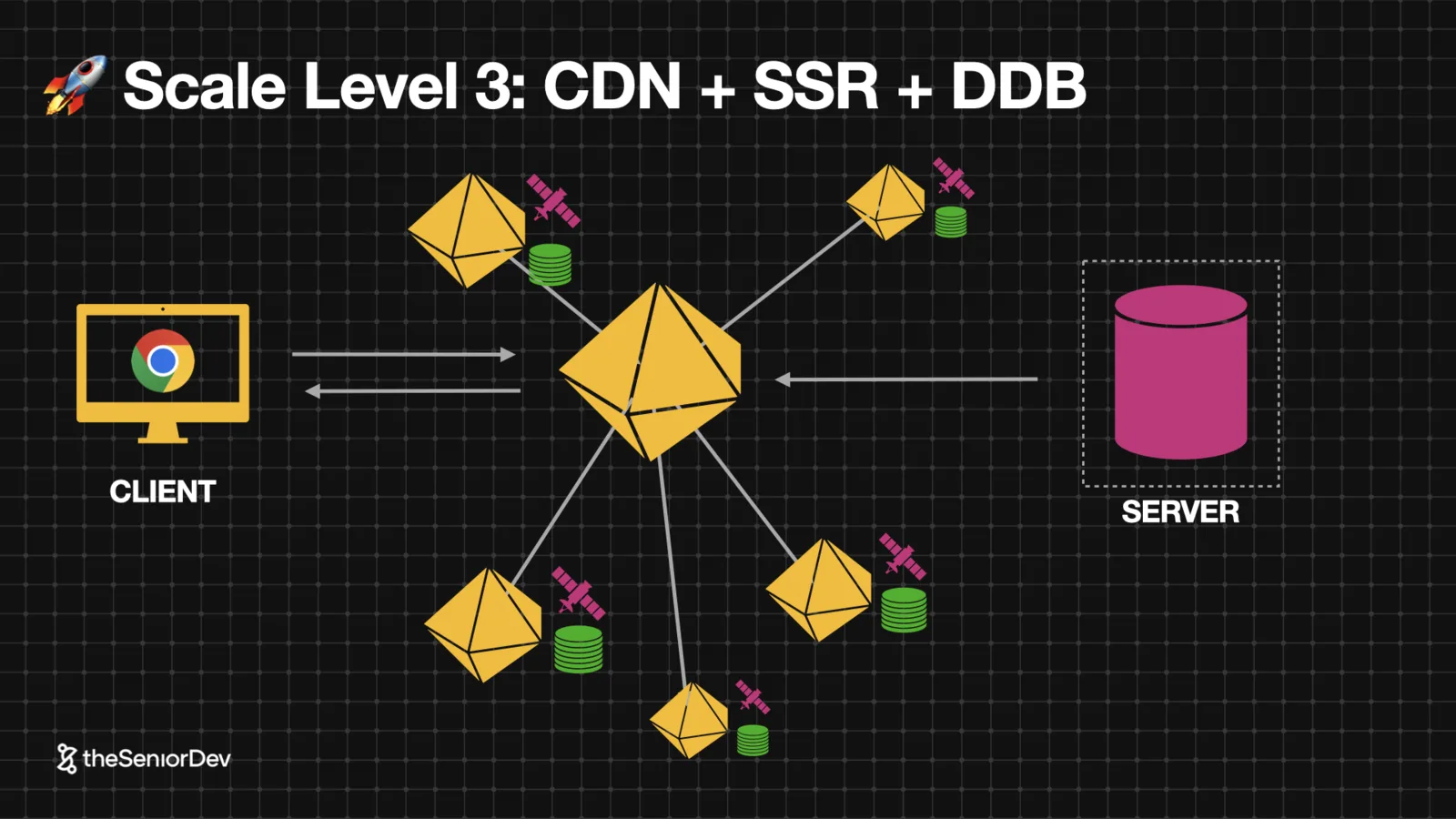
So distribute the compute: edge functions running close to users. Then distribute the reads: read-only database replicas next to the edge functions.
That's the CAP theorem trade: with partitioning, you give up strict consistency. Fine for social feeds. Unacceptable for payments. Say which one your use case is.
 Edge functionsRead replicasCAP theoremHydration
- 09
9. Scale by Eliminating Requests
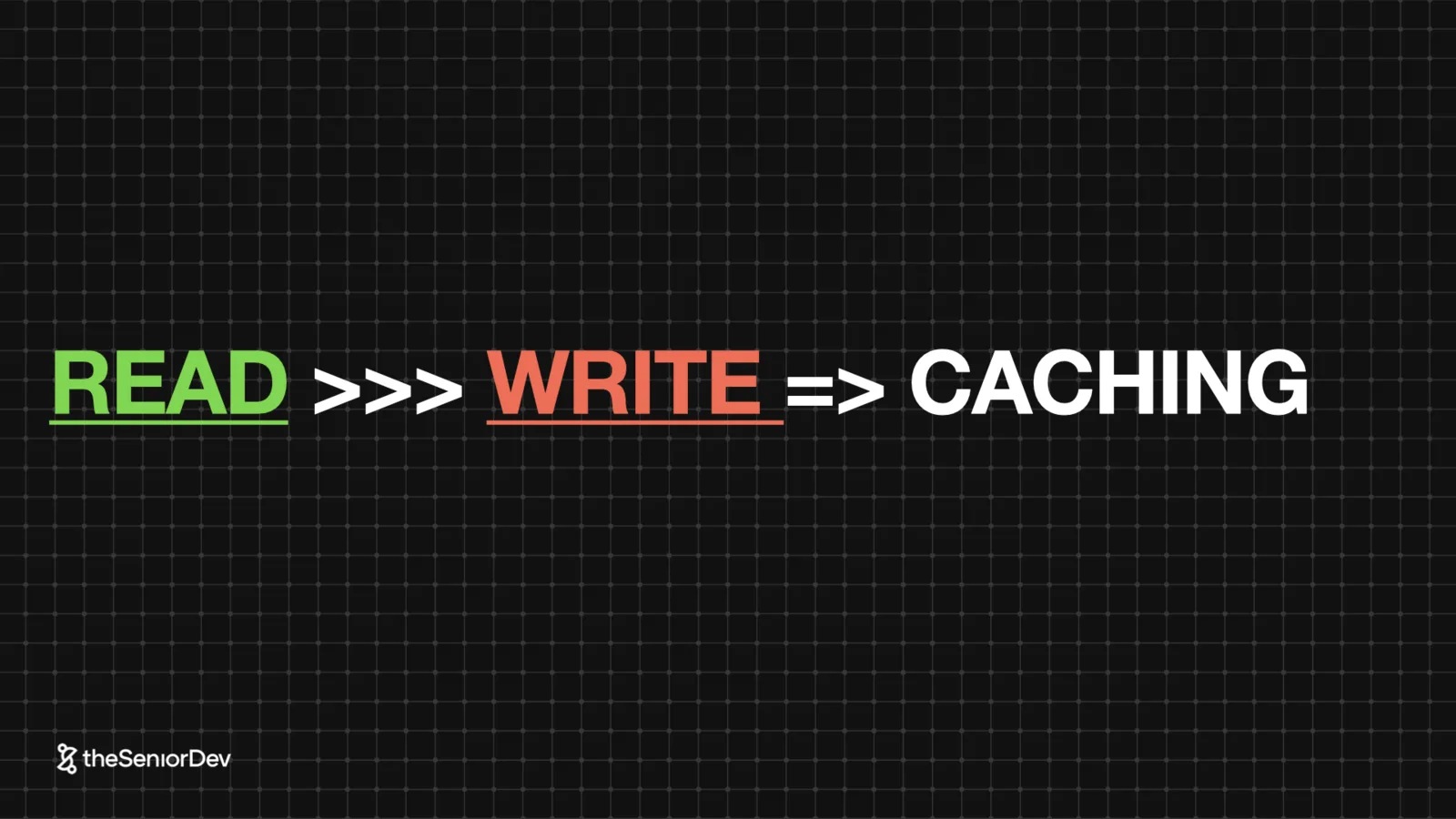
The best way to serve more requests is to serve fewer. Find data that's read far more than it's written — product images, titles — and cache it aggressively.
Pricing and delivery estimates change constantly; cache those carefully or not at all. The read/write ratio decides the policy.
 Read-heavy dataCache policiesHTTP caching
- 10
10. API Gateway, BFF & GraphQL (Scale Level 4)
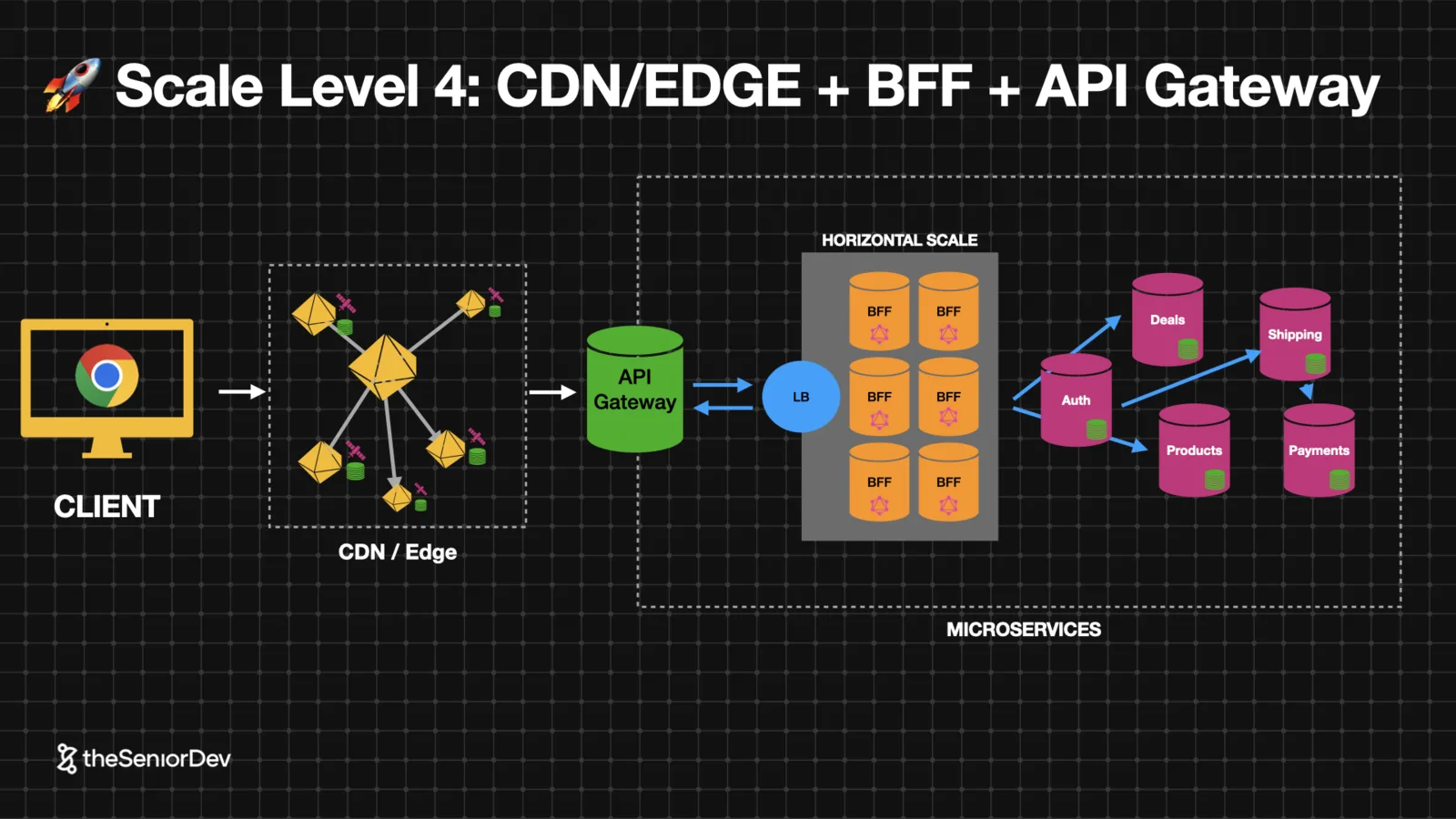
An API gateway is a reverse proxy that centralizes the repetitive work — HTTPS termination, auth, caching — so microservices behind it stay simple.
The BFF is a reverse proxy built for one client, owned by the frontend team. It implements the facade pattern: the frontend asks for a view, the BFF assembles it from microservices. One per client if mobile and desktop diverge.
Add GraphQL to the BFF and five REST calls become one query, with the frontend choosing exactly the fields it needs — mobile data budgets say thank you.
Then scale the BFF horizontally behind a load balancer (round robin, least connections). That's where the traffic concentrates.
 API gatewayBFFGraphQL resolversLoad balancing
- 11
11. Conway's Law & Micro-Frontends (Scale Level 5)
Organizations ship their communication structure. A 45-person daily standup is an architecture problem wearing a calendar invite.
Split the team, and to split the team, split the system: micro-frontends — independent apps on independent domains, composed at runtime by a shell, released independently.
Jeff Bezos' rule: if two pizzas can't feed the team, it's too large.
 Conway's lawTwo-pizza teamsIndependent deploys
- 12
12. Design Systems & Monorepos (Scale Levels 6-7)
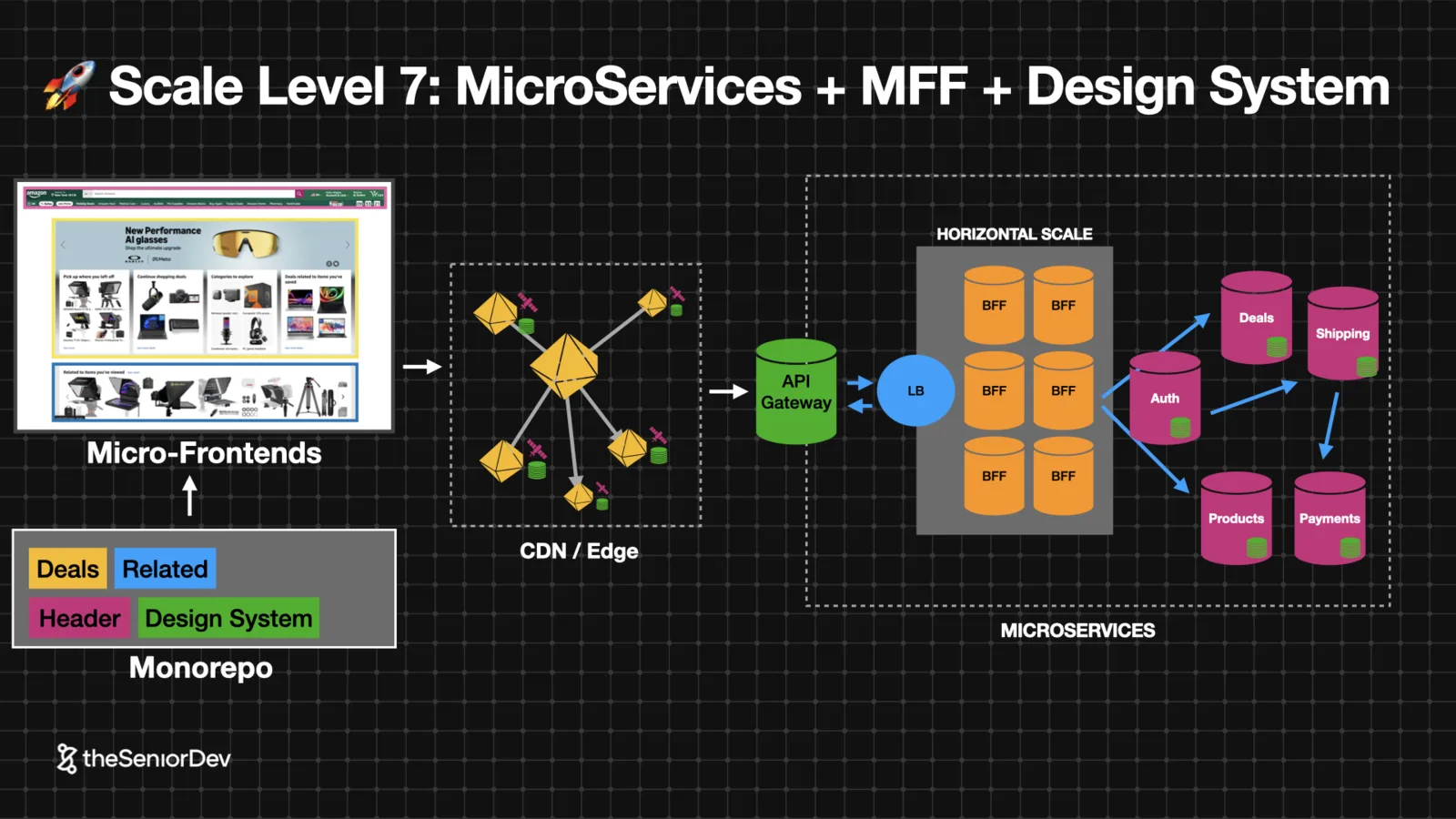
Independent apps drift apart visually. A design system — an internal npm package of shared components — keeps visual cohesion and stops every team rebuilding the same date picker.
A monorepo keeps them coherent technically: shared lint rules, TypeScript config, build tooling, one deployment pipeline shipping Docker images. Engineers can switch teams without learning a new universe.
 Design systemMonorepoShared tooling
Transcript
Now, when you're looking for front-end system design, you'll find a lot of videos telling you how to build Spotify or Instagram or Uber or x.com or any of those. And sure you can watch all those and try to memorize them and then probably remember something in the interview, but it's a lot better if you focus instead on the front-end system design mental models. And then you can use those in any interview.
So, in this video, we will focus on those front-end system design mental models. And also, we will talk about things like web performance, front-end scalability, web accessibility, front-end state modeling at scale, server side rendering, and computing on the edge. As we go through all these concepts, we'll also scale a system from a very basic architecture, which would be the client server, all the way to the last level of scalability, scale level number seven, which will have micro front-ends, microservices, load balancing, CDNs, a design system, and much more.
Now, your typical front-end system design interview will start with a very broad statement with something like, hey, let's build Instagram or Netflix or Amazon or Uber. And the first thing you need to do is to break that statement into actual requirements. Now, when it comes to requirements, you basically have two types. And you can think of it as if we were building an airplane. The functional requirements would be everything that the aircraft needs to fulfill its functions.
Things like the number of seats, the landing gear, the engines, the structure, everything the airplane needs to get users from A to B. But then we have non-functional requirements, and those non-functional requirements are more about how the aircraft does what it has to do. So, there'd be things like how fast can it go, or what is the average fuel consumption. Or when you think about legislation, things like the CO2 emissions or even the noise level at landing.
Now, when we talk about a front-end system, in general, the functional requirements will be fulfilled by the UI, that's what the user sees and interacts with. And then we have the non-functional climates. And those will be things like web performance. So, how fast is the application, or scalability. Can it sustain a lot of users? Or things like security. So, let's start with our functional requirements.
And for the sake of this video, I will use amazon.com as an example, specifically the product listing page. Which is, as we will see, one of the most visited pages amazon.com has. And so, when it comes to functional requirements, you can think of them as basically whatever you need to fulfill the user stories. So for amazon.com, it will be things like users can view products, they can add products to the cart, they can rate and review products, and they can order and pay online.
So from those requirements, you can extract the first version of the UI, which would be the low fidelity mockup. In some interviews, they will give it to you. In some others, you'll have to be able to sketch it yourself. I used TDL to build this one. Again, as a senior dev, we don't have affiliate links. So, I'm just recommending you tools that I use every day and I love. You can also use Miro or Excalid draw, whatever you're most comfortable with, but you should be able to go from user stories to a low fidelity mockup, even if you are not a designer, but a front end engineer.
In some cases, you might actually receive the high fidelity design, which would be the actual UI, or you just can take a screenshot of it. In this video, I will use one or the other interchangeable. Our analysis stays the same for both cases, but be ready for any of those. And once we have the functional UI, we can extract from it two things. Number one would be our state data model, so basically the data structure that we need.
That will be under the UI to achieve all the functionality and modeling of the API. Because as a senior front end engineer, you are expected to have an opinion on how the API should look like and work together with backend engineers to help build the best API representation. For the UI you are being given. So let's start with the state data model. Basically, when it comes to state, state comes from two places in the application.
Number one would be satisfying any user interaction, usually means things will be dynamic because we need to respond to input and number two will be data fetching. So 99% of all state you're seeing in an application will come from these two directions. And when you look for state, you want to condense it down to the essential state, which would be the minimum data representation needed to achieve a given UI.
So you want to have as little state as possible because state consumes memory and state can trigger re-renders, so that's usually good for performance. The less, the better. So if you look at our UI, we can see that there's some state to represent the brands, we will have to fetch those from the backend, so we'll have the loading error and then data state. We'll also have to allow the users to select which brand they want to filter by, so that to be a user interaction, we need to store that in state.
The users can add things to cart, so we need to manage somehow the cart state and be able to react to that. There's also pagination, so they might click on a different page and we need to refresh the UI. So there will be also a pagination state because of that user interaction. And finally, we have all this product list, so we need to fetch those products and again, there will be loading error and data state for the loading part.
Once you've extracted all your state, you want to run an irducibility test. So, you want to be sure that you have the minimum, the essential state. And so, you need to try to remove any of the state variables that you have and make sure that without them, the UI cannot work. So, that's when you know you have your essential state. When if you take any piece of the state out, there's no way you can make the UI work.
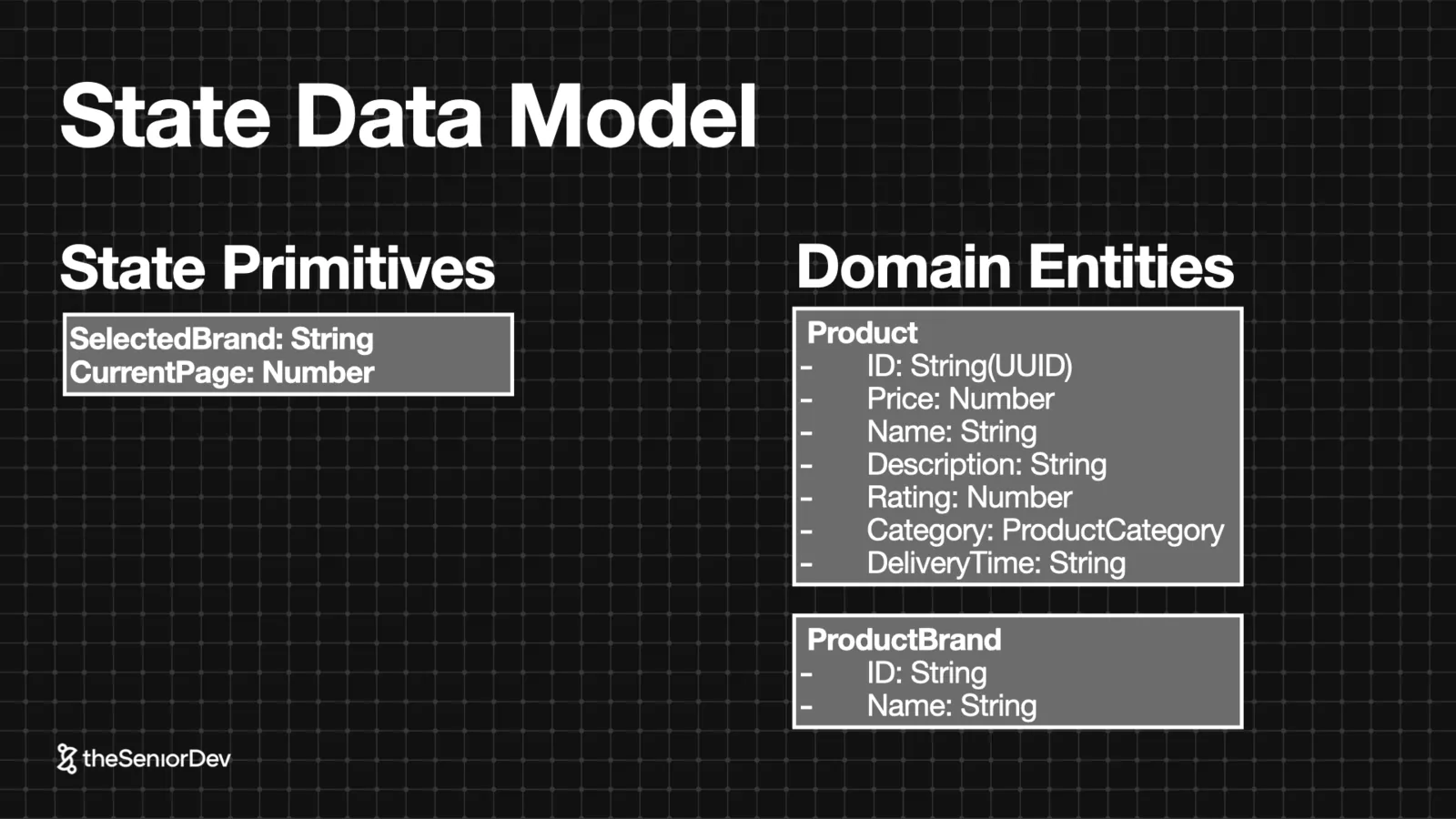
Now, when it comes to the actual data, we might have something like a product brand for the brands that will be an array. We might have a selected brand or a selected brand array. With the IDs of each selected brand, for the cart state, I will leave it out of the scope of the video. Just because it will be too too much to handle and that's pretty common. In system design interviews, they will allow you to leave things out of scope.
And we'll have the pagination state as the current page and last page and the list of products that would be an array of products. structures. So we have some state primitives that are very that's very simple state like the selected brand that could be a string or an array of strings and the kind page which would be a number. And then we have our domain entities, that would be product and product brand.
I will not go too deep into domain driven design in this video, but you are expected to be able to look at a certain design and extract yourself at least the aggregates and the entities that it deals with. Now, before we move on to the API modeling, let's look at lifting state. And there are basically three levels of state altitude. So how high the state will be in the component tree. We have our local state, which is at the very bottom, then we have shared local state.
And finally, global state. Each one of those can implement the reducer pattern if the state transitions are complex. I will not go in deep into the reducer pattern, but we do have another video on the channel where I do just that, so make sure you check that one out. Now, in modern applications, you can think of the UI as the top level of a tree, and that would be the component tree. So what the users see, it's actually the the leaves, the components at the very end, at the very top of the component tree.
So, yes, the component tree is a tree, but it's actually an inverted tree. And so what the users see, it's actually the bottom leaves. And so when you start placing state, you usually start placing it at the very bottom where it's actually being used, and you want to avoid lifting it as much as possible. But sometimes you have siblings components that need the same state, so you might have to lift it up in shared local state.
And finally, there is a certain state like authentication that has to be global because pretty much every component might need it, so it needs to flow globally into all of them. In a system design interview, after you marked the UI, the first thing you probably have to discuss with your interviewer is how would you handle state, what are the data structures, and where would you place it. So, make sure you're able to have this discussion of lifting state.
And remember that whenever we leave state, state should should leave as low as possible, as close to the leaves in the component tree, but as high as necessary. So lifting state, it's a necessary evil, and we only want to do it if it's really, really necessary. Going back to our example, let's think about our pagination state. So, that would be our current page state. Well, we might think, hey, let's just keep it down there because it's kind of a local state.
The reality is you'll need the current page to make the API request and then get that specific page from the back end. So, we need to lift it up at the same level as the data fetching state of the products. Now, it turns out that whenever we fetch our products, we might also need to filter them by the brands that the user selected. So, the brand state should be lifted to the same level as the pagination state and as the product fetching state.
Which means we need to leave the client page all the way up to be accessible to all those components because they are all siblings. And the same goes for a brand filter, a current page, and a product state, so they are all must be lifted up as shared local state. And that will be the easiest way to make this UI happen. So, when you look at the UI, make sure you start with your state being very global, and then raise it as high as necessary, but as low as possible.
Now, before I continue, let me introduce myself. I'm Bogdan from the senior dev. I started the senior dev together with my brother five years ago, where we basically helped JavaScript developers get to senior using senior level mental models, a proven road map, feedback, and a global community. We already worked with 360 plus JavaScript developers. And if you are a JavaScript developer and you want to get to senior, make sure you check the free training in the description.
Now that we have a state data model, let's talk about API modeling. So, how do we translate that state into requirements for our backend API? And to do so, we will focus first on a restful version of our entities. So, basically, we look at those entities like product and product brand as rest resources with an uniform standardized interface. So basically now we will go a bit deeper and sketch out what that product entity needs to have.
To have a price, a number, an ID, a rating, a category attached to it, and it even has a delivery time. Now, if you look a bit closer to it, we'll realize that it's almost impossible to map this out as a single entity, because things like the product price will change very often, they have a currency and they have a value. So the best idea would be to put that in a separate entity. And the same goes for the product rating, because the rating is calculated based on product reviews, and that would be yet another entity.
And finally, the delivery time with the delivery ID, it's pretty much the same because users might change their address all the time and we need to recompute that very quickly, so it's not like we can just store the delivery time at product level. So, as you see, we went from one very simplified monolithic entity to five right now. And I'm keeping this very simple. If this would be a production scenario, the actual domain would look a lot more complicated.
So, let's see how this will look in rest endpoints. Well, basically, we need an endpoint for a product, then we need an endpoint for a product price on the products, so in rest you can actually nest the prices just behind the product. We have a rating endpoint where we can actually fetch ratings by the rating ID or maybe the product ID, whatever we prefer. We have product reviews attached to that rating, so that would be yet another endpoint, and the product delivery, which probably should be another rest endpoint.
And all those endpoints would have the capability to make a get for listing of products, and then to make a delete and put and patch and post to modify the specific resource. Now it's not enough to be able to fetch and modify those entities, but we also might need to filter them or paginate them. So, for example, in the case of products where we have this slash products endpoint, we will also need to implement things like query parameters that allow us to paginate.
So, we'll have a query parameter that's page, let's say it's one, and the page size would be 10. So, then the back end knows that it has to deliver as the 10 first products. You'll also need to add query parameters for searching and for order. But I'll keep things simple for now. Just keep in mind that any sorting or filtering is done with query parameters on the same endpoint, which would be in this case slash products for the products.
Now, congrats on making this far, if you like the video, make sure you click subscribe and share your feelings in the comment section, we appreciate all of them, even the nasty ones. Back to our rest model, we can see that for a single front end visit, for a single page, we need to do at least five back end calls. And this is what we call under fetching in rest, and so the problem with rest APIs is that many times you don't get enough information in a single request and you have to do a lot more subsequent requests to get everything, which ends up putting a lot of pressure on our back end and we will handle this later in the video when we talk about scaling our data layer.
Now let's recap. You can satisfy most of your functional requirements with a very simple plain client server architecture where you have your client UI, that would be a front end, some rest interface and a very simple back end. The problem with this architecture is that it doesn't scale too well, and as we start adding non-functional requirements, we will need to refactor or change our components altogether.
So let the fun begin. And now it's when we actually begin the real system design because we start talking about non-functional requirements. So non-functional requirements are about things like the users, the user distribution, the devices they use, the age they have, the operating conditions of the application, like compliance or regulation, and the cost of change. So, can we add more users without having to change our application, that would be scalability, or how easy is it to add new features and extend the system?
So back to non-functional requirements, we can summarize them in six main non-functional requirements. Number one would be the web performance of the application, that would be the loading speed and responsiveness to input on the front end. The client scalability. and application, can I front an application sustain traffic increases and application, can I front an application sustain traffic increases without having to change the code. The availability and fault tolerance, so how resilient the system is, if something fails, can it recover itself? Web accessibility measured by the web accessibility levels that will be single A, A or triple A. Maintainability, so what would be the cost of change? How modular is the system and can we have different people working in parallel on it? And finally, web security which can be done with a security audit or OASP top 10 vulnerabilities. Now, remember that your seniority is decided not only by the answers you give, but the questions you ask. So it's very important in the interview that you ask smart questions because they make you stand out as a senior even more than the answers you give. Some examples of good questions for your non-functional requirements are things like, how many users or traffic do we expect? Are there any description patterns in the traffic like evening versus morning or what's the geography, West coast versus East coast? Do we expect any traffic spikes due to special marketing events like Cyber Monday or Prime Day or Christmas? What is the most popular browser or device users actually use? We will need that to decide, do we need to polyfill our JavaScript bundle for example? Or what is our bundle budget or do we have any special requirements in terms of data throughput or image size? because users are accessing everything on mobile. Is loading speed critical? Are we in an e-commerce scenario or a media scenario? Are we building a blogging platform or a news website? Then you need to load very fast, or is it the opposite? Do we have a lot of state and are we expected to react fast to a lot of user input? That would be the case in enterprise software or SaaS or gaming. How important is accessibility for our use case? Are we building something for the government or any kind of nonprofit organization? They're usually legislated in a way in which you need to pay a lot more attention to accessibility. And are there any special security concerns? For example, in the case of banking and insurance, you'll have to pay more attention
things like security. So let's go back to our amazon.com example and try to break down the traffic for this one. So I went to semrush.com and figured out that amazon.com receives 2.11 billion visits per month from the US. And it's pretty much evenly distributed. So when it comes to traffic, we have around 2.11 billion monthly users, only from the US. In terms of geography, they're distributed evenly, so pretty much the same volume coming from East Coast as the West Coast.
In terms of seasonality, Tuesday to Thursday, it's more or less peak hour 7:00 to 10:00 p.m. There are certain spikes like Prime Day, where on that single day we get around 120 million users. But we will leave those out for now. And in terms of device, 70 to 75% of traffic comes from mobile devices. So now we are ready to do a bit of a back of the envelope analysis, that will be a rough calculation of the operating conditions of the system, and this is very similar to what they call dimensional analysis in traditional engineering.
So basically we need to go from this rough number 2.11 billion users monthly to something more concrete. And so let's break this down by week, so that will be 500 million users weekly, and if 50% happens on Tuesday to Thursday, that means we get 250 million on those two days. And finally, 125 million visits on Thursday. But remember that we had a peak hour, and that 50% of traffic on that specific day happens between 17:00 to 8:00 p.m.
Which means that in that peak hour, we have 21 million visits per hour. That's a lot of visits. That's probably as high as you can go in terms of visits. Amazon.com is probably one of the most visited websites globally. Again, the important when we do back of the envelope is not to get things concrete, but be able to go from a fizzy number like 2.11 billion monthly, whatever that means. down to a concrete request per second, per minute or per hour number.
It doesn't have to be very exact. It's more important how you reason your way through these numbers with your interviewer. But wait. We can go even deeper. It turns out that for every visit, a user will look at an average of 6.8 pages. So remember that number, those 21 million visits per hour? Well, we multiply that by 6.8, and it turns out at peak hour we have around 136 million page views per hour.
And that's our final system requirement. Now, there's no way in the world, any server, any single server is able to handle that. So we'll definitely have to scale our architecture later on. And just to finish our analysis, it turns out that 59% of purchases happen on mobile. So we will assume 59% of mobile traffic where you have a mobile data connection, you have lower CPU and memory. So we have to make things very easy to compute, we cannot abuse JavaScript, and we have a smaller device width that can serve smaller images and we can use that to our advantage.
Not only that, but it turns out 70% of all the page visits happen on the product search view. So that's where the battle is being fought and that's where we will focus on that view for the rest of the video. Now, let's start satisfying our non-functional requirements. And we will start with web performance. And this is a big difference with backend system design interviews where they will go into scalability or database optimization.
In the front end, the first and most important topic is web performance. And web performance is basically two things: how fast the application loads, so that will be a loading speed, and how responsive is to user input. Web performance is measured by the core web vitals. Those are empirical metrics that measure how fast the page loads and how fast it responds to input. And that's what we call our web performance SLI.
What's an SLI? Well, an SLI is a service level indicator, which is basically a way to measure and quantify non-functional requirements. Common ones are things like latency, throughput, availability, and in the front end, the core web vitals. Because we don't want just to tell people, hey, our application is very performant, but we want to actually measure how performant is it in a quantifiable way.
And so when it comes to core web vitals, we have three of them. Two of them are about the initial load. is just continual paint and a cumulative layer of shift. And interaction to next paint would be about the UI rendering speed. So the UI ability to respond to user input very fast. You can measure those for any application, I will not go too deep into it, but we'll use them as a reference. Now going back to our plain client server architecture, let's see how can we make our client UI more performant.
And the number one question you need to ask yourself is how static or dynamic is my UI. So a very static UI would be something like media, blogging platforms, newspapers, like the New York Times, there's a lot of images, a lot of text, not a lot of user interaction. Now, if you add more user interactions with it, you'll find yourself into something like e-commerce, where you have a lot of content because you have all those product images and special offers, but you'll also have a lot of user interactions because you have all this add to cart, uh there's special offers.
So there's definitely a lot more user interactivity than in a plain media or blogging website. If you keep increasing the dynamic part of your application, you find yourself in the social media space, where there's a lot of user generated static content, but also a lot of live comments, live chat, likes and so on. And finally, if you go all the way dynamic, you'll find yourself in the enterprise SAS space or enterprise software where you have things like accounting software, where there's just a lot of data, a lot of user interactions, not so much content.
And applications like Uber that are peer-to-peer. So there's a lot of user interactions, a lot of state, a lot of even real-time communication, but not a lot of content. Now, let's start with the easy one, which is static web performance. So, before we get into it, we need to look at the web itself and the infrastructure behind it. And the web is now built on fiber cables. So, basically light fiber cables, they're like small tunnels that guide light to the destination, and based on the light we receive and send, we can compute the bits in bytes.
The good thing about light fiber is that you travel at the speed of light. And so that's around 300,000 km/s or 180 6,000 miles per second. Going from San Francisco to New York at the speed of light, we take around 9 milliseconds. So, if you see this number, you'll think, well, that's very fast. We probably don't need to worry too much about it. Remember that for human beings to perceive something as slow, it has to take more than 100 milliseconds.
So 9 milliseconds seems pretty legit. But the problem is, you don't really go that fast. Because you have all this network infrastructure and you lose a lot of efficiency. Basically, packages don't go straight to New York, but they have to be redirected between different switches and a lot of networking infrastructure. So you go to a first node, and maybe find your way to another node, and then again a third node, finally a fourth node, and then you're finally in New York.
And that takes around 140 to 160 milliseconds per round trip. Now, the other detail is that in TCP, you need three trips only to establish a connection. And when it comes to TCP plus TLS, that's https, you need at least four round trips. So, you're looking at around 600 milliseconds only to establish the connection. Just because the users are geographically far away. So network latency is basically the amount of time it takes for a data package to get from one place to another. The maximum theoretical limit is the speed of light, but usually you go a lot slower than that.
Now latency, it's one of those senior mental models, and if you really want to see how many of those you know, make sure you take our free 10 minutes technical assessment for JavaScript engineers, where you'll find out where are you on the seniority scale, and it's built with real interview questions, so it'll also give you an idea of how competitive you are in the market. So, even if we place our server in the middle of the US, you'll still have a lot of latency, especially when you travel all the way to the east coast or the west coast.
And the easiest way to eliminate that latency is to basically duplicate our static assets and place them closer to the users. And so whenever the user needs to get an image or a JavaScript bundle or a font, instead of going all the way to the server, they'll be redirected to the edge loc cation that is closest to them. And that's a CDN, basically distributing those static assets close to the user by replicating them in those specific edge locations.
And that would be our scale level one, where we still have a client and our server, but we add a CDN to serve our static content in a very efficient way and eliminate the latency problem. Now, CDNs will help us with the static part of our application, so that's why they are great in e-commerce and media, but we still have to make our dynamic part of the website also very performant. So, how do we tackle the web performance of dynamic parts?
Well, in modern applications, we have a lot of reactivity and so there's a lot of state, there's a lot of user interactions, and there's a lot of complex data structures. So, because of that, we'll probably have to use a JavaScript framework, like a component-based framework to handle all that complexity, things like React, view or Angular. And the issue with those frameworks is that whenever you ship your application to the user, they will get an empty HTML and they'll have a specific div where the application will be attached to and then finally you'll interpret all this JavaScript to actually build your UI.
And so the problem with this client side rendering is that the client will receive this empty HTML, then it will download all JavaScript and then run this initial render, but again the page is empty. Then probably we'll have to do some data fetching in the components, get the data and then come back in render and finally display the actual page. And that creates what we called the white screen. Of that, that means the users are looking at an empty white screen, then they might even believe that the website it's broken and go somewhere else.
And we can fix this by implementing server side rendering. So basically in server side rendering, when we make that initial request to get the HTML, the server will do the initial render. It will make a data fetch request to its own database, finally, it will pre-render the HTML and send that pre-render the HTML to the client. Which will immediately display it as a static page. Of course, this static page do not interact render it, which is basically render the whole component tree and then attach it to the pre-rendered HTML.
But, we did solve this problem of user staring at an empty screen. Now, the problem with server side rendering is that we need to make that trip back to the server. So, even if we solve the latency problem for the static assets, whenever we have a pad in our application that is dynamic and has to be server rendered, we go back to having that latency problem that I just explained. And this is why the industry developed edge computing, where instead of going to the server to render on the server, you have a network of edge functions that are running a specific runtime, like Node.js, and you can redirect your request there,
and finally do some rendering. Those edge functions are identical and they are placed very close to your user, following the same mental model as the CDN. So basically, not only we distribute our static content in edge locations, but we also distribute our compute capability. Now, okay, but what if those functions need to fetch some data? Even if this server piece is located close to the user, you still need to make that trip to the database.
So basically, the client will make a request to the edge function, and the edge function will make a request to the database, which takes a very long time. Then we'll receive the data back. The edge function will do the rendering and then the client gets the pre-rendered HTML. But that request, it's very, very slow. And to finally solve this and close the latency problem, we can actually distribute our database.
So, we push a read-only copy of the database very close to the edge function. So, we create a read-only copy of the database very close to the edge function and very close to the user. And so, to summarize this, not only we duplicate our static assets, so we have it on edge locations close to users, but we also distribute our compute and the database. So, pretty much everything is close to the user, so we can do server-side rendering and have both static web performance and dynamic web performance.
And so, in this new setup, the client will go to the edge function, the edge function will pre-render and give it back the pre-rendered HTML. and that's when you get blazing fast performance even for applications that have a lot of static assets and a lot of state like e-commerce. And I did mention the read-only pattern, which would basically mean that you can scale your database by creating those read-only replicas that are geographically distributed.
Now, if you remember the cap theorem, it basically says that we can only have two guarantees at the same time. So we can either have consistency, availability, or partitioning at the same time. And in this case, because we have the partitioning guarantee, we'll use the consistency guarantee. That means our data might not be consistent because it takes time to synchronize whatever was written in the main database with the read only replicas.
Depending on your use case, this might be an okay price to pay. If you are building a payment network, then it probably won't work because consistency in banking is very important. But in social media, for example, you don't really care it so much about having the latest information information is more important to be fast. So again, depending on your use case, you might prefer one warranty over the other.
And so our final setup is basically distributing our static assets, our edge compute network and the database very close to the user, and we finally eliminate that latency problem. And so a scale level 3 would be not only having that CDN between the client and server, but also having the distributed edge compute runtime where we can execute code and our distributed database. So now that we're done with web performance, let's talk about scalability.
And so scalability is basically the ability to support more users or traffic without a decrease in performance and ideally without any code changes. Now the best way to scale and support more requests is to actually eliminate the requests. And so the first question you want to ask yourself is, is there any data that is read much more than it's being written? So going back to UI, if you take a quick look, we realize that the images are basically read very often, but they might not change too often.
So probably there's millions of requests to get that. the image, but only now and then vendors will change that image. And the same goes for data, so you might have the title of the product that it's yet also very, very often, but it changes very rarely. Now, on contrast, there's the pricing data and the delivery data that's very dynamic. So, even if users will read that a lot, it also changes very often.
Now, whenever you have a lot more reads than writes, you can apply caching to scale that. Basically, you can tell the client or whoever is consuming that data or image to reuse the previous version because it's unlikely that it changed. And one of the coolest things about CDNs is that they already implement HTTP caching for us, which means that our static assets, our bundle and our images are being shipped to the client with instructions to be cached.
We can decide for how long the client should keep them. But in general, the list often you think an asset will change, the more aggressive you can be with our cache policy. I will not go too deep into caching here, just for the purpose of time. I do that in another video on the channel. Now, another advantage of CDNs is that they also do asset optimization. So, when you have to get that asset, when you have to download that image or the bundle, it comes with several optimizations.
The most important one, it's compression, so it will basically compress our bundle and usually you can save up around 25% of data if you do compression. And modern CDNs will also apply the right format, so images will be transferred to WebP, and sometimes they can even do JS minification. So, as you see, a CDN is usually one of the most important pieces of scalability and not only it solves the latency problem, but it has so many great side effects.
Now, at scale level 3, we had great web performance with our CDN network and edge, but what we didn't talked about, it's all the pressure that is being placed on the server. And even if this is a front-end system design video, you will need to at least have an opinion on how you would roughly scale the data layer. So, let's talk about scaling our data layer. Now, going back to our amazon.com example, you can see that all those frontend widgets, they need data and images and all that ends up going to the server.
Not only that, but if you are working with a modern backend team, they probably implemented microservices. So you have all those different services that you need to request data from. And the first optimization we can do to this architecture is to add an API gateway. And the reason we add an API gateway is because the API gateway can handle very repetitive functions. So for example, you need HTTPS between your client and all those different microservices.
Well, you can implement HTTPS with the API gateway and behind it, you can have normal traffic. So the API gateway will receive an HTTPS request, but then it will forward it as an HTTP request to your microservices. And the advantage there is that the communication between the API gateway and microservice will be a lot faster and you only have to implement HTTP once. The same goes for topics like caching or authorization.
The beautiful thing about an API gateway is that you just do it once and you can forget about it. So an API gateway, it's a reverse proxy that unifies repetitive functions like authentication or SSL. The next optimization you can implement, it's adding a backend for front end, a BFF. And the BFF, it's basically a middleware that will present data as the front end needs it rather than how the microservices implement it.
So basically, the front end will say, well, I need this data for this view and the BFF will implement that. So it's extremely easy for the front end to communicate with the BFF. In the background, to satisfy that view, the BFF will make different requests. And put the requests together from all those different microservices. The advantage here is that the BFF, it's usually owned by the front end team.
So whenever you need to deliver a feature, you can go much faster because you don't need to wait on all those different microservices to implement the changes. And the other advantage is that those microservices, they are building internal APIs and they can also work in isolation. So people dealing with the payment microservice can deliver features independently. payments API, implement that in the BFF and finally have it in a front end. So it's basically implementing the facade pattern and making sure that the front end team is now more or less a full stack team that can move very fast and it can move independently.
The other advantage of the BFF is that you can build one for every client. So if you have very different data requirements between your mobile application and your desktop application, you can have a desktop BFF and a mobile BFF. But you don't need to change all the other microservices. So again, it's more of an organizational choice because you get a lot of speed. The mobile team can move very fast, the desktop team can move very fast, and in parallel, the backend teams are building the microservices.
And so a BFF it's a reverse proxy, just like the API gateway, but it's built specifically for a front-end client and usually owned by the front-end team. This is why even if you are a front-end engineer, you are expected to have some full-stack knowledge. Finally, to make our BFF even better, we can add GraphQL to it. So GraphQL it's a data layer technology where you can query multiple resources in a single query, avoiding that under fetching or over fetching problem that we've seen at the very beginning of the video.
And so basically, remember that we had five backend calls for every front-end visit. Well, with GraphQL, we can replace all those five with a single query to our BFF. And our backend for front-end would have resolvers attached to all the query fields and go to the different microservices, make the request and then put everything together in a single JSON object and send it as a unified response. Now, leaving aside the performance advantage, it also gives the front-end the freedom to request only the data they need, not more or less.
Because the front-end can actually write that query against a schema that we build so they can decide, do we need the full product or do we need only the title and an image? And this is extremely good for our mobile performance because we use less data and mobile users are usually very sensitive to data. If you have an application that consumes a lot of data, it's not good for mobile users. Now, with our new architecture, the BFF It's where most traffic will concentrate.
And even if this is not a backend system design interview, we do need to just give a rough idea about how we would scale that. And so the back and front end is now where most traffic will concentrate. And even if this is not a back end system design interview, we still need to give a rough idea on how we would scale it. And the easiest way to do so would be by scaling it horizontally, that means we have a load balancer that will distribute traffic between those identical instances.
And so a load balancer will be basically distributing traffic among identical instances based on a specific algorithm, like round robin or the least active connections. And that would be our scale level four, where we have a client, we have a CDN network, we have an API gateway, we have a back and for front end scaled with a load balancer. And that will cover most of our scalability needs, but now let's talk about maintainability.
So maintainability, it's basically the ability to easily extend the system from the front end perspective. Now going back to our system, even if there are microservices in the back end, we are still dealing with a front end monolith. And the problem with monoliths is illustrated by Conways law, which states that organizations design systems that mirror their own communication structure. So basically, how the team looks like, it's how the system will look like, and how the system will look like, it's how the team looks like.
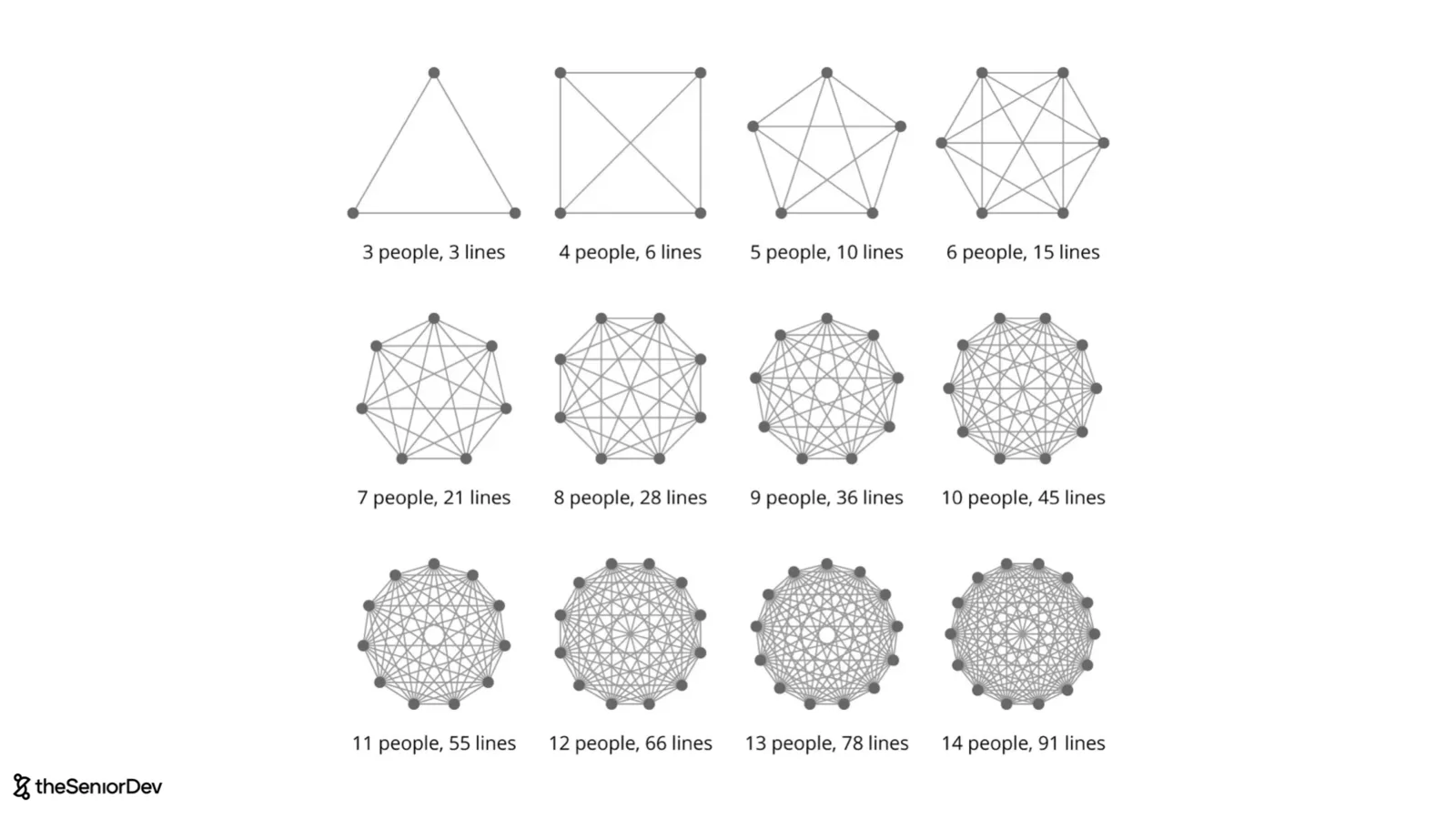
The other problem is that as you add more people to a team, you get more communication overhead, so we see when you have three people in a team, there's basically three deadlines of communication. When you have 14 people, there are 91 lines. And so it's just very hard for everybody to communicate. And just to illustrate this, one of the developers we worked with, I think it was three years ago, he was working for a very big US company.
A traditional company, so in one of the coaching calls, he mentioned that he's very burning out. And we kind of looked at his day, I'm like, okay, how does your day look like? 1 hour 30 minutes daily stand up. I was like, what are you doing in an 1 hour stand up every single day? Does it really take 15 minutes for everybody to share what they do? And he told me, well, it's it's not that, is that we have 45 people in the daily stand up.
I was like, what? And that was the reality. They were working on a monolith application and it was 45 people. And the problem with 45 people in a meeting is that it's just impossible to understand what everybody is doing and it's very chaotic. And 90% of the people talking are doing things that have nothing to do with what you're working with. So it's a total disaster. Luckily he was able to switch the apps to a much better place.
But luckily he was able to switch the apps to a much, much better place. Going back to our Amazon example, Jeff Bezos mentioned that if you can't feed a team with two pizzas, it's too large. So we definitely need to split our team. And in order to split the team, according to Conway's law, we need to split the system. So, going back to our front and monolith, we will split this into micro front ends.
Those are independent applications, they live on different domains and they're put together at runtime. So there's basically a shell that consumes all of them and presents them to user as a single front application. But in reality, all those teams are completely independent and they can release software independently and they can work independently. They don't need to talk to each other to make even the smallest decision.
And that would be our scale level five, where we have micro front ends in the front end. Microservices in the back end and we strategically add caching layers and load balancing layers to have great scalability and very low latency. Now, how do we keep visual cohesion when we have these different applications? So how do we make sure they still look like a single application? Well, the solution is adding a design system.
And a design system is basically an internal library of components that everybody is supposed to use in their micro front end. So it should be distributed as an NPM package that you install and you can basically use the same elements for input fields, forms, even text, and so on. And that's how we make sure not only that there's visual cohesion in the application that everything looks the same, but also that engineers don't have to invent the wheel whenever they're implementing a form or a date picker.
And so a design system, it's an internal collection of reusable UI components and has two main objectives. Cheaper development, because we use the same elements, we don't need to implement the same thing over and over, and visual cohesion across all those different independent micro front ends. And this backs the second question, which is, how do we make sure that we keep the code quality high and that it's easy for front end engineers to switch teams?
So imagine you're working for the header team and then you want to go and work on a different team, how easy would it be for an engineer to do that? Well, that's where the mono repo comes into place. And so traditionally, you'll have all those micro front ends in different repositories and then our design system in a different repository and they all have their own linter rules and typescript configuration and maybe even testing setup and different versions of packages.
But to make this easy, what we can do is we put it all in the same repository. And this brings a lot of transparency to teams because you can actually see the source code of pretty much everybody in the company, but also it means you can reuse a lot of configurations. And so all of a sudden, even if people are working on different applications, it still feels like they are working for the same company and the same team and they don't need to learn a whole new way of doing things when they join a different team.
And so in this way, we can keep code quality high and technical consistency across all those different applications. And so a mono repo would be a single repository containing all these applications with a shared build system, shared code quality tooling, shared packages, and sometimes even they share the deployment pipeline because what the infrastructure team tells you is, hey, why don't all of you just give us a docker image?
So basically each application in the mono repo will end up building a docker image and then the mono repo has tooling to take all these docker images and deploy them with their respective domains. And that would be our scale level number seven where we scale our organization. Where components and a monopole together with all the other scaling infrastructure behind that. Now, let's talk about availability and fault tolerance.
So, in order for us to make something available, we will use distribution patterns. And the good thing about CDNs and load balancers is that not only they make the system more scalable, but because they are this duplication dimension, they also increase our availability. And so basically in a CDN, if one of the edge locations will fail, you can easily redirects us to another one. In the load balancer, it's pretty much the same. If one instance fails, you can always instruct the load balancer to redistribute traffic between the instances that are healthy.
And when it comes to distributing your database, if any of the read-only replicas fails, you can always redistribute traffic to the ones that are left. The problem is that both the load balancer and the master database become unique points of failure. And the unique point of failure is a component that if it fails, it will bring down the whole system. So, load balancers are a good example or even DNS servers.
So, how do you make sure that when a unique point of failure fails, your whole system goes down? Well, I'll throw a little bonus in and that's the active passive pattern. In this pattern, you would have two load balances, one of them would be active receiving traffic, and the other one would be standby copy, which is just waiting. And if the main load balancer fails, then we can immediately distribute traffic to the second one.
Again, we are fronting engineers, you don't need to know too much about how exactly you would implement this. But it's good for you to have at least a mental model about how it works at a high level. Now, to wrap this up, let's talk about web accessibility and web security. So, when it comes to web accessibility, make sure you use semantic HTML for everything so you are accessible out of the box. And whenever you cannot use semantic HTML, you might use aria attributes, but again, these should be the exception, not the rule.
And also make sure that your tabulation order is exactly the same as the visual order on the screen if you use semantic HTML that should come out of the box. And finally, test for accessibility early on. There are tools like the axe plugin or even accessibility Linter plugins that you can use in your development process so you fix problems before they actually happen. So non-semantic HTML would be things like a div or a span. People tend to abuse those, especially when they work with React, because they're like, oh, let me create any component and then I add a div to wrap it. That's a very bad idea. You should avoid doing that and use semantic HTML as much as possible, those would be semantically meaningful tags like H1, lists, for lists. And if you need to add a footer, well, you'd use the footer tag. And finally, let's go really quickly over web security. In general, you just want to make sure that you know how to explain the main web security attacks. The easiest one is the man in the middle where someone is sniffing traffic between the client and the server, but if you use https, traffic is encrypted, so they cannot really decrypt that. The second attack would be XSS attacks, that's cross-site scripting. And so basically an attacker would submit JavaScript code as, let's say, a comment on a social media post, and then whoever loads that, it's actually executing that JavaScript on their client. So avoid executing anything that the user gives you, and never use dangerously set HTML in React, for example. Cross-site request forgery, I will go very quickly over this one, but if you use second factor authentication for any important action, like changing your password or making a banking transaction, you should be fine. Sequel injection is when they try to run SQL code by adding it as input to an input field, but if you're using an ORM, in the backend, which is usually standard, you should be protected against it. And the distributed denial of service, that would be when there's many instances that an attacker controls and they all go to your infrastructure and try to overload your infrastructure so that your system goes down. But if you use traffic filtering or third-party CDNs like CloudFlare, they help you a lot because they have a huge network and so it's impossible to bring that network down even for a great attacker. And rate limiting also helps. Again, I'm just scheming to, if you want me to make a specific video on web security, let us know in the comments. And so as I mentioned, one of the advantages of
off CDNs with all those edge locations, is that if you get attacked, it's almost impossible to bring your system down because you can redistribute traffic and in the end the attacker will run out of budget also. Now that we covered most non-functional requirements, I have a small bonus. Number one will be SEO because you're building a client side application, they might ask about this, especially in the e-commerce space.
But remember, we used server side rendering, which means we are delivering to our search engine crawlers a pre-rendered HTML, which is a lot easier to consume. We've also mentioned semantic HTML, which makes our pages very meaningful for crawlers, and it helps SEO. And we talked about the core web vitals, which makes everything more performant, and Google will rank you better if your core web vitals are high.
So in general, everything we've done for scalability and accessibility will also help our SEO. And final bonus would be client observability, that it's your ability as a team to understand what's happening to the system. The first thing they will ask you about is logs and alerts. And for that you need some sort of a centralized system. Things like data dog usually help. Because we're talking about the front end, you also have real user monitoring to see the real core web vitals, Sentry, it's a great tool for doing real user monitoring and you actually see what core web vitals they are actually experiencing, even on mobile devices.
Product analytics to make product decisions, especially when you're building SAS, tools like Amplitude will allow you to understand which features users are actually using and which ones you should extend and do a lot of AB testing. Web analytics, if you're building e-commerce, you will deal with a lot of web traffic because you usually advertise on the Google network, and Google Analytics is great for building funnels and understanding conversion.
Finally, you have constant managers because if you use analytics and you're dealing with user data, then you will need to actually make sure you get consent on that. And because now we're adding all these tools to our frontend application, we can also leverage web workers to delegate a lot of the analytics. So of all these new tools. And this is it. Congratulations. You made it. You're awesome and I really hope that you nailed that frontend system design interview, best of success there.
If you want to go deeper in any of the topics I mentioned. Make sure you check out my other video on 15 frontend concepts every senior developer has mastered. And my other video on frontend architecture. This has been a long one. So again, congratulations and I'll see you on the next one.