
Video guide
20:12 · 10 December 2025
9 JavaScript Concepts That Get You To Senior
Chapters 6 sections
Key concepts in this video:
- 01
1. The Event Loop
The event loop is the component that executes your JavaScript. Three parts: the call stack runs synchronous code top to bottom, plus two queues with different priorities — the microtask queue and the macrotask queue. Queues are first-in-first-out: the first task in is the first one processed.
In the browser, event listeners on DOM elements, the timer API, and the promise API all push tasks into those queues. When a task reaches the call stack it gets broken into function calls, and each function call gets its own stack frame.
The key rule: when the call stack empties, the engine drains the microtask queue before finishing the current tick. Then the browser renders, and the next iteration starts. Promises resolving does not mean their callbacks run immediately — they get queued as microtasks first.
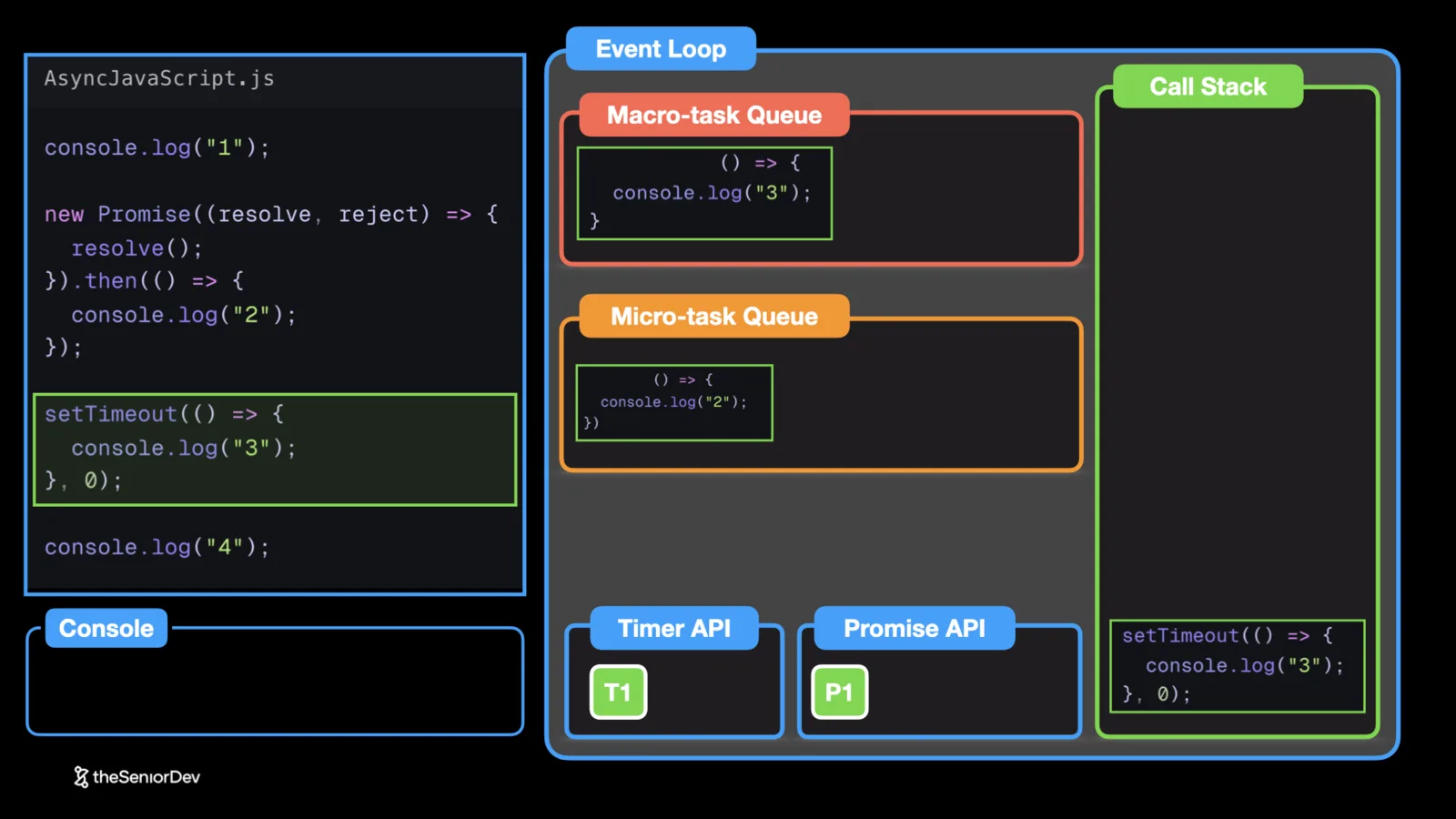 event loopcall stackmicrotask queuemacrotask queue
- 02
2. The Classic Interview Question: console.log Ordering
A very common question: given a mix of `console.log`, a resolved promise, and a `setTimeout(0)`, in what order do the logs print? The naive answer is source order: 1, 2, 3, 4. It is wrong.
Trace it with the event loop. Synchronous logs run first: 1, then 4. The resolved promise callback went to the microtask queue, so it runs before the tick ends: 2. The setTimeout callback is a macrotask, even at zero milliseconds — it runs on the next tick: 3. Final order: 1, 4, 2, 3.
This exact question shows up in interviews for senior frontend positions and senior backend roles with Node.js. Review it until you can trace it cold.
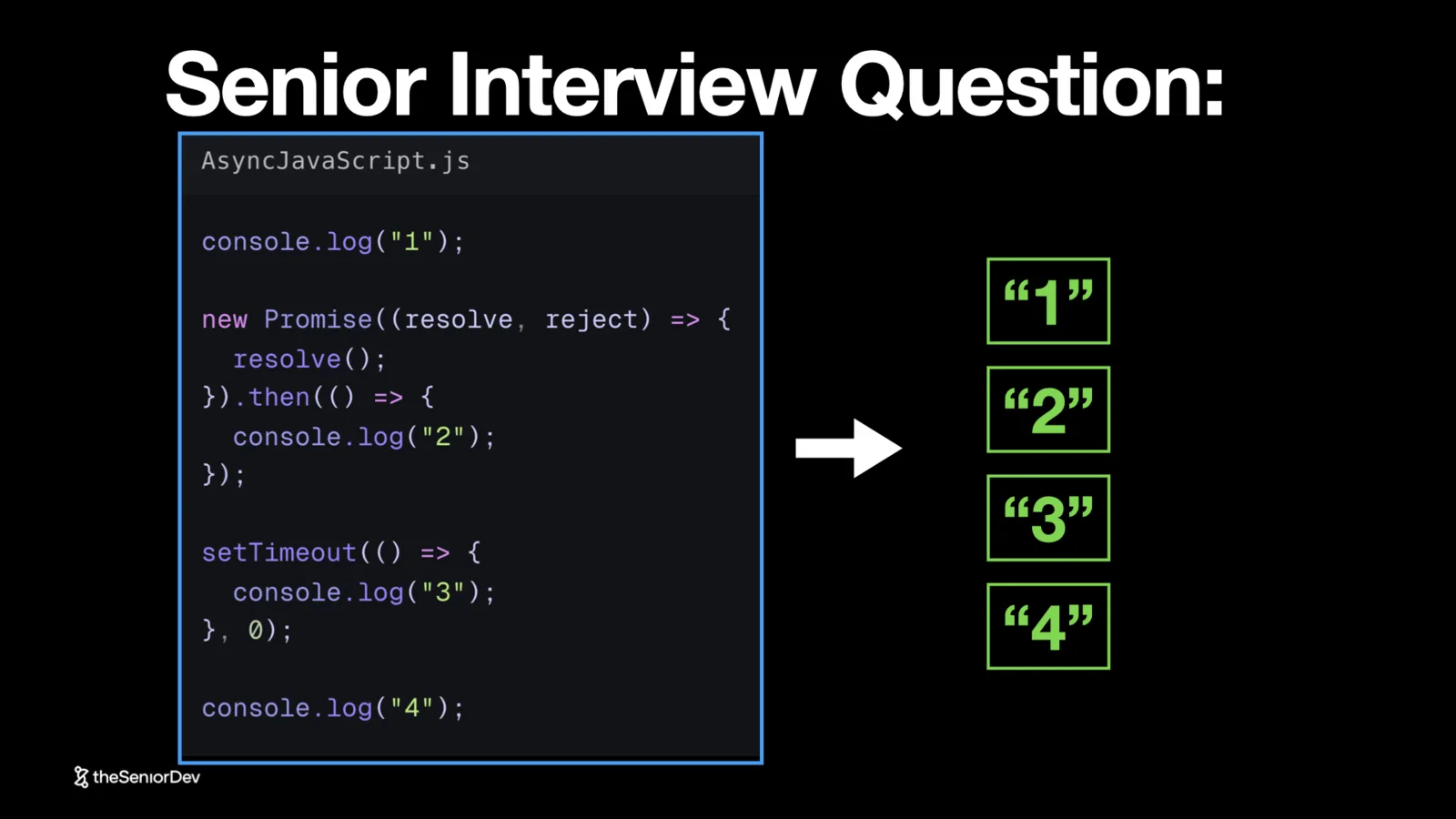 setTimeoutpromisesmicrotasksinterview questions
- 03
3. Execution Context (The Stack Frame)
A function needs more than its own code to run. The execution context — the stack frame — bundles the function code with the value of `this`, the arguments, and the variable mapping: the addresses of every variable in the function's scope chain, pointing into heap memory.
Every time a function is pushed to the call stack, a new execution context is created for that invocation. As the code runs, the engine follows those addresses into the heap to read actual values.
There is also the global context: in the browser that means `fetch`, `alert`, and every global variable injected when the JavaScript environment is created — basically when you open a new tab.
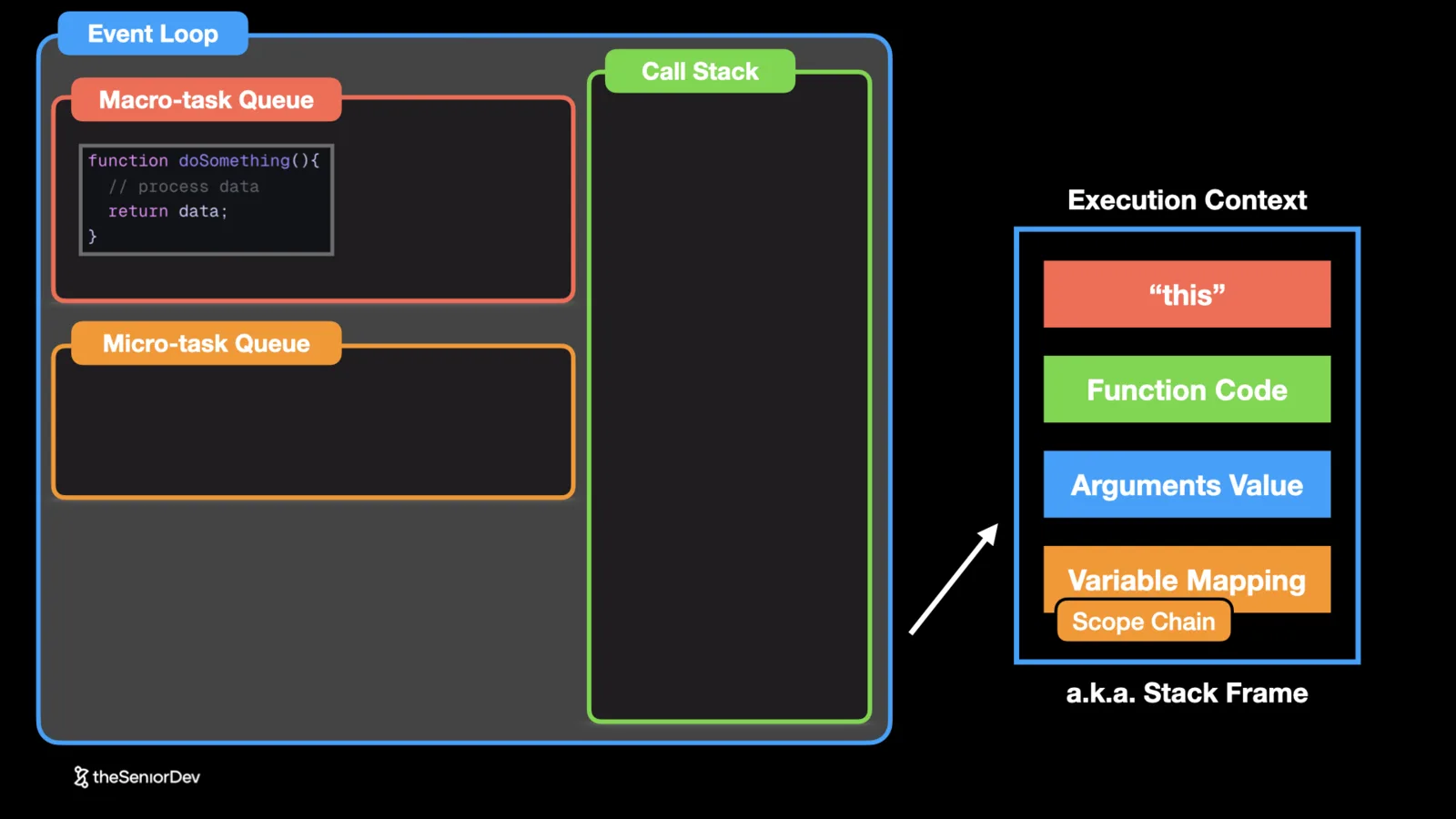 execution contextstack frameheapthis
- 04
4. Scope and the Scope Chain
In JavaScript, everything between curly brackets is a scope. A function declaration creates a scope. An `if` inside it creates another. A `for` loop inside that creates a third. An `else` is a sibling scope of its `if`.
The scope chain is every scope accessible from a point in the code, and it only works inside out. Code inside the `for` loop can read variables from the `if`, the function, and the global scope. The parent cannot go the other way: an outer function has no access to variables declared in an inner one. Child scopes are isolated from their parents.
If you understand scope well, you read code like Neo reads the Matrix. Next time you touch production code, name the scopes you are looking at. It is the art of the masters.
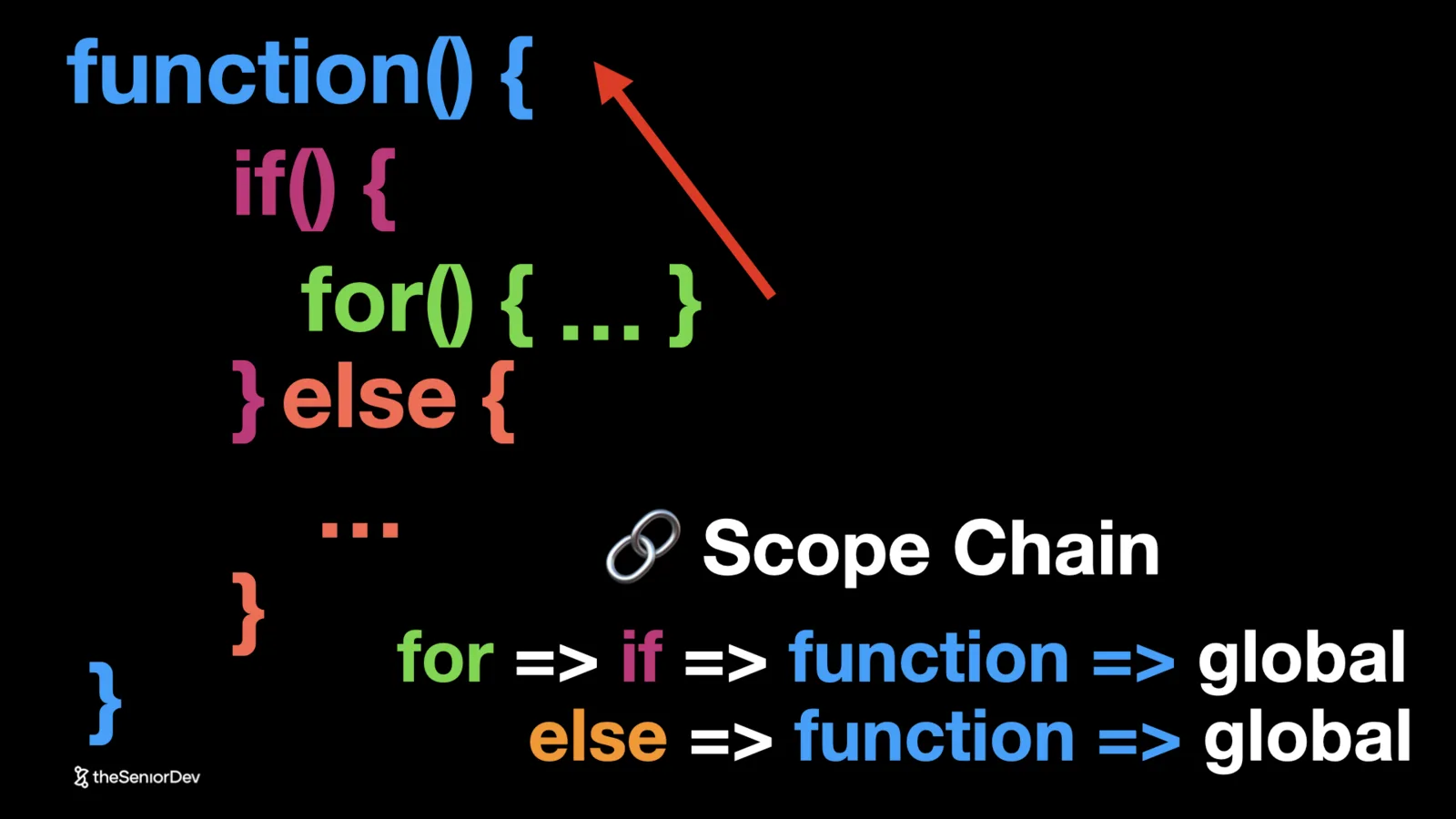 scopescope chainlexical scope
- 05
5. Closures
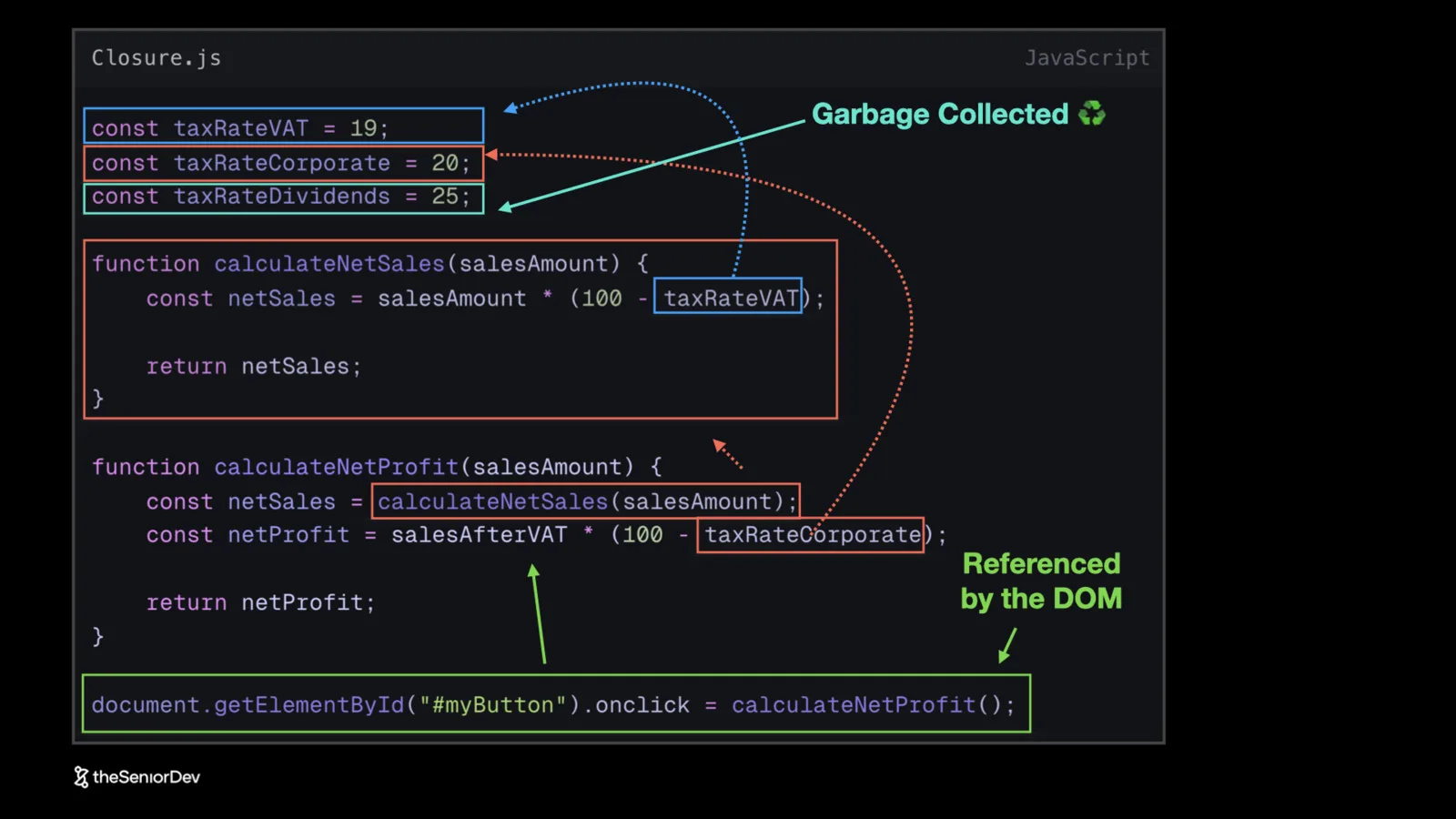
A closure means a function remembers the variables that were in its lexical scope when it was declared — everything up its scope chain. As long as the function is still in use, those variables cannot be garbage collected. That memory stays taken.
Enclosing the whole chain would waste memory, so modern JavaScript engines only enclose variables that are actually used by the function. That distinction is exactly what interviewers test: given a handler attached to a DOM element, which variables stay alive?
In the video's example, the handler lives as long as the page, so everything it references — the helper function it calls and the tax rates that helper reads — stays in memory. The one variable nothing references is the only one that can be collected.
 closureslexical scopememory
- 06
6. Garbage Collection
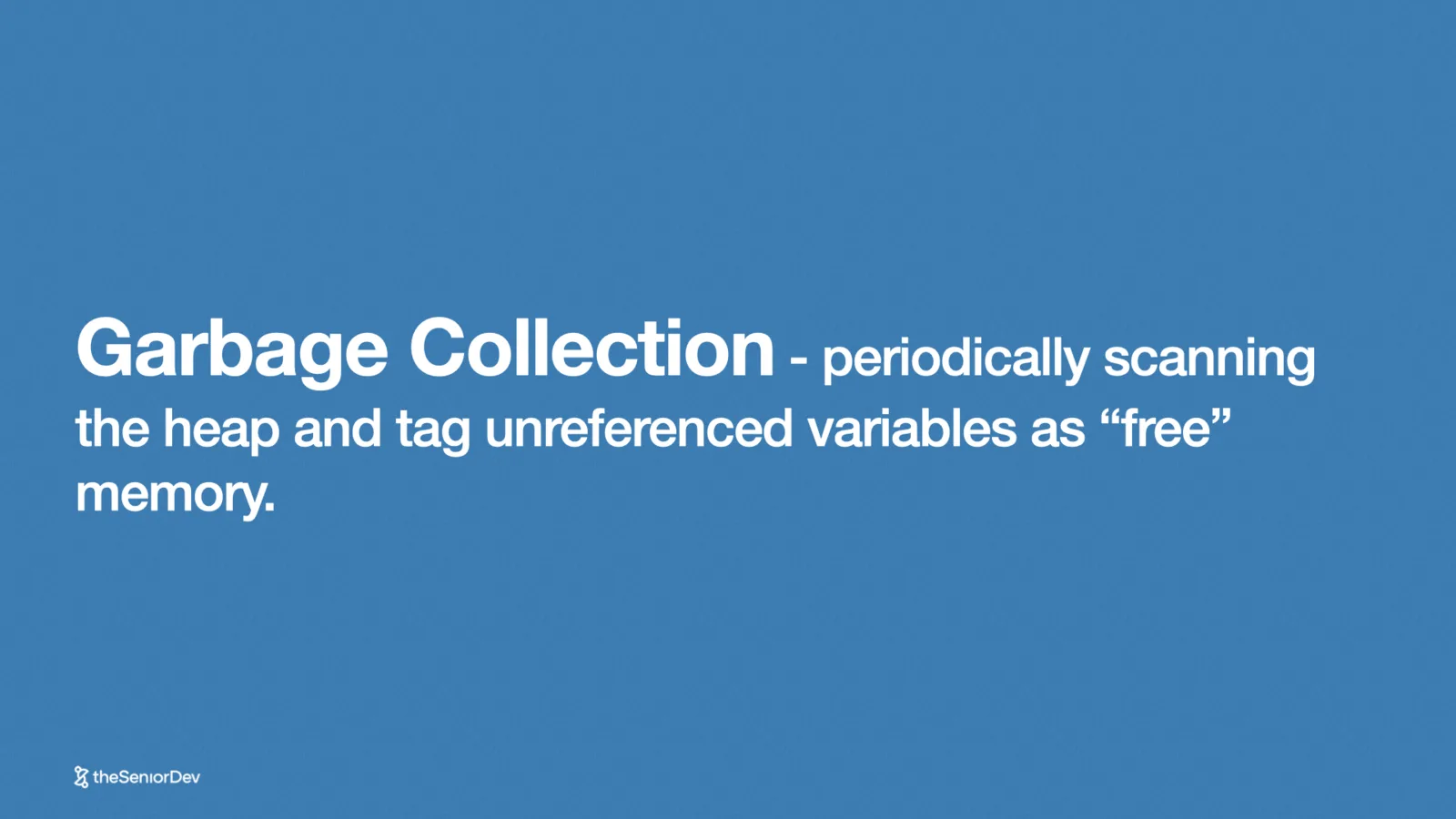
The garbage collection algorithm periodically scans the heap — the memory your program uses, usually sitting in RAM — looking for variables that are no longer referenced.
It does not actually delete anything. It tags that memory space as free, so new things can be placed on top. That is a soft delete, not a hard wipe.
This is why closures matter for memory: a variable referenced by a live closure can never be tagged as free, no matter how long ago it was declared.
 garbage collectionheapmemory management
- 07
7. Promises (and the Callback Hell They Replaced)
Before promises, the only way to react to async work was the callback pattern: hand your code to the network thread and it calls you back when the request finishes. By convention the first callback argument was the error, the rest was data. Nested callbacks became unreadable fast — callback hell. You will still find it in legacy Node.js codebases.
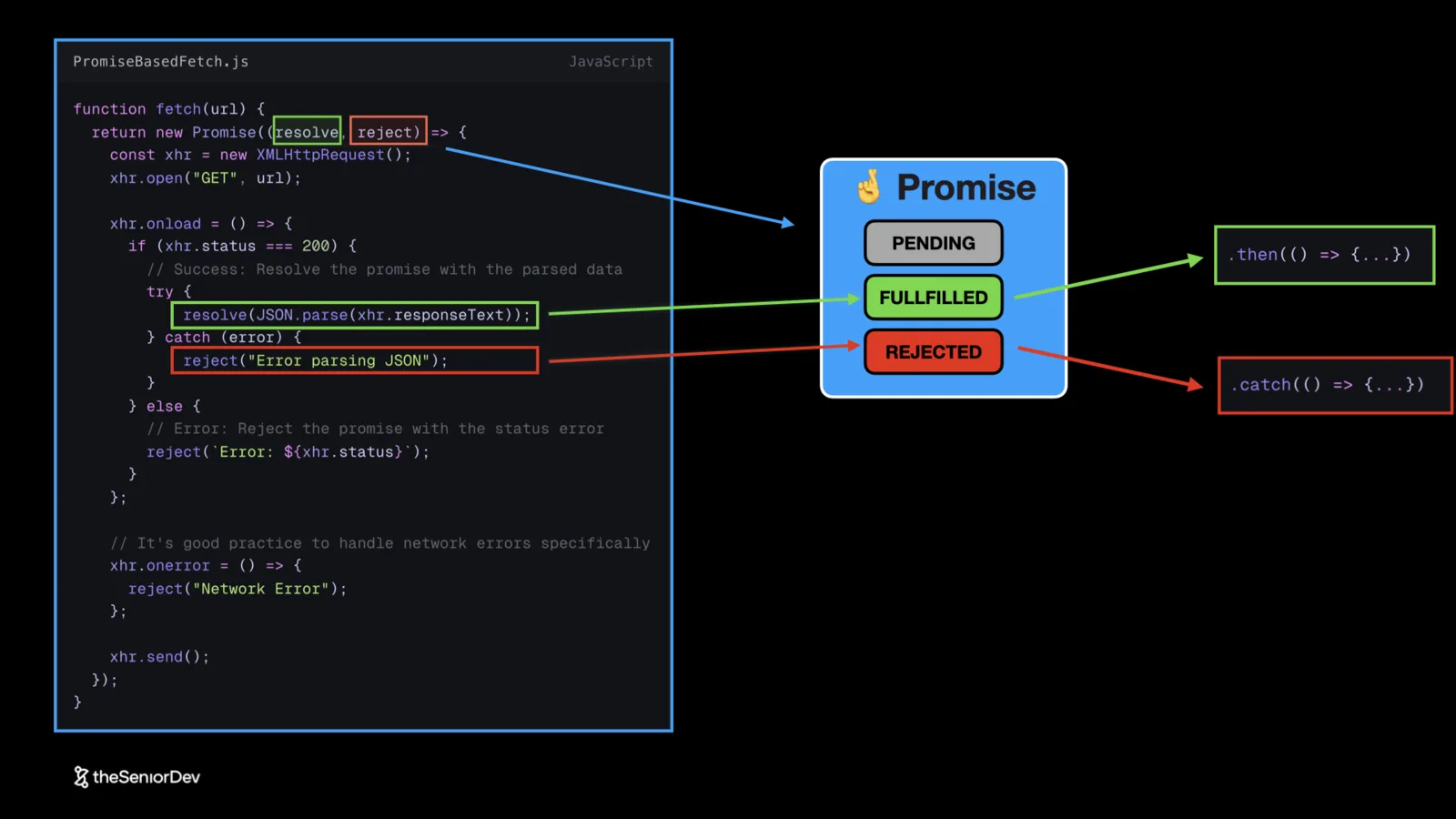
Promises flipped the control: instead of passing a callback and hoping, `fetch` hands you a promise object and you attach callbacks to it with `.then` and `.catch`. A promise starts `pending`, then becomes `fulfilled` on resolve or `rejected` on rejection.
Both outcomes push the attached callbacks into the microtask queue, to run at the end of the current event loop tick — never immediately. Promise chains are cleaner than callback hell and far easier to debug.
 promisescallbackscallback hellmicrotask queue
- 08
8. Async/Await
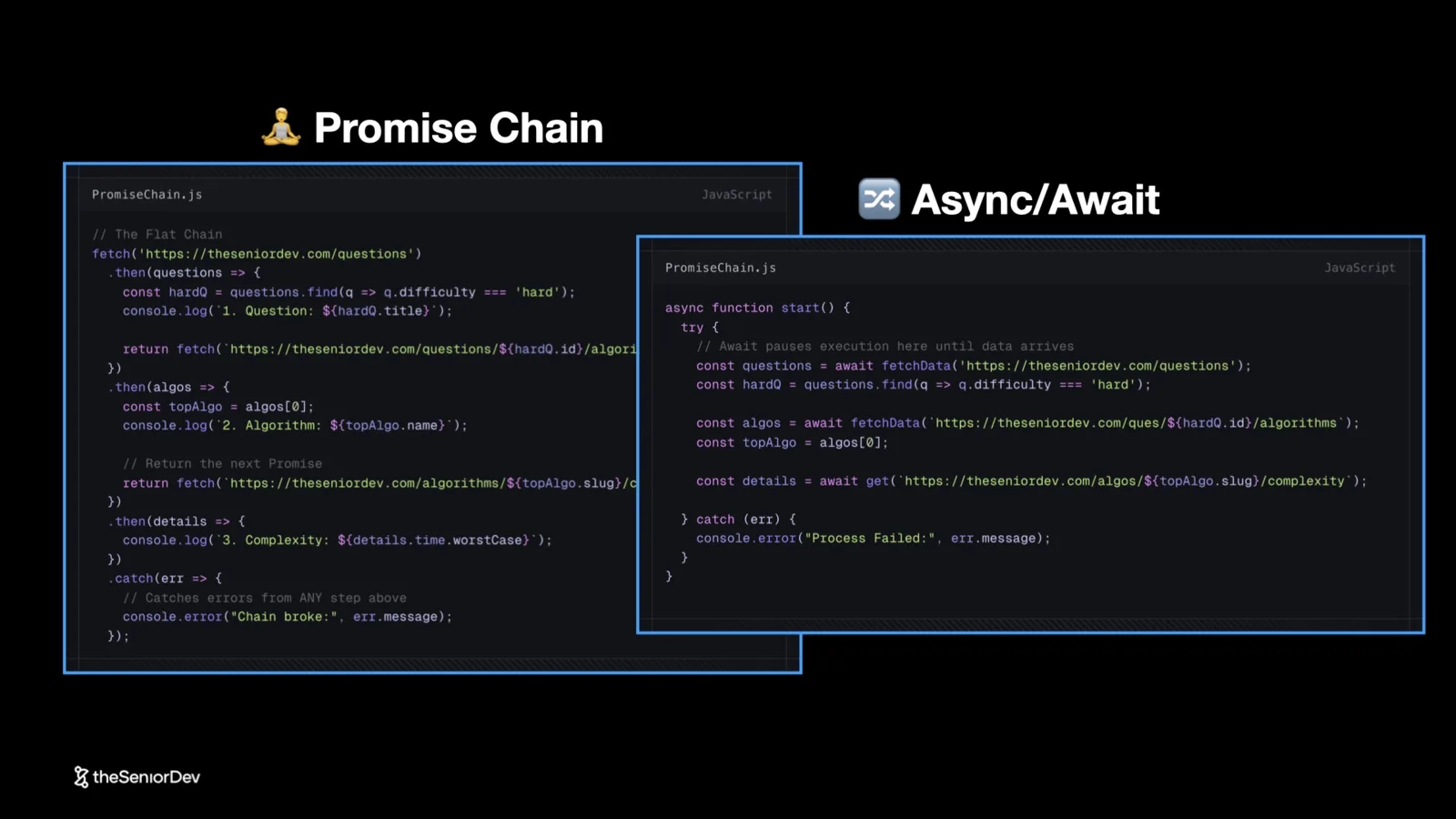
async/await is syntax sugar over promises. Anywhere you write `async` or `await`, the engine translates it to promises under the hood. You get promise behavior without constructing promises explicitly.
The migration path is readability: from callback hell, to promise chains, to `async` functions where you just put `await` in front of every promise. In a bigger codebase the difference is dramatic.
Under the hood it combines two things: an overarching promise created for the function, and a generator that pauses at every `await` and resumes when the value arrives. Every async function returns a promise that resolves with the function's return value once all the awaits finish.
 async/awaitpromisessyntax sugar
- 09
9. Generator Functions
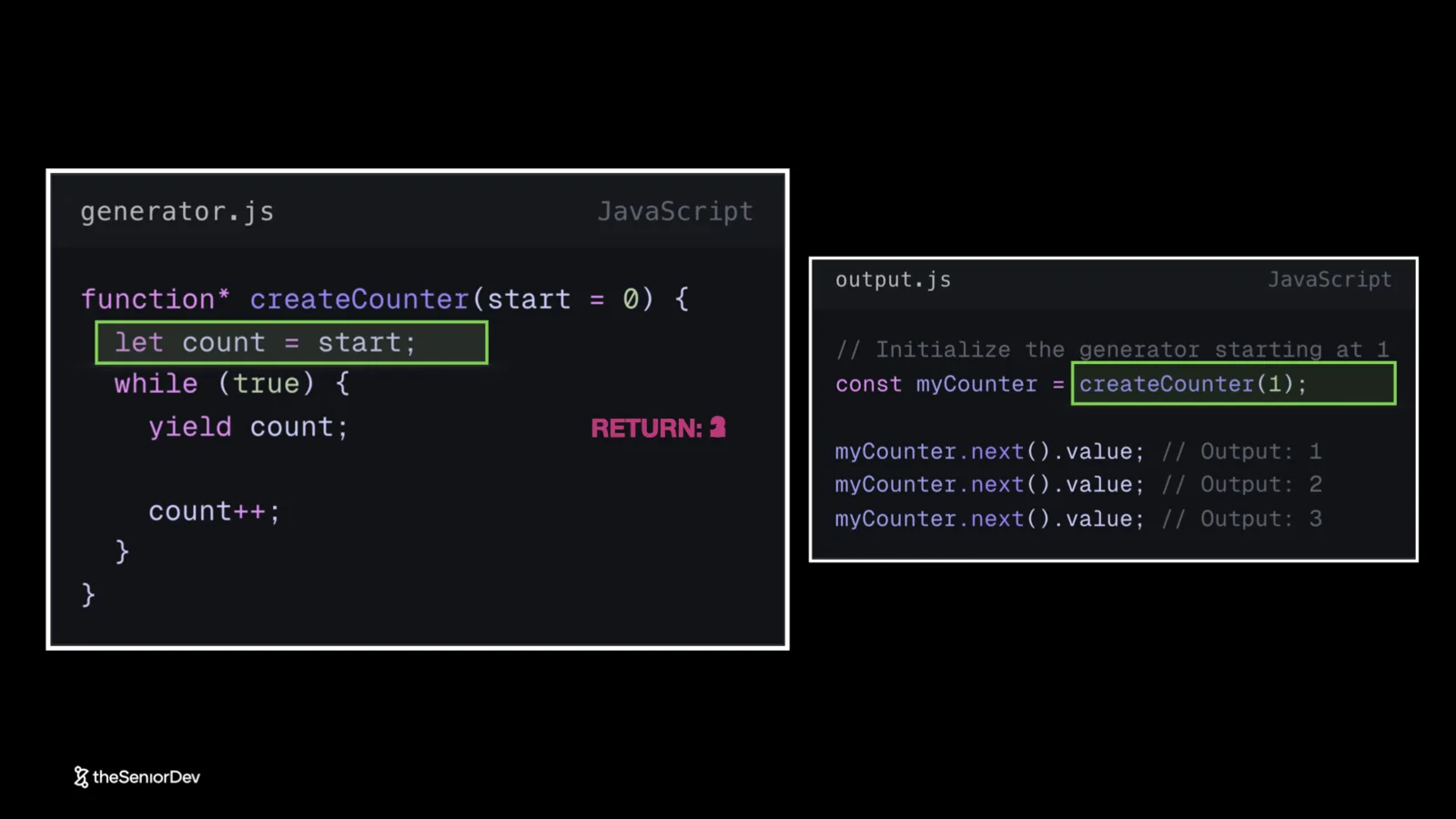
Generator functions are functions with state. A normal function runs to completion once. A generator pauses and can be resumed. The `function*` star tells the compiler it is a generator: calling it does not run the body — it creates an iterator object with the function paused.
Calling `next()` on that iterator starts execution. When the code hits a yield, it returns that value and pauses, waiting to be called again. Call `next()` again and it picks up where it left off. A counter generator can yield 1, 2, 3 forever, keeping its count between calls. Add a stop condition and the generator gets tagged as done.
This is the machinery behind async/await: roughly, every `await` in an async function is a `yield` in a generator created under the hood, driven recursively inside a promise until the function completes.
 generatorsiteratorsyield
Transcript
If you are a JavaScript developer, everyone tells you that in order to get to senior, you need to master the fundamentals. But nobody tells you what those fundamentals actually are. How can you best apply them in your next technical interview? And do they even matter when writing production code? Today we look at the top nine JavaScript concepts every senior engineer has mastered. And let's start with number one, the event loop.
The event loop is the component that will execute JavaScript code. And it does so by using three parts. Number one, we have the call stack, that's executing synchronous code from the top all the way to the bottom. Then we have the macro task queue and the micro task queue, and those queues have different priorities. Now, all this happens in the context of the browser, where we'll have our document object model, the DOM, and we have different elements, and as developers, we can connect event listeners to those elements.
We also have the timer API and the promise API. And we'll talk in depth about these two. But for now, keep in mind that both event listeners and the timer API can push tasks to the micro task queue. Q's are first in, first out data structures, and that means the first tasks that went in will be the first one to be processed. In this case, we have that macro task one that will get pushed to the top of the queue, and then finally get pushed into the call stack where it will get broken into different function calls.
So functions might call other functions, and so for every function, we create a stack frame. And we'll see what that is in a couple of minutes. But as we execute those functions, they might also end up creating promises. And so promises will be stored in that promise API and it might resolve at some point. Does that mean that we'll go ahead and execute the promise callback? No, we will actually push that to the micro task queue.
And so finally, the call stack will keep executing and finish all the function called. Now, when the call stack, it's empty before we finish this iteration of the event loop where we executed that micro task Task one. We will look at the micro task and execute that too. We push whatever it is in the micro task into the call stack, transform it into functions and execute it. And we are basically done. We finish our first iteration of the event loop.
In between, the browser will re-render and then run the next iteration, that means it'll look at the macro task Q, pick up the task and repeat the whole process again. And that's pretty much how the event loop works and we'll come back to this in this video over and over again. So as a senior, you're not only expected to know things, but to be able to relate that to actual code. And a very popular interview question is, can you tell me how all those different console logs will be actually printed when the code is executed?
And so a very naive answer would be, okay, well, we have a console log, so that gets straight to the console and gets executed. And then we have a promise, but it resolves instantaneously, so that will print two to the console. And then we have a set timeout that will set a timer in the future, but that timer is set to zero, so probably also execute instantaneously. That's a three. And finally, we have our synchronous console log and that would be a four.
And we'll see in a second that this answer is wrong. So let's go back to what we learned about event loop. So when we start executing this code, the first instruction will get pushed to the call stack, executed and printed to the console. The second instruction, which would be the promise constructor, will create a promise using the promise API. And that promise will stay there until it's being resolved.
Now we see that is basically resolved instantaneously. So as soon as it's been created in the creation of that promise, it's already being resolved. Which means its callback will get pushed to the micro task Q, but not executed yet. Now we move on to the set timeout instruction, which will create a timer. Now that timer is set at zero, so it'll probably also expire immediately and push its callback to the micro task Q.
And finally, we move on to the console log four, which is synchronous code that goes into the call. stack gets executed and prints the console. And so far we printed one in four to the console and and we finished our synchronous code. Now, before we finish this event loop iteration, this event loop tick, we will look at the microtask queue. And if there's anything in there, we will actually take that, push it to the call stack and execute it. So before we finish, we'll also print two to the console. And that's pretty much it. We finish our first event loop tick. Now the browser will render and then we move on and we look to the micro task queue and we push that into the call stack and finally execute the console log tree. So that's how the event loop works in the context of real JavaScript code. So going back to the original question, we'll print console log 1 to the console. Then we'll print console log 4, which is also synchronous. Then we'll print console log 2, which comes from my promise and gets pushed to the microtask queue. And finally console log 3, which will run in the next tick. Make sure you review this because it's a very common interview questions, especially for senior front end engineer positions or a senior backend with Node.js. And if you're a developer working mostly with JavaScript and you want to get to the senior level, make sure you check all the links in the descriptions where we have free training, a free assessment, and the most common interview questions to help you together. Now moving on, let's talk about the execution context. And so we saw that in our event loop functions get pushed to the call stack, but we need a lot more to execute a function than just the function itself. And that's what we call the execution context or the stack frame. And so together with the function code, we'll also have the value of this, function code, the value of the arguments, and the variable mapping. That means all the variables that are in the scope chain of this function, basically we need the addresses of those things in the heap memory. So as we execute the code, we go to the heap and we read the actual value of that variable. And so every time we have a function that gets pushed to a call stack, a new execution context will be created, basically the stack frame of that execution.
is back to the actual piece of code. So if they would ask us, what would be the execution context or the stack frame of calculate net profit, we'll definitely have the global context, that means in the context of the browser, we'll have things like fetch function, the alert function, all the global variables that get injected when we create the JavaScript execution context, basically when you open that new tab.
But we'll also have all the local context, that means all the variables that are in the scope of this function. And right now, we have the tax rate VAT, the tax rate corporate, and the other function that is calculate net sales. Now, we mentioned the word scope and scope chain. So let's see what exactly it's the scope chain for a function. Well, in JavaScript, everything that is between curly brackets, it's scope.
And so, if we declare a function, that's a new scope, that would be the function scope. If inside that function we declare an if statement, that will have a new scope too. And if inside that if statement we declare a for loop, that will be a new scope. You might also have an else, that would be a sibling of the if scope, and inside the else, you have as many scopes as you want. And so the scope chain would be all the scopes that are accessible in a point of the code.
And so if we were to look at the scope chain of the for statement, inside the for statement, you'll be able to also access all the variables inside the if statement, the function and the global scope. However, if you're looking for the scope chain of the else statement, you'll be able to access all the variables inside the else statement, the ones in the function scope and the ones in the global scope.
So you can always go inside out. And so looking at some real code again, if somebody would ask, okay, what is the scope that format net amount has access to? It will basically be the two outer scopes and the global scope, so on the scope chain, it would have access to the scope of calculate net tp, pretty much every variable in that function. looks through the matrix. So this is really a superpower and it's the art of the masters.
Make sure next time you code something on your production code, you pay attention to all the different scopes and you're able to define them. Now keep in mind that it doesn't work the other way around, so basically calculate net does not have access to variables that are inside format net amount. So those variables are actually isolated. And so somebody in the parent scope doesn't have access to variables in a child scope, so we wouldn't have access to the variable symbol, for example, in calculate net.
It only works from the inside out. Now congratulations on making it this far, I'll probably make a second version of this video because there's a lot to talk about here. Make sure you subscribe so you get the notification when we release this. Now, let's move on to concept number six, which is closures. And so closure means that the function will remember all the variables that were in its lexical scope when it was declared.
So pretty much all the variables all the way across to this scope chain that we saw. So for as long as the function is still used, those variables cannot be garbage collected, they cannot be removed from memory. So that memory space, it's still taken. Now the reality is that would be a very inefficient way to manage memory, and so what modern JavaScript compilers do is that they'll actually only enclose variables that are in the scope chain and have been used in the function itself.
And so looking at this piece of code, let's answer the question, which variable will be garbage collected, so which one will be tagged for removal. Now, the first thing we notice is that the calculate net profit function, it's attached to a DOM element. And most likely that DOM element will live forever until we close the tab or reload the page, which means we'll need to keep the calculate net profit function also in memory for as long as that page is open.
And now, if we look at the calculate net profit function, we see that it's using calculate net sales in tax rate corporate. So, we definitely will not be able to garbage collect the variable tax rate corporate. When it comes to the calculate net sales function we'll keep that one in memories because we need the function code. But we see that it also references the tax rate VAT. So all those things are being referenced and they cannot be garbage collected.
And so the only variable that can be garbage collected, it's tax rate dividends. And that's how closures works. So basically you keep everything in memory for as long as they're being used. So the garbage collection algorithm that goes periodically to our heap memory. It looks at the memory and tries to tag variables as, hey, this is no longer being used. And it doesn't actually delete things, it just tags that memory space as, oh, you can now place new things on top.
So it's what we call a soft delete. And so in this case, the only memory space that could be tagged for reallocation is the one that tax rate dividends occupy. And as I mentioned, remember that the garbage collection algorithm will periodically scan the heap, that's the heap memory, the one that our program uses. It's usually sits in a RAM memory on the computer and tag and reference variables as free memory.
So we can place things on top, what we call a soft delete. Now, if you want to check your knowledge of more mental models like garbage collection and closures, make sure you check the link in the description to our 10 minutes technical assessment. It'll tell you more or less where you are on the senior scale. And it's built with real interview questions that we've seen ourties getting in the last five years.
So it's lots of give you a rough idea of where are you compared to what the market expects for the senior level. Now let's talk about promises, one of the most popular topic in JavaScript. Now, before we get into promises, we need to go back in time because it's a bit of a long story and it all starts with callbacks. Callbacks used to be very big in JavaScript. And so basically with the callback pattern, back in the days when we didn't have promises, the only way to react to something would be to give it a piece of code that they can execute for you later on.
So whenever you use the network thread to make a network request, you'd attach a callback. your code. So the all implementation of our fetch API was not returning a promise like it does today, but rather asking you to pass a callback to it. And so whenever the XML HTTP request was finished, they will end up calling your callback. And by default, in the callback pattern, the first input to callback would be an error, if there was one, and the second one would be the actual data. And so if there was an error, they'll call your callback with an error, and if not, they'll put null to that first argument and add all the other arguments that you needed after that one. And so the callback function that we will pass would take that first argument as the error, the second argument or the third would be the data, and then do whatever logic you need. So basically you will react if there is an error, and if not, you'll react to data and they will eventually call your logic at some point in the future. And so to fully connect this, remember our discussion about browser architecture, we'll have our network thread, maybe we instruct the network thread to make a request, and it will take some time. And whenever the network thread would actually have an answer from the backend, it will come back to us and then our callback will get pushed to the call stack. And that's how we used to work with asynchronous things and multitasking before we had promises. You know, the problem with callbacks is that they are very complex to debug, and so you end up having all these nested callbacks and it's extremely hard to actually read this. And that's what we call callback hell. If you ever have the privilege to work with legacy Node JS code bases, you'll find a lot of callback hell in there. And so promises were introduced as a language feature to solve this problem. And basically, with a promise, rather than the fetch function calling a callback, they will give us back a promise. And then we can attach callbacks ourselves to that promise. We can take that promise object and attach things to it, rather than passing a callback and hoping they'll call it at some point. So it's kind of an inversion of control in a way. And so a promise object would be initiated with a status pending, and depending of what happens, it would either get resolved with some
data. So the status will change to fulfilled, which will cause whatever callback we attached to it with .then to be executed, actually push into the microtask as we've seen with event loop, or it will get rejected. And in the case for rejection, the status of the promise will be rejected, and we'll push the microtask whatever was attached to it with the .catch keyword. And so promise is a special object with internal state that we can attach callbacks to.
And a promise will start with an internal state of spending as we've seen, and it can either be fulfilled or rejected. Both the resolution or the rejection of the promise will push the callbacks attached to it into the microtask queue to be executed at the end of the current event loop tick. And so the way this will work with the event loop is that we get our promise, we push that to the call stack that will create the promise with the promise API.
And as we see here, we resolve the promise instantaneously. And so the promise will start with a status that's it's pending. And then we'll execute the promise constructor, which will resolve it, in this case, instantaneously. Because of the resolve statement, the promise will immediately be fulfilled, which means the callback that we attached with .den will move straight into the microtask. And now that we finish everything in the call stack, it will be cleaned, and when the call stack is cleaned, we look at the microtask before finishing the current tick.
So we push that into the call stack, execute it, and we finish the tick. So this is how promises interact with the event loop. So with promises, we go from callback hell to actually being able to chain promises, which is a lot cleaner code and a lot easier to debug. Well, we'll see that we can go even farther and make a synchronous JavaScript code even more elegant. And so let's talk about a sync await.
And so basically a sync await, it's an easier way to create a new promises without explicitly creating them, and we also call that polyfill or a syntax sugar. So at the core, whenever you have a sync or a wait, it will be under the hood translated to promises. So the core, whenever you have a sync or a wait, it will actually be translated to promises. So going back to our promise chain, our promise code will look something like this, but we could actually translate it to something a lot cleaner and easier, which would be a sync await.
Just by creating an asynchronous function and adding a wait in front of every promise we received. And in a bigger code base you'll go from a promise chain, which is a lot simpler than callback hell, to an even simpler approach with a sync await. Now, how does a sync await actually works? Well, it's a combination of two things. There's a promise that will get created for that function and a generator function that will work together with the promise and resolve every time we see an await.
Which brings us to our last concept, which is generator functions. Our generator functions are relatively new feature of the language, and you can think of them as functions that have state. So those are functions that can be invoked several times, even if they already run once. Like the normal functions, you pass some arguments, you execute and you finish that function invocation, you can only call it once and it runs to completion.
But generators will pause after the first execution, and depending on how they were implemented, you can keep going. So let's see this with a very simple example, which would be a counter. So, as you see the function has the star over there that tells the compiler, hey, this is a generator function, and whenever we run it, it will actually create an iterator object internally. But that's it, it will not really run the function.
So, the function is being paused. Now, whenever we take that iterator object that was created and we call next on it, that's when the function starts executing with the first execution. In this case, we take whatever was passed to the start, in this case was one, and we assign count to that. Then we execute our while loop, and then we get to this yield statement. And the yield is basically the return.
So whenever we see a yield, we'll actually return the value and then pause and wait to be called again. And so basically, we will just return A1 as the value. If the user calls us again, we move on to the next execution and we pick up the work where we left it. So, in this case, we'll go to the count and increase the count, so the count will be two. Well, we are still in this while loop, which is true, so then we run to the while we begin and we return again.
So that will return two. And we can do this forever. So this counter can keep on counting for as many times as we call it, and so if we call it again, it will go again, increment the count, it was two, so now it will be three. We hit the while up, it's wild too, and then we return again, and that will return three. So as I mentioned, it's basically a combination of function and some internal state that you can pause.
Of course, we could have made this generator stop and we could have said, you know, if counter it equals five, then just finish. And then that would be the last return and then the generator would be tagged as done. I won't go deeper into how generators work in this video, but let me know in the comments if you want a video specifically on this. Now, how can you actually achieve a sync await from a generator?
Well, basically, in a very simplistic shape, you can think of every await in an async function as the yield in the generator that was created for that a synchronous function under the hood. Now, the actual polyfill it's a bit more complex, I will not go in depth into how you can achieve it. But keep in mind that in rough terms, you have an overarch promise for every a sync await function. So every a sync function will return a promise.
And that promise, it's using a generator internally that calls itself recursively and returns value from every yield, that will be your await. And finally, when all the yields have finished, then the promise will resolve with whatever the return of the generator, which in that case it's your a sync function. I explained it very roughly, but if you do want me to make a video when we actually polyfill this by hand, let me know because it's a very fun exercise, it's very advanced, and it will really make sure that you learn these things once and forever.
Now, thank you so much and congratulations to you for making it this far. I am planning on making a second part of this video. I'm actually drafting it. So do let me know in the comments and I will prioritize that. Now, knowing the fundamentals, it's not enough. So make sure you check our video on front and architecture because as a senior, you are expected to reason about the frontend architectures, and our video on 15 frontend concepts that every senior has to know, which is more holistic about frontend as a whole, as for me, I'll see you in the next one.